
EDIFACT message guide · Ordering
REQOTE Request for quote
The UN/EDIFACT message a potential buyer sends to ask potential sellers for prices, delivery schedules and other conditions.
- Sent by
- Buyer or procurement team
- Received by
- Potential supplier
- Standard
- UN/EDIFACT · Batch message
- X12 equivalent
- 840 Request for Quotation
What is the EDIFACT REQOTE message?
REQOTE is the UN/EDIFACT request for quote message. The directory defines it as a message that lets potential buyers solicit prices, delivery schedules and other conditions from potential sellers of goods or services.
A request lists the products or services, quantities, required dates, delivery terms and the date by which quotes are due. Suppliers answer with a QUOTES message, and the buyer compares the answers before ordering with ORDERS. Sending requests in structured form lets the buyer's sourcing system line up several suppliers' answers item by item instead of reading emailed spreadsheets.
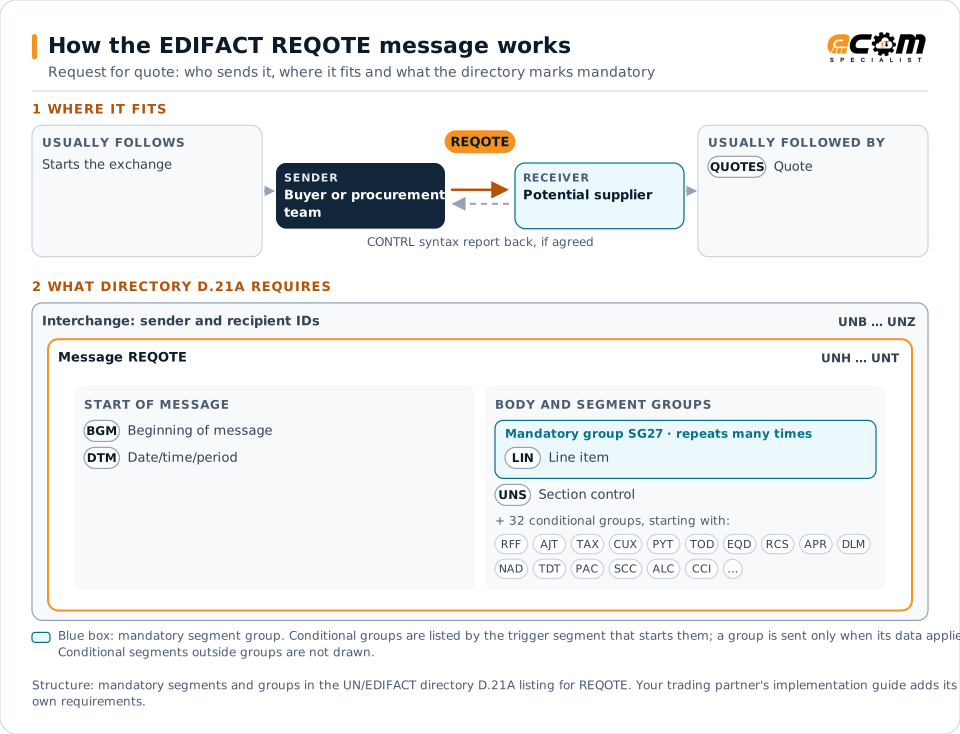
How to read this diagram: the top row shows who sends REQOTE, to whom, and which messages usually come before and after it. The lower part shows what the directory D.21A itself requires: the envelopes around REQOTE and the segments and segment groups it marks mandatory. Conditional groups are listed by their trigger segment rather than drawn in full. This is the directory's minimum, not a trading partner's requirement: a message implementation guide, such as an industry subset or a partner’s own guide, usually makes some conditional groups mandatory, restricts the codes and may use an older directory.
When it is used
- Running a competitive request for quotation
- Asking for prices on engineered or made-to-order items
- Re-sourcing recurring purchases
Where it fits in the message flow
Structure
Mandatory segments in REQOTE (directory D.21A)
In UN/EDIFACT directory D.21A, the REQOTE message has 171 segment positions arranged in 56 segment groups. These are the segments and segment groups marked mandatory at message level, in order; a mandatory group is shown with the segment that starts it. Segments inside conditional groups are needed only when the group is used. This is the directory’s requirement, not your trading partner’s: each partner’s message implementation guide names the directory it uses, often an older one such as D.96A or D.01B where the structure can differ, makes some conditional segments mandatory and restricts the codes.
- UNH
- BGM
- DTM
- SG27 (LIN)
- UNS
- UNT
Practical example
REQOTE in practice
An agricultural machinery maker needs a new supplier for cast housings. Its sourcing system sends a REQOTE to four foundries with the part number, drawing reference, annual quantity split into call-offs, delivery terms and a two-week deadline. Each foundry returns a QUOTES message, and the buyer awards the business with an ORDERS.
Implementation
Implementation considerations for REQOTE
- Give each request a unique reference that quotes must return.
- Use the item identifiers and units the eventual order will use.
- State the response deadline and whether alternatives may be quoted.
- Reference drawings and specifications that travel separately.
How ECOM helps
Automate REQOTE with ECOM
Solution
Procure-to-Pay Automation
Automate purchasing, receiving and supplier invoicing across EDI, portals and documents.
Industry
Industrial Manufacturing
Distributor, OEM customer and supplier integration for industrial manufacturers.
Solution
EDI Integration
Exchange X12 and EDIFACT documents with partners and integrate them directly with your ERP.
Compare X12 and EDIFACT, or see answers to general questions in the EDI FAQ.
Related messages
Related ordering messages
Need help with REQOTE?
ECOM maps, tests and monitors EDIFACT messages for your trading partners and integrates them with your ERP.