
EDIFACT message guide · Statistics and reporting
UTILTS Utilities time series
The UN/EDIFACT message parties in a utilities infrastructure use to report time series and connected technical or administrative information.
- Sent by
- Grid operator, balancing party or utility
- Received by
- Another utility market participant
- Standard
- UN/EDIFACT · Batch message
- X12 equivalent
- No direct equivalent
What is the EDIFACT UTILTS message?
UTILTS is the UN/EDIFACT utilities time series message. The directory defines it as a message sent between responsible parties in a utilities infrastructure to report time series and connected technical or administrative information.
Time series include aggregated consumption or generation per interval, used for balancing, settlement and network planning. Where MSCONS reports metered values at metering points, UTILTS is typically used for calculated and aggregated series exchanged between market roles. National market rules define which roles exchange which series, and at what interval.
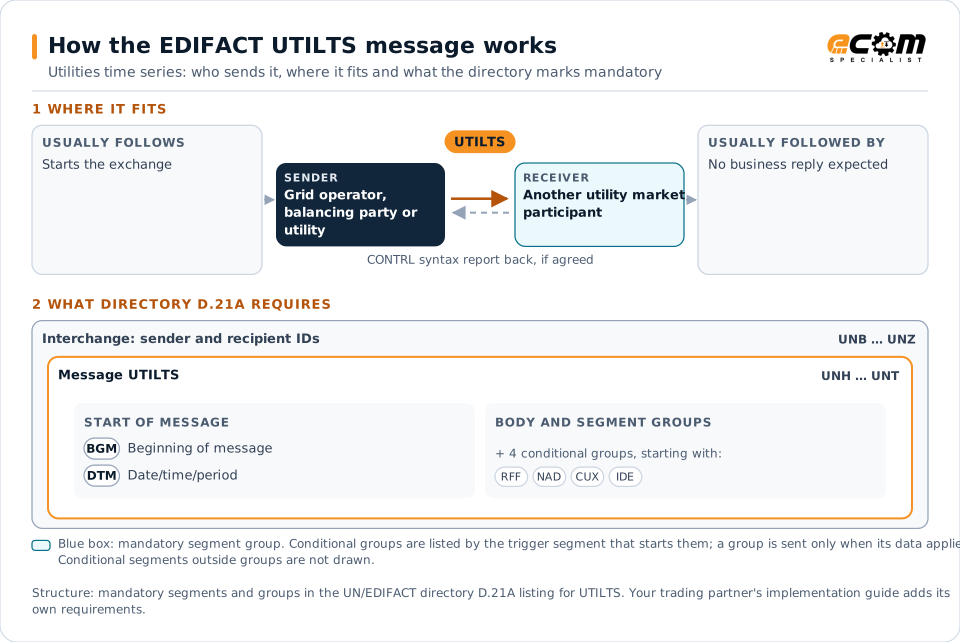
How to read this diagram: the top row shows who sends UTILTS, to whom, and which messages usually come before and after it. The lower part shows what the directory D.21A itself requires: the envelopes around UTILTS and the segments and segment groups it marks mandatory. Conditional groups are listed by their trigger segment rather than drawn in full. This is the directory's minimum, not a trading partner's requirement: a message implementation guide, such as an industry subset or a partner’s own guide, usually makes some conditional groups mandatory, restricts the codes and may use an older directory.
When it is used
- Reporting aggregated consumption for balancing settlement
- Exchanging calculated time series between grid operators
- Reporting generation or loss profiles
Where it fits in the message flow
No other message routinely comes directly before or after UTILTS; it is exchanged when the business event occurs. If the partners agree, the receiver confirms each interchange with a CONTRL syntax and service report.
Structure
Mandatory segments in UTILTS (directory D.21A)
In UN/EDIFACT directory D.21A, the UTILTS message has 51 segment positions arranged in 13 segment groups. These are the segments and segment groups marked mandatory at message level, in order; a mandatory group is shown with the segment that starts it. Segments inside conditional groups are needed only when the group is used. This is the directory’s requirement, not your trading partner’s: each partner’s message implementation guide names the directory it uses, often an older one such as D.96A or D.01B where the structure can differ, makes some conditional segments mandatory and restricts the codes.
- UNH
- BGM
- DTM
- UNT
Practical example
UTILTS in practice
A grid operator calculates the hourly consumption of all customers of each supplier in its area. It sends each balancing party a UTILTS with the aggregated hourly series for the month. The balancing parties compare the values with their own forecasts and settle imbalances with the system operator.
Implementation
Implementation considerations for UTILTS
- Follow the national market rules defining UTILTS usage.
- Align interval lengths and time zones precisely.
- Reconcile aggregated series with metered data.
- Handle corrections and resubmissions clearly.
How ECOM helps
Automate UTILTS with ECOM
Solution
B2B Integration
Connect every customer, supplier, carrier and bank across EDI, API, file and portal channels.
Solution
EDI Integration
Exchange X12 and EDIFACT documents with partners and integrate them directly with your ERP.
Solution
Enterprise Integration
Any-to-any integration across partners, systems, protocols, security requirements, formats and ERPs, in batch or real time.
Compare X12 and EDIFACT, or see answers to general questions in the EDI FAQ.
Need help with UTILTS?
ECOM maps, tests and monitors EDIFACT messages for your trading partners and integrates them with your ERP.