
The short answer
Good EDI monitoring tracks both technical health (connections, transmissions, acknowledgments) and business outcomes (orders acknowledged, shipped and invoiced on time). Alert on missing or late events, not just failures, route each alert to someone who can act, and track a handful of metrics such as exception rate, acknowledgment gaps and on-time document performance.
Both columns follow this guide: alert on missing or late events, not only on failures, and route each alert to someone who can act on it.
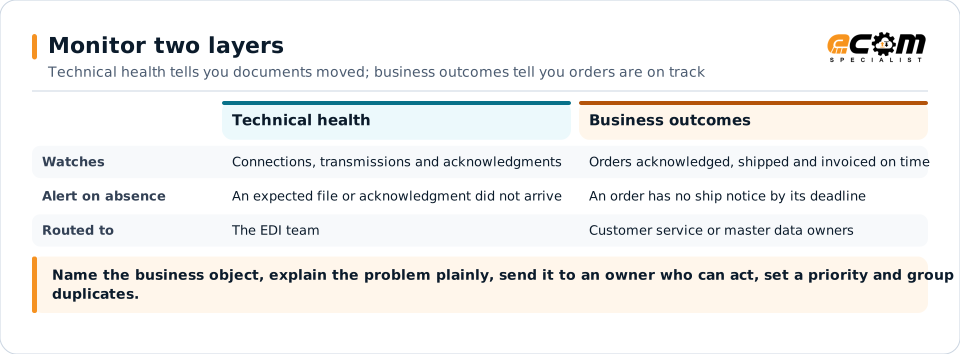
Monitor two layers
EDI problems show up in two layers, and both need watching.
Technical layer: Are connections up? Did files transmit? Did translation succeed? Did the partner acknowledge?
Business layer: Was every order acknowledged? Did every shipment get a ship notice? Was every shipment invoiced? Did the partner reject anything?
Many teams monitor only the first layer. Everything looks green while an order quietly sits unacknowledged and a retailer prepares a chargeback.
What to track
Technical events
- Connection and certificate status for each partner
- Failed transmissions and retries
- Translation and validation errors
- Missing or rejected 997 acknowledgments and AS2 MDNs
- Queue backlogs and processing delays
Business events
- Orders received but not posted to the ERP
- Orders without an acknowledgment within the partner’s window
- Shipments without a ship notice
- Shipped orders without an invoice
- Partner rejections, such as 824 application advice
- Expected documents that never arrived, such as a weekly schedule or inventory feed
Alert on absence, not just failure
The most damaging problems are often things that did not happen: a partner that stopped sending orders, an acknowledgment that never came, an inventory feed that silently failed. Define what you expect, such as “every 850 gets an 855 within the partner’s window” or “this retailer sends orders every weekday”, and alert when expectations are not met.
Make alerts actionable
An alert is only useful if someone can act on it. Good alerts:
- Name the business object, such as the purchase order or shipment, not just the file.
- Explain the problem in plain language.
- Go to the right owner. Connection problems go to the EDI team; unknown items go to customer service or master data.
- Carry a priority based on business impact and deadline.
- Group duplicates, so one root cause produces one alert.
Metrics that matter
Track a small set of metrics over time:
| Metric | Why it matters |
|---|---|
| Exception rate by partner and document | Shows where problems concentrate |
| Acknowledgment gaps | Reveals silent failures |
| On-time acknowledgments, ship notices and invoices | Predicts compliance and chargebacks |
| Mean time to resolve exceptions | Measures operational responsiveness |
| Recurring exceptions | Points to root causes worth fixing |
Review them monthly with both EDI and business stakeholders.
Coverage and escalation
- Decide which alerts need response outside business hours.
- Define escalation paths and response targets by severity.
- Document runbooks for common issues so anyone on call can act.
- Review significant incidents afterward and fix the cause.
From monitoring to visibility
The next step beyond monitoring is a business view that links each document into its order lifecycle, so operations, customer service and finance can see where every order stands. That shared view reduces the back-and-forth needed to diagnose problems and is where AI-assisted analysis can help most, by summarizing exceptions and suggesting likely causes.