
The short answer
NetSuite does not translate EDI itself, so an integration layer converts partner documents into NetSuite records. Inbound 850s become sales orders through SuiteTalk web services or RESTlets, while item fulfillments and invoices drive outbound ship notices and invoices. Success depends on modeling partner identifiers, item cross-references and packaging data, and designing within NetSuite's governance limits.
Read the diagram from top to bottom. NetSuite does not exchange X12 itself in this design: the integration layer handles the partner connection and translation, and NetSuite creates and posts the business records. Outbound documents are built from what NetSuite actually recorded.
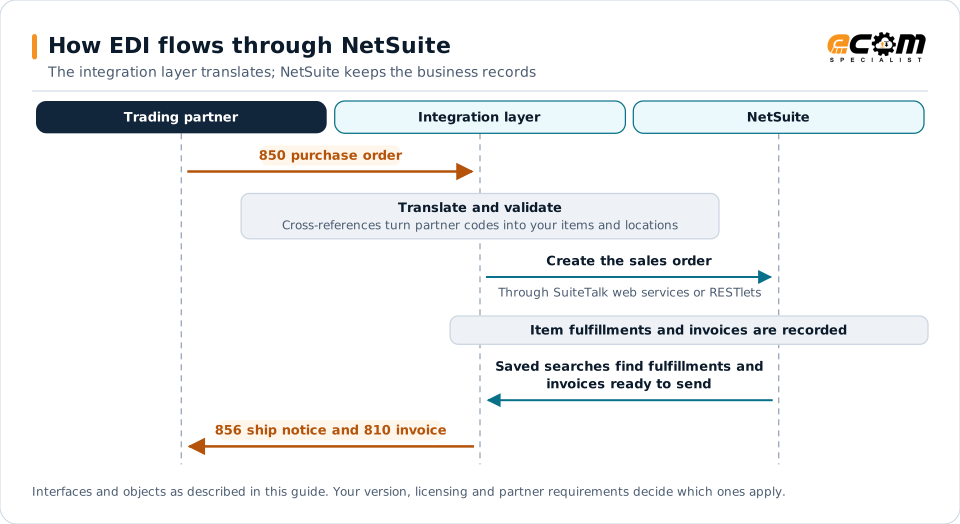
How EDI connects to NetSuite
NetSuite is popular with growing brands, wholesalers and distributors, many of whom must trade EDI with retailers. Because NetSuite does not translate EDI, an integration layer handles partner communication and translation and exchanges data with NetSuite records.
Document-to-record mapping
| EDI document | Direction | NetSuite record |
|---|---|---|
| 850 purchase order | Inbound | Sales order |
| 855 acknowledgment | Outbound | Sales order status and lines |
| 856 ship notice | Outbound | Item fulfillment, packages |
| 810 invoice | Outbound | Invoice |
| 846 inventory | Outbound | Item availability by location |
| 820 remittance | Inbound | Customer payment application |
Integration methods
- SuiteTalk REST and SOAP web services for creating and reading standard records such as sales orders, item fulfillments and invoices.
- RESTlets written in SuiteScript, useful when one call should apply custom validation or create several related records.
- Saved searches to find records ready for outbound documents, such as fulfillments without a ship notice.
- CSV import for simple or low-volume scenarios and initial data loads.
Modeling partner data
EDI partners send identifiers NetSuite does not have by default. Plan for:
- Partner identifiers on customers, such as EDI IDs and vendor numbers.
- Customer item cross-references, commonly a custom record or field mapping customer item numbers to NetSuite items.
- Ship-to locations such as store and distribution center numbers.
- Transaction body and line custom fields to keep partner references, such as the original purchase order line numbers, needed on acknowledgments and invoices.
Packaging and labels
Retail ship notices need carton-level detail and GS1-128 labels. Packages on item fulfillments cover basic tracking, but carton contents usually come from warehouse management features, custom records or a WMS. Design this early, because it affects warehouse workflows, not just the integration.
Governance and scale
NetSuite enforces limits on web service concurrency and script usage. For high volumes:
- Batch requests where possible and respect concurrency limits.
- Keep heavy transformation in the integration layer rather than in scripts.
- Schedule non-urgent outbound documents sensibly, but trigger time-sensitive ones, such as ship notices, promptly.
Best practices
- Validate customers, items and prices before creating sales orders.
- Keep partner-specific rules in the integration layer, not in NetSuite scripts.
- Store original partner references so outbound documents can echo them exactly.
- Monitor each order across acknowledgment, fulfillment and invoicing.
- Plan carton and label data together with the warehouse team.