
B2B communication protocols
ebXML messaging for agreed partner exchanges
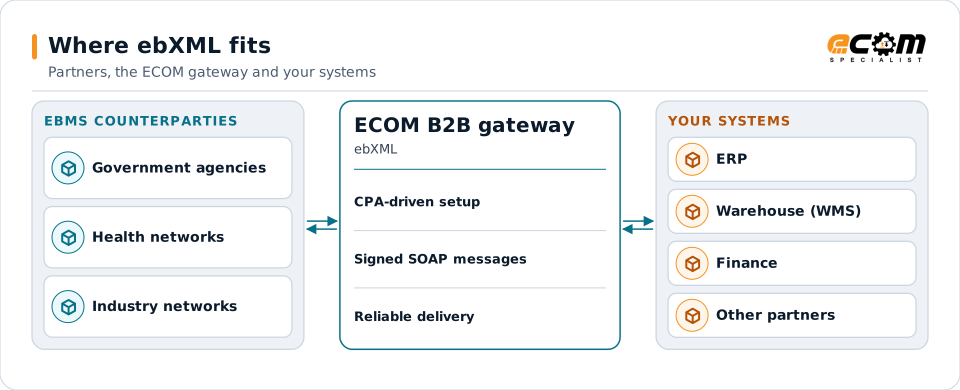
ebXML Messaging Services (ebMS) is an OASIS standard for exchanging business documents reliably and securely over SOAP, governed by an agreement that both partners load. Government, healthcare and industry networks use it. ECOM sets up ebMS connections and maps the documents they carry.
- Standard
- OASIS ebXML Messaging (ebMS 2.0, 3.0)
- Agreement
- Collaboration Protocol Agreement (CPA)
- Transport
- SOAP over HTTPS
- Reliability
- Acknowledgments, retries, duplicate checks
Counterparties exchange ebMS messages under a CPA; the gateway handles delivery and maps the documents.
Overview
What ebXML is
ebXML was developed by UN/CEFACT and OASIS as a framework for electronic business. Its messaging part, ebMS, sends documents as SOAP messages with attachments and adds reliable delivery: acknowledgments, retries and duplicate elimination.
Partners describe their capabilities in Collaboration Protocol Profiles and agree a Collaboration Protocol Agreement (CPA): endpoints, certificates, services, actions and reliability settings. Both systems load the CPA, so the exchange follows exactly what was agreed. AS4 is a profile of ebMS 3.0.
Where businesses use it
Government exchanges
Agencies and their partners exchanging documents under agreed profiles.
Healthcare networks
Health information exchanges that adopted ebMS.
Industry networks
Sectors that specified ebMS for partner messaging.
How it works
How an ebMS exchange works
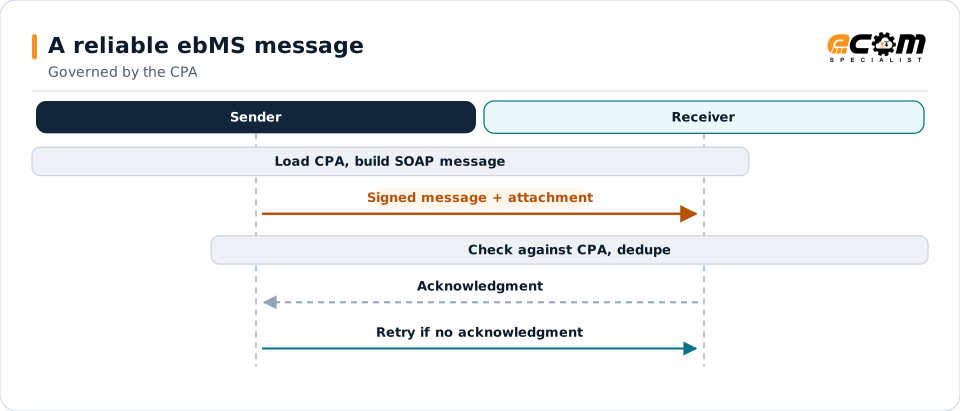
The sender builds a SOAP message whose ebXML header names the CPA, the parties, the service and the action, attaches the document, signs it and sends it over HTTPS. The receiver checks the message against the CPA, returns an acknowledgment, and discards any duplicates of the same message ID.
If no acknowledgment arrives, the sender retries according to the CPA's settings. Errors are returned as ebXML error messages.
The CPA defines every setting. Acknowledgments and retries make delivery reliable; message IDs prevent duplicates.
In depth
ebMS in practice
CPA
The agreement sets endpoints, certificates, services, actions and retry settings for each partner.
Security
XML signatures, TLS and, where agreed, encryption protect messages.
Reliable delivery
Acknowledgments, retries and duplicate elimination.
Versions
ebMS 2.0 and 3.0 differ; AS4 is a profile of 3.0. The partner's specification decides.
Network profiles
Networks add their own rules for identifiers and certificates.
Payloads
Attachments are usually XML documents, mapped to your systems.
In practice
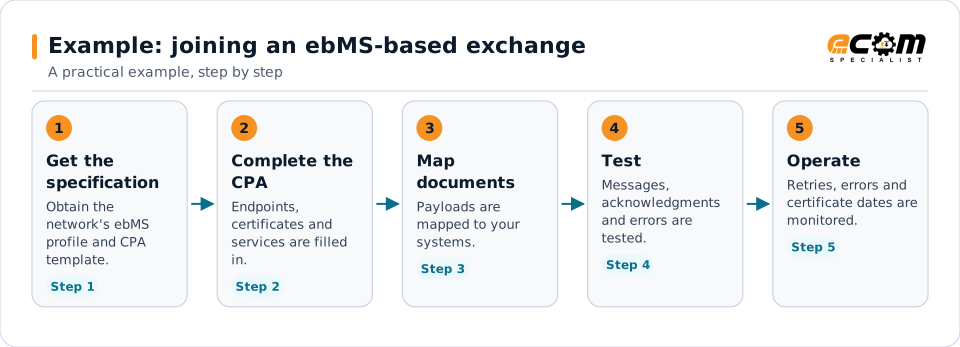
Example: joining an ebMS-based exchange
An organization is asked to exchange documents with a network that uses ebMS.
The CPA is the center of the setup; the rest follows from it.
Connections
How ebXML connects your business
Networks and agencies
ebMS exchanges under agreed profiles.
XML payloads
Documents are validated and mapped.
Your systems
Data flows to and from your applications.
Monitoring
Acknowledgments and errors are tracked.
ECOM
How ECOM supports ebXML
ECOM supports ebXML with dedicated implementation, mapping, communication and support teams, and with specialists who know the industries your partners work in.
Implementation team
Plans the ebXML setup with you, configures it on the gateway and runs the tests with your partners and systems.
Mapping team
Builds and maintains the maps, code conversions and validation rules between partner data and your applications.
Communication team
Sets up and monitors partner connections, certificates, keys and credentials, and coordinates changes with each partner.
Support team
Watches the flows, investigates failed or missing documents, and works the issue through with you and your partner.
For ebXML in particular
- ebMS setup from the partner's CPA, with certificates and reliability settings.
- Mapping of the XML payloads to your systems.
- Partner onboarding for ebXML: exchanging connection details, testing in both directions and confirming the go-live date with each partner.
- Monitoring of every connection, with alerts for failed, missing or unacknowledged transfers.
Frequently asked questions
What is a CPA?
A Collaboration Protocol Agreement records the technical agreement between two partners: endpoints, certificates, services, actions and reliability settings. Both systems load it.
How does ebXML relate to AS4?
AS4 is a profile of ebMS 3.0 that simplifies it for B2B use. Older exchanges may use ebMS 2.0.
Is ebXML still used?
Yes, in government, healthcare and industry networks that adopted it.
Can ECOM set up ebMS from our partner's specification?
Yes. ECOM works from the network or partner specification and CPA.
Talk to an EDI/API Expert
Tell us which partners, systems and ebXML requirements you are working with. An ECOM specialist will review them with you and outline the setup, the maps and the tests.