
Data formats
XML integration and mapping
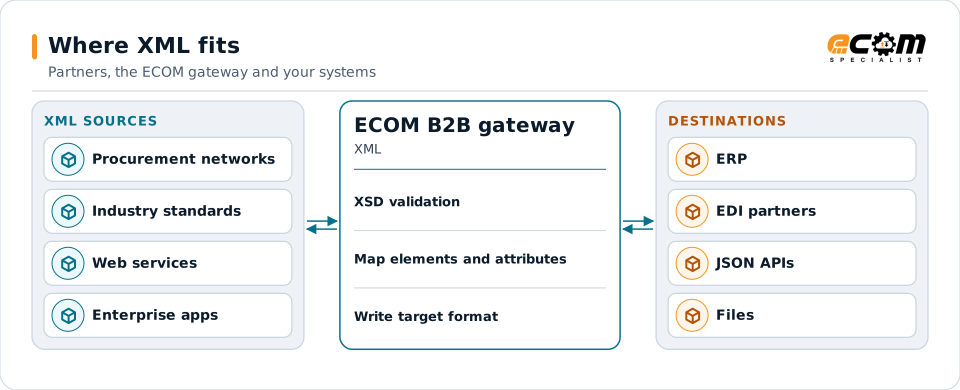
XML is the structured document format behind many enterprise applications, industry standards, web services and procurement networks. ECOM validates XML against its schema and maps it to EDI, JSON, files and your ERP.
- Stands for
- Extensible Markup Language
- Common in
- Enterprise apps, SOAP, industry standards
- Structure
- Elements, attributes, namespaces
- Schema
- XSD (XML Schema Definition)
XML is validated against its schema, then mapped to each destination's format.
Overview
What XML is
XML marks up data with named tags, such as <OrderNumber>4500012345</OrderNumber>. Tags nest inside each other to form a tree, so one document can hold a header, a list of lines and the details of each line.
An XML Schema Definition (XSD) states exactly which elements are allowed, in what order, how often and with what data types. Industry standards such as cXML, OAGIS, PIDX and many government and healthcare formats are published as XML schemas, and so are many ERP interfaces.
Where businesses use it
ERP and enterprise applications
ERP interfaces, such as SAP IDocs in XML form, and middleware exchange XML documents.
Industry standards
cXML, OAGIS, PIDX, RosettaNet, UBL and many others are XML.
Web services
SOAP web services wrap XML in an envelope and describe it with WSDL.
Structure
How XML is structured
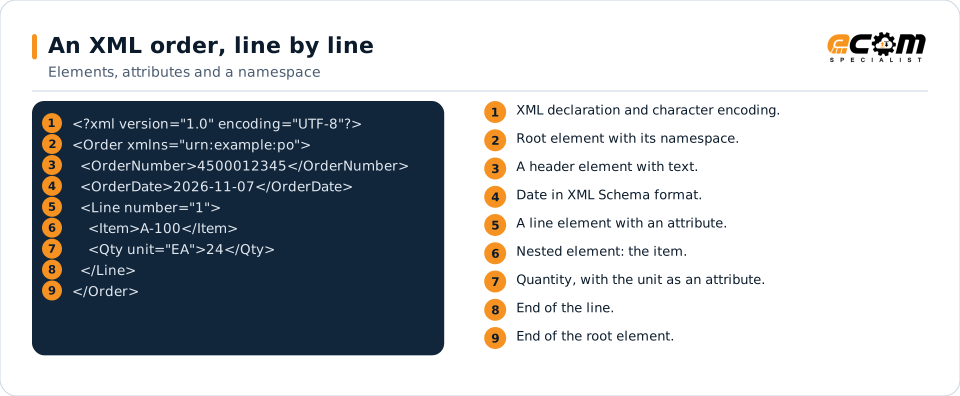
An XML document has one root element. Each element has an opening tag, content and a closing tag, and can contain text or other elements. Attributes add small pieces of information to a tag, such as a unit code. Namespaces, declared with xmlns, keep element names from different standards apart.
A document is well-formed when its tags nest correctly, and valid when it also follows its XSD. Validation catches a missing required element, an element in the wrong order, or a value of the wrong type.
The root element holds the header and the lines. The unit is an attribute on the quantity element; the namespace says which schema the document follows.
In depth
What matters when integrating XML
XSD validation
Documents are validated against the schema before and after mapping, so structural errors never reach a partner.
Namespaces
Element names are read with their namespaces, which matters when one document mixes several standards.
Attributes versus elements
Some values sit in attributes, others in elements. Maps read and write each exactly where the schema expects it.
Large documents
Big catalogs and reports are processed in a streaming way, so size does not stop a transfer.
Encoding and special characters
Characters such as & and < are escaped, and encodings such as UTF-8 are honored.
Signatures and encryption
XML signatures and encryption, used in some standards and web services, are applied or verified where required.
Mapping
How a mapper reads and writes XML
XML as input
The mapper validates the document against its XSD, then reads values by path, such as /Order/Line/Qty, including attributes such as @unit. Each repeated element becomes a repeat of the target loop.
XML as output
Outbound, the mapper creates elements and attributes in schema order, applies the namespace, escapes special characters and validates the finished document.
What the mapping handles
Fields
Element and attribute paths are mapped to target fields.
Loops
Each repeating Line element becomes a target line.
Validation
XSD checks plus business checks such as totals.
Code conversions
Unit attributes, party codes and items are converted.
Business rules
Optional elements are written only when the partner requires them.
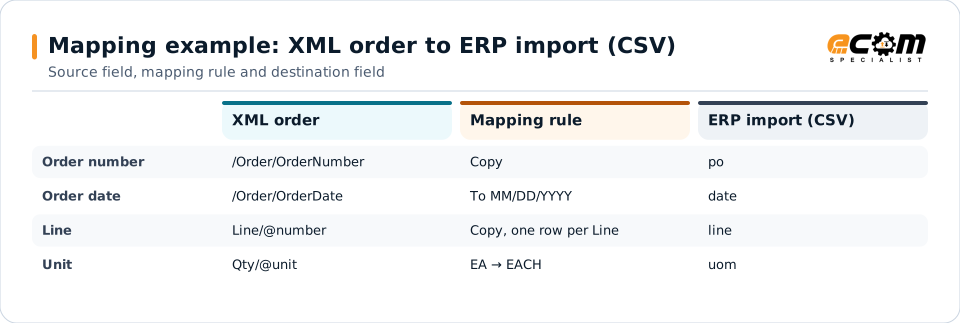
Example: source, mapping, destination
<Order>
  <OrderNumber>4500012345</OrderNumber>
  <OrderDate>2026-11-07</OrderDate>
  <Line number="1">
    <Item>A-100</Item>
    <Qty unit="EA">24</Qty>
  </Line>
</Order>po,date,line,item,qty,uom
4500012345,11/07/2026,1,A-100,24,EACHElement and attribute paths on the left, the rule in the middle and the CSV column on the right. Each Line element produces one row.
Connections
How XML connects your business
Trading partners
Partners that use XML standards connect over AS2, HTTPS, web services or SFTP.
ERP systems
ERP XML interfaces and IDocs are mapped to and from partner documents.
APIs and web services
SOAP and XML-based REST services are called or exposed by the gateway.
Business workflows
Procurement, logistics and finance workflows that run on XML standards.
ECOM
How ECOM supports XML
ECOM supports XML with dedicated implementation, mapping, communication and support teams, and with specialists who know the industries your partners work in.
Implementation team
Plans the XML setup with you, configures it on the gateway and runs the tests with your partners and systems.
Mapping team
Builds and maintains the maps, code conversions and validation rules between partner data and your applications.
Communication team
Sets up and monitors partner connections, certificates, keys and credentials, and coordinates changes with each partner.
Support team
Watches the flows, investigates failed or missing documents, and works the issue through with you and your partner.
For XML in particular
- Maps between XML and X12, EDIFACT, XML, JSON, flat files, databases or your ERP's own formats, in either direction.
- Validation rules for XML data before it reaches a partner or your ERP, with clear error reports.
- Cross-reference tables for items, units, locations and partners, maintained with you.
- Testing with sample files from your systems and partners before go-live.
Frequently asked questions
What is an XSD?
An XML Schema Definition describes which elements and attributes an XML document may contain, in what order and with what data types. It is used to validate documents.
Can XML be converted to EDI?
Yes. Values are read by path from the XML and written into EDI segments, with repeating elements becoming loops. EDI can be converted to XML the same way.
Is XML still used?
Yes. Many industry standards, government formats, ERP interfaces and web services use XML, even where newer APIs use JSON.
Can you handle very large XML files?
Yes. Large documents are processed in a streaming way rather than loaded all at once.
Talk to an EDI/API Expert
Tell us which partners, systems and XML requirements you are working with. An ECOM specialist will review them with you and outline the setup, the maps and the tests.