
Data formats
JSON integration and mapping
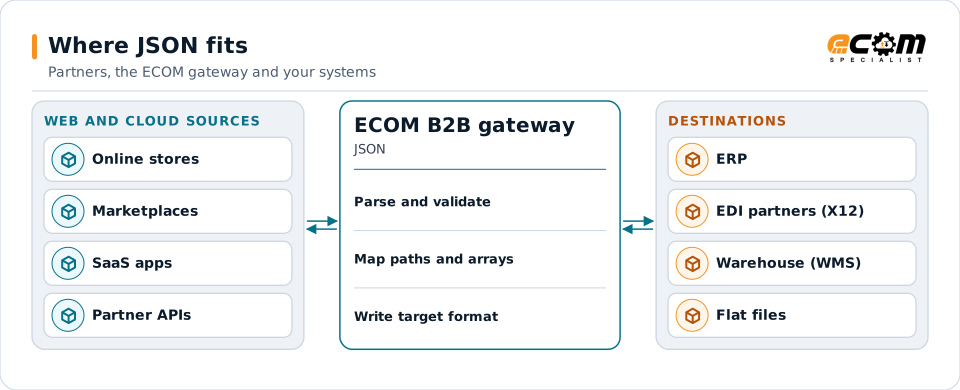
JSON is the data format of modern APIs, online stores and cloud applications. ECOM reads and writes JSON and maps it to X12, EDIFACT, XML, flat files and your ERP, so web and cloud systems can trade with partners that use EDI.
- Stands for
- JavaScript Object Notation
- Common in
- REST APIs, webhooks, SaaS, e-commerce
- Structure
- Objects, arrays, values
- Schema
- Optional, often JSON Schema or OpenAPI
JSON from web and cloud sources is validated and mapped to whatever each destination needs.
Overview
What JSON is
JSON is a text format for structured data. It is easy for people to read and for programs to produce, which is why most web APIs use it. A JSON document is a set of names and values, where a value can be text, a number, true or false, a list, or another set of names and values.
Because there is no fixed document type, every API defines its own JSON structure. An order from an online store, an order from a marketplace and an order from a SaaS procurement tool all look different. Mapping turns each one into the structure your ERP or your EDI partner expects.
Where businesses use it
E-commerce and marketplaces
Online store and marketplace APIs return orders, products, inventory and shipments as JSON.
SaaS applications
CRM, procurement, shipping and accounting applications exchange JSON through their APIs and webhooks.
Event streams
Messages on queues and event platforms often carry JSON payloads.
Structure
How JSON is structured
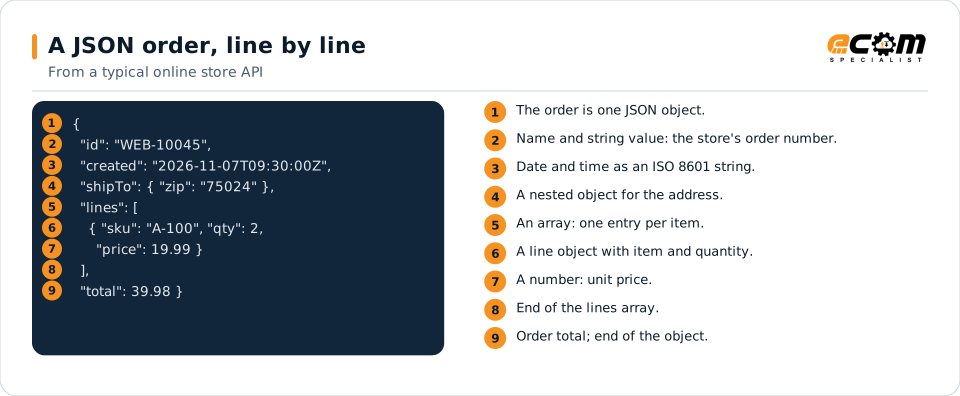
Curly braces hold an object: a set of "name": value pairs separated by commas. Square brackets hold an array: an ordered list of values, often a list of objects such as order lines. Objects can be nested inside objects and arrays, so one document can hold an order header, its lines and each line's details.
JSON has a few value types: strings in double quotes, numbers, true, false and null. Dates and amounts are written as strings or numbers by convention, which is why a map must know each API's conventions, such as date format and decimal precision.
The order is one object. The ship-to address is a nested object and the lines are an array of objects, one per item.
In depth
What matters when integrating JSON
Schemas and contracts
Many APIs describe their JSON in OpenAPI or JSON Schema. Validating against it catches missing or wrong fields early.
Nested data
Nested objects and arrays must be flattened for EDI segments or flat files, and rebuilt when going the other way.
Data types
Numbers, strings, booleans and nulls are converted carefully; a quantity of "2" as text and 2 as a number are not the same to every system.
Dates and time zones
ISO 8601 timestamps with time zones are converted to the date formats partners and ERPs use.
Optional and missing fields
Absent fields, empty strings and nulls are handled by explicit rules, so defaults are deliberate.
Character encoding
JSON is UTF-8. Names with accents or symbols are converted when the destination uses a narrower character set.
Mapping
How a mapper reads and writes JSON
JSON as input
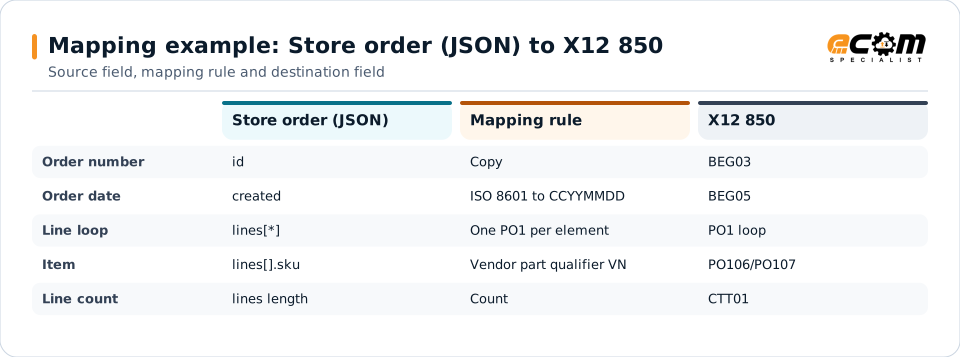
A mapper parses the JSON into a tree, checks it against the schema if one exists, then reads values by path, for example lines[*].sku for each line's item. Each array element becomes a repeat of the target loop.
JSON as output
Going out, the mapper builds objects and arrays from your data, writes values with the right types, leaves out or nulls empty fields as the API expects, and validates the result before posting it.
What the mapping handles
Fields
Each path, such as shipTo.zip, is mapped to a target field or segment element.
Loops
Each element of the lines array becomes one PO1 loop in X12 or one row in a file.
Validation
Required fields, types and value ranges are checked.
Code conversions
Store SKUs, carriers and units are translated with cross-reference tables.
Business rules
Defaults, totals, splits and partner-specific logic are applied.
Example: source, mapping, destination
{
  "id": "WEB-10045",
  "created": "2026-11-07T09:30:00Z",
  "lines": [
    { "sku": "A-100", "qty": 2,
      "price": 19.99 }
  ]
}BEG*00*SA*WEB-10045**20261107~
PO1*1*2*EA*19.99**VN*A-100~
CTT*1~Each row follows one JSON value to its place in the X12 purchase order. The lines array drives the repeating PO1 loop.
Connections
How JSON connects your business
Trading partners
JSON from APIs becomes the EDI documents retailers and distributors require, and their EDI comes back as JSON.
ERP systems
Cloud ERPs often take JSON through their APIs; older ERPs get files or database records.
APIs and webhooks
The gateway calls APIs, receives webhooks and handles authentication, paging and retries.
Business workflows
Order-to-cash, drop ship and inventory updates run across web and EDI channels.
ECOM
How ECOM supports JSON
ECOM supports JSON with dedicated implementation, mapping, communication and support teams, and with specialists who know the industries your partners work in.
Implementation team
Plans the JSON setup with you, configures it on the gateway and runs the tests with your partners and systems.
Mapping team
Builds and maintains the maps, code conversions and validation rules between partner data and your applications.
Communication team
Sets up and monitors partner connections, certificates, keys and credentials, and coordinates changes with each partner.
Support team
Watches the flows, investigates failed or missing documents, and works the issue through with you and your partner.
For JSON in particular
- Maps between JSON and X12, EDIFACT, XML, JSON, flat files, databases or your ERP's own formats, in either direction.
- Validation rules for JSON data before it reaches a partner or your ERP, with clear error reports.
- Cross-reference tables for items, units, locations and partners, maintained with you.
- Testing with sample files from your systems and partners before go-live.
Frequently asked questions
Can JSON be converted to X12 EDI?
Yes. A map reads values from the JSON by path and writes them into X12 segments, turning each array element into a repeating loop. The reverse direction works the same way.
Do we need a JSON schema?
It helps but is not required. If the API publishes OpenAPI or JSON Schema definitions, the gateway validates against them; otherwise ECOM builds validation rules from sample documents and the API documentation.
How are nested arrays handled?
Each level of nesting maps to a level in the target, such as order lines and their allocations. When the target is flat, the map repeats header values on each row.
How do you handle API authentication?
The gateway supports common API authentication methods such as API keys, OAuth 2.0 tokens and certificates, set up for each API.
Talk to an EDI/API Expert
Tell us which partners, systems and JSON requirements you are working with. An ECOM specialist will review them with you and outline the setup, the maps and the tests.