
EDI and B2B standards
X12 EDI, every version and transaction set
X12 is the EDI standard most US companies use to exchange purchase orders, ship notices, invoices, payments, freight and healthcare documents. ECOM maps, validates and acknowledges X12 for any release and transaction set your partners use, and connects it to your ERP.
- Published by
- Accredited Standards Committee X12
- Used mainly in
- North America, all industries
- Acknowledgments
- TA1, 997, 999 and application-level documents
- ECOM coverage
- Every release and transaction set your partners use
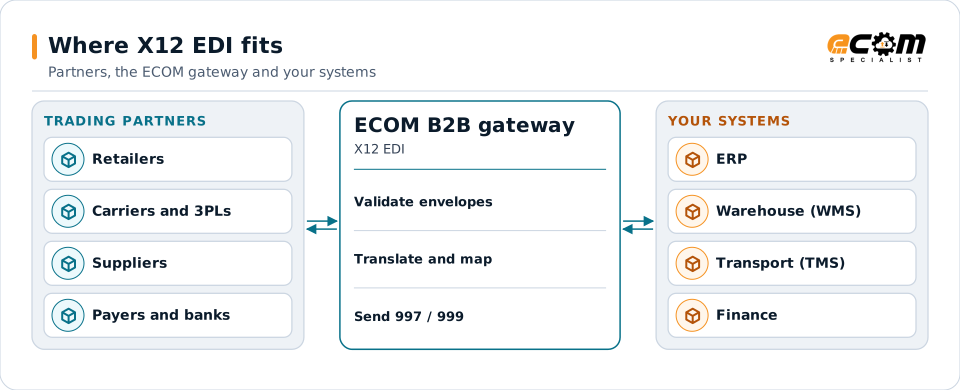
Partners send and receive X12. The gateway checks the envelopes, translates each document to and from your systems, and returns acknowledgments.
Overview
What X12 EDI is
X12 is a family of standard electronic business documents. Each document type is called a transaction set and has a three-digit number: the 850 is a purchase order, the 856 a ship notice, the 810 an invoice. Two companies that agree to use the same transaction set and release can exchange documents without retyping anything.
Each document is plain text made of segments, such as BEG for the beginning of a purchase order or N1 for a party name. Segments contain elements separated by a delimiter, often an asterisk, and end with a terminator, often a tilde. X12 publishes new releases over time, so a partner always tells you which release it uses, for example 004010 or 005010.
Where businesses use it
Retail and consumer goods
Orders, acknowledgments, ship notices with carton labels, invoices, inventory and sales reports between suppliers and retailers.
Transportation and logistics
Load tenders, tender responses, shipment status and freight invoices between shippers, carriers and third-party logistics providers.
Healthcare, finance and manufacturing
HIPAA claims and eligibility, remittance and payment orders, and forecasts and shipping schedules between manufacturers and suppliers.
Structure
How an X12 document is structured
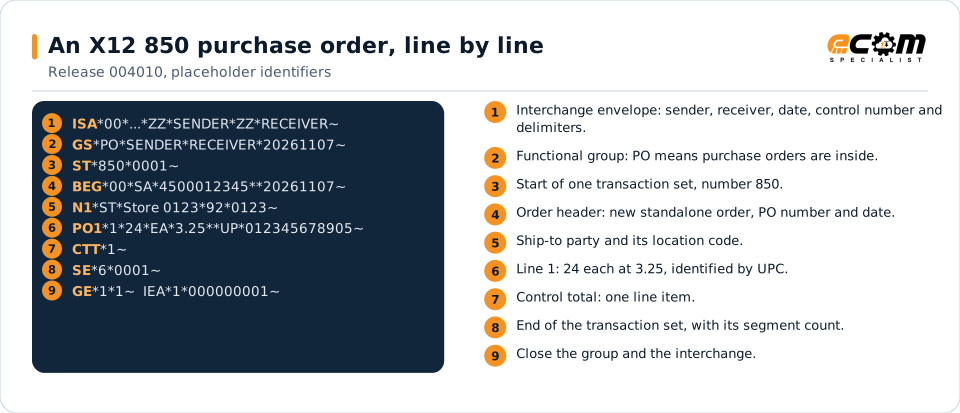
Every X12 transmission is wrapped in three envelopes. The interchange (ISA and IEA segments) identifies sender and receiver and sets the delimiters. The functional group (GS and GE) bundles documents of one kind. The transaction set (ST and SE) holds one business document.
Inside a transaction set, segments appear in a defined order and some repeat in loops. A purchase order, for example, has a header, a loop of line items (PO1) and a summary with control totals. Control numbers on each envelope let both sides match acknowledgments to what was sent.
Read top to bottom: the envelopes open, the purchase order header names the order and the ship-to party, one line item follows, then the control totals and closing envelopes. Identifiers are placeholders.
In depth
Versions, acknowledgments, validation and partner rules
Every release
Partners still use older releases such as 003040 and 004010 next to 005010 and newer releases. ECOM maps each partner on the release it specifies, and can run different releases for different partners on the same transaction set.
Every transaction set
From common supply chain documents (850, 855, 856, 810, 846, 820) to transportation (204, 990, 214, 210), healthcare (837, 835, 270, 271) and specialized sets for grocery, automotive and government.
Acknowledgments
The TA1 confirms an interchange envelope was received intact. The 997 functional acknowledgment confirms each document passed syntax checks. The 999 implementation acknowledgment, used with HIPAA, also reports implementation-guide errors. Business replies such as the 855 or 824 come on top.
Validation
Inbound and outbound documents are checked for envelope integrity, segment order, required elements, data types, lengths, code values and control counts, and against the partner's own implementation guide.
Partner requirements
Each partner publishes an implementation guide that narrows the standard: which segments it uses, which qualifiers and codes it expects, and its timing and label rules. ECOM builds maps to that guide, not just to the standard.
Delimiters and character sets
Element, sub-element and segment delimiters are set in the ISA segment and differ between partners. The translator reads them from each interchange and writes each partner's choice on output.
X12 acknowledgments compared
| Document | What it confirms | Typical use |
|---|---|---|
| TA1 | The interchange envelope (ISA/IEA) was received and is readable. | Requested in the ISA; common in healthcare and with some VANs. |
| 997 | Each functional group and transaction set passed X12 syntax checks. | Retail, logistics, manufacturing and most supply chain partners. |
| 999 | Syntax plus implementation-guide rules, with error detail. | HIPAA 005010 healthcare exchanges. |
| 824 / 864 | A business-level result or a text message about a document. | Partners that report application errors after the 997. |
Mapping
How a mapper reads and writes X12 EDI
X12 EDI as input
The translator reads the ISA segment first to learn the delimiters, checks the envelopes and control numbers, then walks the segments of each transaction set in order, collecting header values, repeating each line-item loop, and checking the totals before the data is handed to your system.
X12 EDI as output
Going out, the map takes records from your ERP, builds the segments in the order the partner's guide requires, applies its qualifiers and code values, counts segments and line items, and wraps the result in fresh envelopes with new control numbers.
What the mapping handles
Fields
Each element, such as BEG03 (the PO number), is mapped to a named field in your system.
Loops
PO1 line loops become order lines; nested loops such as the 856 shipment, order, pack and item levels become a hierarchy.
Validation
Required segments, code lists, lengths and totals are checked, and errors are reported in the 997 or 999.
Code conversions
Units such as EA or CA, party codes and qualifiers are translated through cross-reference tables.
Business rules
Defaults, date calculations, item lookups and partner-specific rules are applied in the map.
Example: source, mapping, destination
BEG*00*SA*4500012345**20261107~
N1*ST*Store 0123*92*0123~
PO1*1*24*EA*3.25**UP*012345678905~{
"customerPo": "4500012345",
"orderDate": "2026-11-07",
"shipTo": "STORE-0123",
"lines": [{
"line": 1, "upc": "012345678905",
"qty": 24, "uom": "EACH",
"price": 3.25 }]
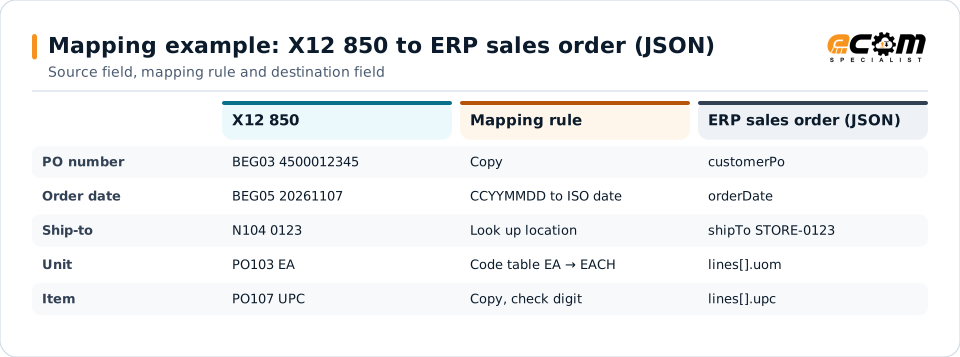
}Each row follows one value from the partner's 850 to your ERP. Some values are copied; others are converted with a code table, a date rule or a lookup.
Connections
How X12 EDI connects your business
Trading partners
X12 documents travel over AS2, SFTP, a VAN or a partner portal, depending on each partner's requirement.
ERP and business systems
Translated documents become sales orders, shipments and invoices in your ERP, warehouse or transport system.
APIs and files
The same data can be published to an API, a message queue or a flat file when an application does not read X12.
Business workflows
Order-to-cash, procure-to-pay and shipping workflows run on the sequence of X12 documents each partner expects.
ECOM
How ECOM supports X12 EDI
ECOM supports X12 EDI with dedicated implementation, mapping, communication and support teams, and with specialists who know the industries your partners work in.
Implementation team
Plans the X12 EDI setup with you, configures it on the gateway and runs the tests with your partners and systems.
Mapping team
Builds and maintains the maps, code conversions and validation rules between partner data and your applications.
Communication team
Sets up and monitors partner connections, certificates, keys and credentials, and coordinates changes with each partner.
Support team
Watches the flows, investigates failed or missing documents, and works the issue through with you and your partner.
For X12 EDI in particular
- Maps for any X12 release and transaction set your partners require, built to each partner's implementation guide.
- Acknowledgment handling: TA1, 997 and 999 generation and reconciliation, with alerts for documents that are not acknowledged.
- Learning Center guides for every X12 transaction set, so your team can look up any document a partner names.
- Partner testing and certification support, including retailer scorecards and label rules tied to the 856.
Frequently asked questions
Which X12 versions does ECOM support?
Any release your partners use, from older 003 and 004 releases to 005010 and newer releases. Each partner is mapped on the release it specifies, and one partner's upgrade does not affect the others.
What is the difference between a 997 and a 999?
Both are functional acknowledgments. The 997 confirms that documents passed X12 syntax checks. The 999 adds implementation-guide checks and is used with HIPAA healthcare transactions. Neither one means the business accepted the document; that comes from documents such as an 855 or 824.
Do I need a different map for each trading partner?
Usually each partner gets its own map or map variant, because partners use different segments, qualifiers and codes. Shared logic, such as item lookups, is reused so that adding a partner is faster.
Where can I read about a specific transaction set?
The ECOM Learning Center has a guide for each X12 transaction set, with its purpose, structure and the documents that usually come before and after it.
Talk to an EDI/API Expert
Tell us which partners, systems and X12 EDI requirements you are working with. An ECOM specialist will review them with you and outline the setup, the maps and the tests.