
IBM Sterling VAN
IBM VAN — Supply Chain Business Network, with ECOM
Connect once and exchange X12 and EDIFACT documents with partners on IBM's value-added network. ECOM provides the connection, self-service partner onboarding, twelve months of document tracking and around-the-clock support.
- Try it
- One-month trial, with approval
- Uptime
- 99.99%, as IBM states
- Support
- 24×7 support
- Tracking
- 12 months, all VAN documents
Availability, support, trial and tracking are features of ECOM's service, not IBM statements.
Connectivity
One connection to your trading partners
Instead of a separate connection to every partner, you connect once. Partners on IBM's network, and partners that connect to it over AS2, SFTP or OFTP2, exchange documents with you through your mailbox on the network.
About the names. IBM now names its network the IBM Sterling B2B Integration Value-Added Network (VAN). The cloud service formerly called IBM Supply Chain Business Network is now IBM Sterling B2B Integration SaaS. Many partners still use the older name.
You connect once. Partners reach you through IBM's network over the method they already use, and ECOM's service handles onboarding, tracking and support around it.
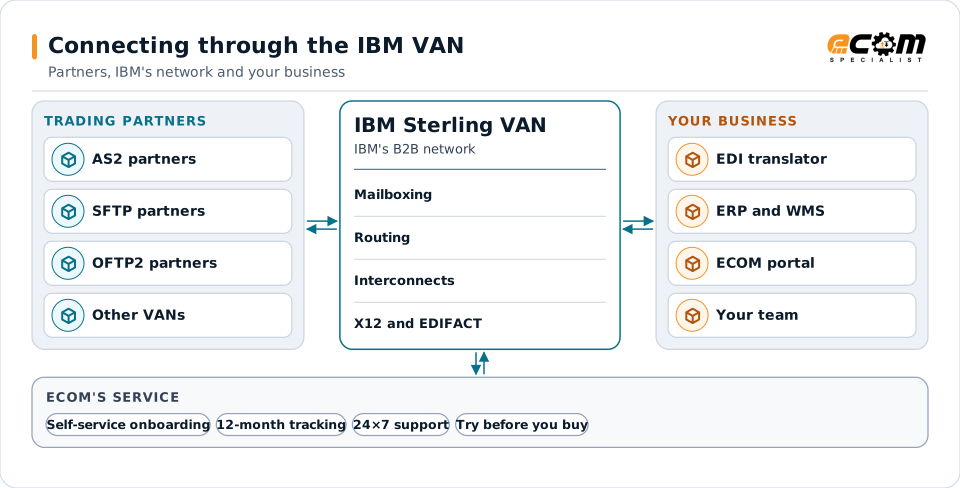
Who provides what
IBM's network and ECOM's service
Two parties are involved: IBM runs the network, and ECOM provides the service around it. The table shows who provides what.
| Area | IBM Sterling VAN (IBM) | ECOM's service |
|---|---|---|
| Network | IBM's value-added network for exchanging EDI documents, with interconnects to partners on the network | Sets up and manages your connection to the network |
| Partner connections | Partners connect to the network with the methods IBM supports | You onboard and maintain your own trading partners, and your partners can onboard themselves (self-service), over AS2, SFTP and OFTP2 |
| Document tracking | IBM documents tracking, search and status of documents exchanged through the VAN | Twelve months of tracking for all documents exchanged through the VAN, including X12 and EDIFACT, included at no charge and purged automatically after twelve months |
| Availability | IBM states 99.99% uptime reliability for IBM Sterling B2B Integration SaaS, which reaches partners through the IBM Sterling VAN (IBM cites an IDC assessment, December 2025) | No separate availability figure is stated for ECOM's service |
| Support | IBM support under IBM terms | 24×7 support from ECOM |
| Trying it | IBM's free trial applies to IBM Sterling B2B Integration SaaS | A one-month trial of up to 100,000 kilocharacters, subject to ECOM approval |
Self-service
Onboard and maintain partners yourself
Add and maintain your trading partners yourself, without waiting for a ticket, or let a partner onboard itself through self-service. ECOM's specialists step in when a partner needs help.
AS2
Exchange AS2 identifiers, URLs and certificates with the partner, test, and switch to production. Certificate renewals are planned before expiry.
SFTP
Set up the partner's SFTP account or connect to theirs, exchange SSH keys and agree folders and file names.
OFTP2
Exchange Odette IDs, certificates and connection details, used mainly with European automotive partners. OFTP2 is the current version of the Odette File Transfer Protocol.
Maintenance
Change partner details, renew certificates and keys, pause or retire partners, and keep a record of each change.
Document tracking
Twelve months of tracking for all VAN documents
Every document that passes through the VAN, X12 and EDIFACT included, is tracked for twelve months, so you can answer "did they get it?" without opening a ticket.
Document status
Where each document is: received, delivered to the partner mailbox, picked up, or stopped with an exception.
Acknowledgments
Whether a 997, 999 or CONTRL acknowledgment came back, and whether it accepted or rejected the document.
Exceptions
Documents that were rejected, not delivered or not acknowledged in time, with the reason when it is known.
Related documents
The documents that belong to the same order or shipment, linked by their reference numbers.
Tracking shows where each document is and links it to the related documents for the same order. It is visibility only: it does not translate, resend or archive documents, and records are purged after twelve months.
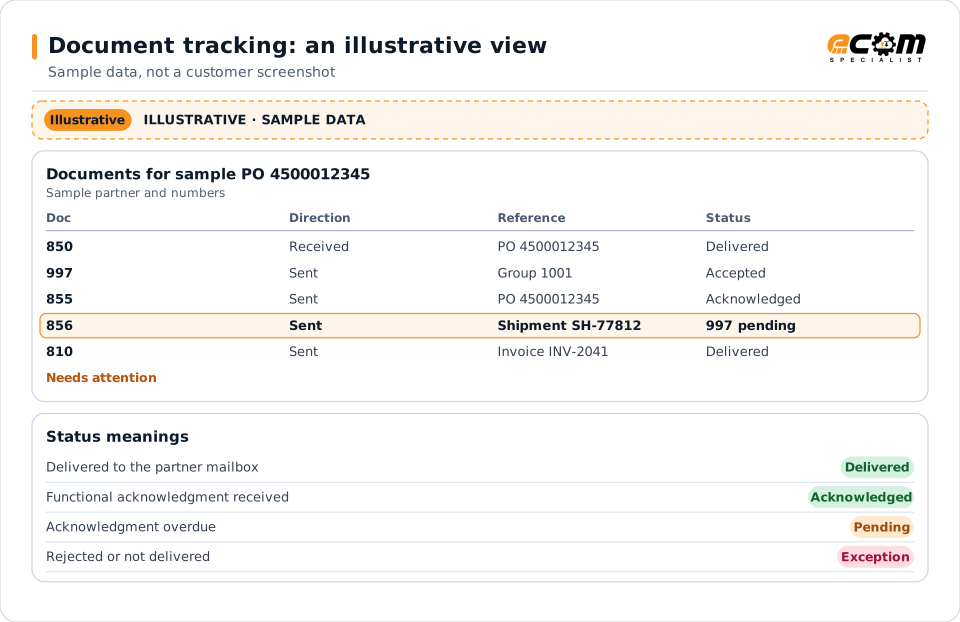
What tracking does not do
- Tracking is visibility only. It does not translate, resend or correct documents.
- Records are kept for twelve months and then purged automatically. Tracking is not an archive; keep your own archive for longer retention.
- Tracking is included at no charge and is separate from PRISM-SCV, which is a paid product.
Document tracking and PRISM-SCV
| Document tracking (included) | PRISM-SCV (paid) | |
|---|---|---|
| What it is | Status of documents exchanged through the service | Supply chain visibility across orders, shipments and partners |
| History | Twelve months, then purged | As agreed for PRISM-SCV |
| Price | Included at no charge | Paid, quoted separately |
| Changes documents | No: visibility only | See the PRISM-SCV page |
Correlated documents
How business documents link together
Business documents come in cycles. An order leads to an acknowledgment, a ship notice, an invoice and a payment, and each document carries the reference numbers of the ones before it. Tracking uses those numbers to show the documents of one order or shipment together.
The reference numbers tie each cycle together: a purchase order number, a shipment or booking number, an invoice number. EDIFACT equivalents are the closest messages, not always one to one, and every partner decides its own sequence.
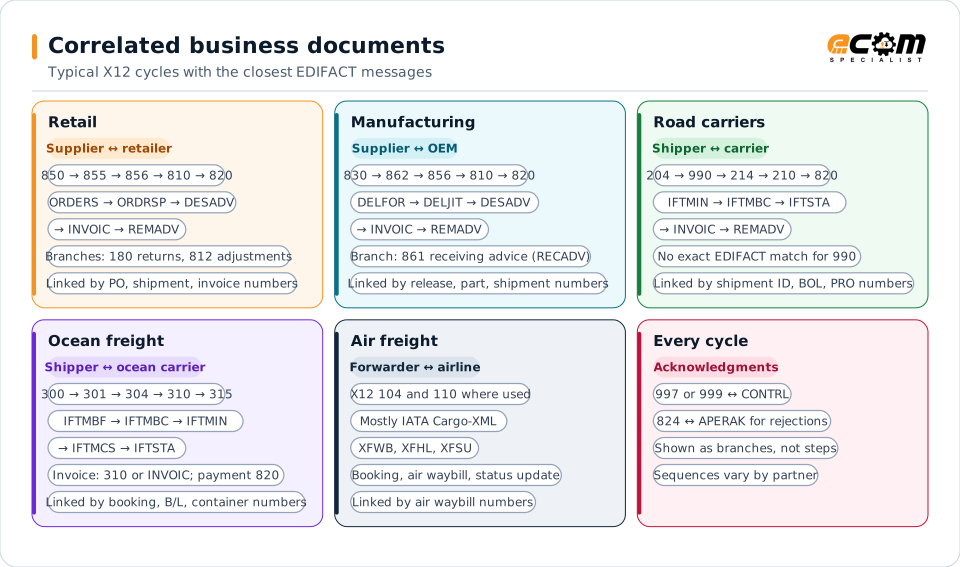
The EDIFACT messages are the closest equivalents, not always one to one: some X12 sets have no exact EDIFACT match, and partners choose different messages. Every partner decides its own sequence and which documents it uses. Acknowledgments, returns and adjustments are branches that apply when used, not mandatory steps.
Retail Supplier and retailer
| X12 | Document | Closest EDIFACT or industry message | Reference numbers that link it |
|---|---|---|---|
| 850 | Purchase Order | ORDERS | Purchase order number (BEG03) |
| 855 | Purchase Order Acknowledgment | ORDRSP | Purchase order number (BAK03) |
| 856 | Ship Notice | DESADV | Shipment ID (BSN02), PO number, carton labels (SSCC), BOL |
| 810 | Invoice | INVOIC | Invoice number (BIG02), PO number (BIG04) |
| 820 | Payment Order/Remittance Advice | REMADV | Invoice numbers paid (RMR02) |
Branches that apply when used
- 180 Return Merchandise Authorization and Notification ↔ RETANN or RETINS, linked by the return authorization and original PO or invoice
- 812 Credit/Debit Adjustment: no exact EDIFACT match; many partners send INVOIC as a credit or debit note, linked by the invoice number
- 997 or 999 ↔ CONTRL for each interchange; 824 ↔ APERAK when a document is rejected
Manufacturing Supplier and manufacturer
| X12 | Document | Closest EDIFACT or industry message | Reference numbers that link it |
|---|---|---|---|
| 830 | Planning Schedule with Release Capability | DELFOR | Release number, part numbers, ship-to plant |
| 862 | Shipping Schedule | DELJIT | Schedule reference, part numbers |
| 856 | Ship Notice | DESADV | Shipment ID or packing slip, part numbers, release |
| 810 | Invoice | INVOIC | Invoice number, shipment or packing slip reference |
| 820 | Payment Order/Remittance Advice | REMADV | Invoice numbers paid |
Branches that apply when used
- 861 Receiving Advice/Acceptance Certificate ↔ RECADV, where the manufacturer confirms what arrived
- Some manufacturers pay from receipts (self-billing) instead of supplier invoices; the partner decides
- 997 or 999 ↔ CONTRL; 824 ↔ APERAK
Road carriers Shipper and motor carrier
| X12 | Document | Closest EDIFACT or industry message | Reference numbers that link it |
|---|---|---|---|
| 204 | Motor Carrier Load Tender | IFTMIN | Shipment ID (B204), BOL number |
| 990 | Response to a Load Tender | IFTMBC (closest) | Shipment ID; accepted or declined |
| 214 | Transportation Carrier Shipment Status Message | IFTSTA | Carrier reference or PRO (B1001), shipment ID (B1002) |
| 210 | Motor Carrier Freight Details and Invoice | INVOIC | Freight invoice number (B302), shipment ID (B303), BOL |
| 820 | Payment Order/Remittance Advice | REMADV | Freight invoice numbers paid |
Branches that apply when used
- 990 has no exact EDIFACT match; transport bookings use IFTMBC, and some partners use APERAK
- 997 ↔ CONTRL
Ocean freight Shipper or forwarder and ocean carrier
| X12 | Document | Closest EDIFACT or industry message | Reference numbers that link it |
|---|---|---|---|
| 300 | Reservation (Booking Request) (Ocean) | IFTMBF | Booking number, shipper reference |
| 301 | Confirmation (Ocean) | IFTMBC | Booking number |
| 304 | Shipping Instructions | IFTMIN | Booking number, container numbers |
| 310 | Freight Receipt and Invoice (Ocean) | IFTMCS | Bill of lading number, booking number |
| 315 | Status Details (Ocean) | IFTSTA | Container number, bill of lading, booking number |
Branches that apply when used
- Freight charges come on the 310 or as a separate INVOIC; payment with 820 ↔ REMADV
- Related: 322 Terminal Operations and Intermodal Ramp Activity ↔ CODECO for container gate moves
- 997 ↔ CONTRL
Air freight Forwarder and airline
| X12 | Document | Closest EDIFACT or industry message | Reference numbers that link it |
|---|---|---|---|
| 104 | Air Shipment Information | IATA Cargo-XML (XFWB) | Air waybill number |
| 110 | Air Freight Details and Invoice | INVOIC | Air waybill number, invoice number |
| — | Booking request and answer | IATA FFR and FFA | Air waybill number, flight |
| — | House air waybills | IATA Cargo-XML (XFHL) | Master and house air waybill numbers |
| — | Status updates | IATA Cargo-XML (XFSU) | Air waybill number |
Branches that apply when used
- Air cargo mostly uses IATA messages (Cargo-IMP and its successor Cargo-XML) rather than X12 or EDIFACT; X12 104 and 110 appear with some US partners
- IATA stopped maintaining Cargo-IMP and maintains Cargo-XML; airlines move to Cargo-XML at different speeds
Frequently asked questions
Is the IBM VAN the same as the Supply Chain Business Network?
Not exactly. IBM's value-added network is now called IBM Sterling B2B Integration VAN. Supply Chain Business Network was IBM's cloud B2B service, now called IBM Sterling B2B Integration SaaS, which uses the VAN to reach partners.
Which connection methods can partners use?
Through ECOM's service, partners connect over AS2, SFTP or OFTP2. Other methods and VAN interconnects are confirmed for each partner during setup.
Who onboards our trading partners?
You can onboard and maintain your own trading partners, and your partners can onboard themselves through self-service. ECOM specialists help when a partner needs it.
How long are documents tracked?
Twelve months, for all documents exchanged through the VAN. After twelve months, tracking records are purged automatically. Tracking is not an archive, so keep your own archive if you need documents for longer.
Can tracking resend or fix a document?
No. Tracking shows status, acknowledgments, exceptions and related documents. Resending or correcting a document is done in your EDI system or by ECOM support.
Is document tracking the same as PRISM-SCV?
No. Document tracking is included at no charge and shows the status of exchanged documents for twelve months. PRISM-SCV is a separate, paid supply chain visibility product.
Can we try the service before we buy it?
Yes, with ECOM approval. An approved trial runs for one month and covers up to 100,000 kilocharacters of documents. A kilocharacter is 1,000 characters of document data, the usual unit for measuring VAN traffic.
What uptime does the network have?
IBM states 99.99% uptime reliability for IBM Sterling B2B Integration SaaS, which reaches partners through the IBM Sterling VAN. IBM cites an IDC vendor assessment from December 2025 for this figure.
Who provides support?
ECOM provides 24×7 support for its service. IBM supports its own network under its own terms.
Why do X12 and EDIFACT cycles not match exactly?
The two standards were designed separately. Some X12 sets have no exact EDIFACT match, and each partner chooses which messages it uses and in what order.
Talk to an EDI/API Expert
Tell us which partners you need to reach and how they connect. An ECOM specialist will walk you through the connection, onboarding and tracking.