
X12 transaction guide · Shipping and logistics
EDI 210 Motor Carrier Freight Details and Invoice
The X12 document a carrier sends to bill a shipper or broker for transportation services, with charges and shipment details.
- Sent by
- Motor carrier
- Received by
- Shipper, broker or 3PL (bill-to party)
- Standard
- ANSI ASC X12
- EDIFACT equivalent
- INVOIC
What is an EDI 210?
The EDI 210 Motor Carrier Freight Details and Invoice is the ANSI X12 transaction set a carrier uses to bill for transportation services. It identifies the shipment and invoice, the payer, origin and destination, weights and quantities, and the line charges, including base freight and accessorial charges such as fuel surcharges or liftgate fees.
Shippers and brokers usually audit each 210 against the original tender, the agreed rates and the shipment's status history before paying. Electronic invoices make that audit automatic, which matters for companies paying thousands of freight bills.
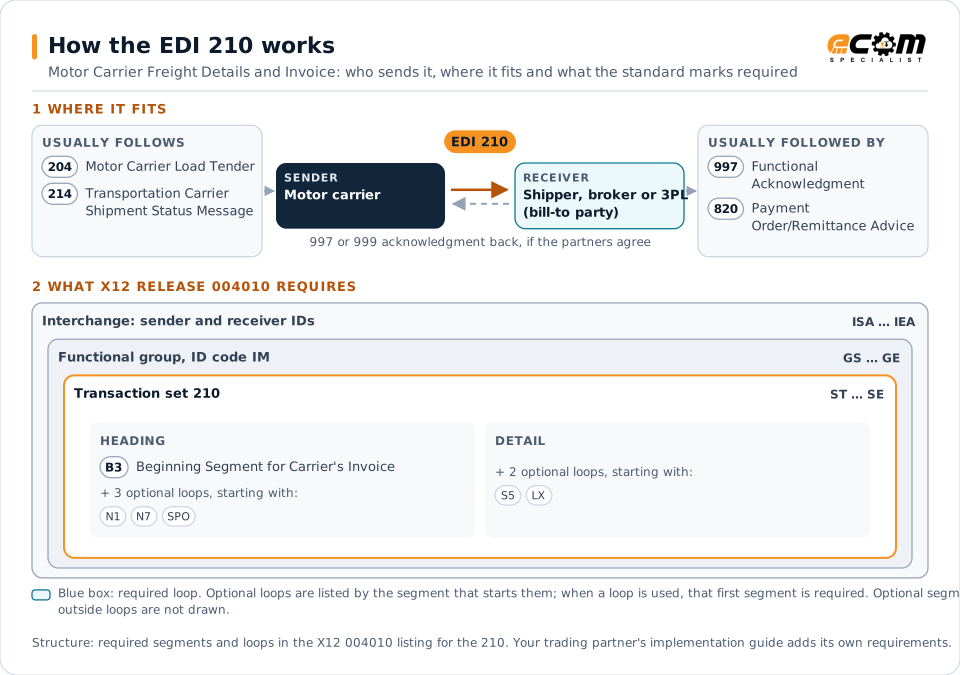
How to read this diagram: the top row shows who sends the 210, to whom, and which documents usually come before and after it. The lower part shows what X12 release 004010 itself requires: the envelopes around the 210 and the segments and loops the standard marks as required, area by area. Optional loops are listed by the segment that starts them rather than drawn in full. This is the standard's minimum, not a trading partner's requirement: each partner's implementation guide usually makes some optional loops mandatory, restricts the codes and may use a different release.
When it is used
- Billing shippers or brokers for completed truckload, LTL or parcel shipments
- Supporting automated freight audit and payment
- Reporting accessorial and adjusted charges
Where it fits in the document flow
Structure
Key segments in the 210
The segments most implementations use, described in plain language. The last column shows what X12 release 004010 itself requires: "Required" marks a segment the standard requires in every 210; "Optional, common" marks a segment the standard leaves optional, or that sits in an optional loop, but that implementations often use. This is the standard's requirement, not your trading partner's: each partner's implementation guide names the release it uses, makes some optional segments mandatory and restricts the values, and requirements can differ between releases. The requirement status comes from one published X12 reference listing and has not been checked against a second source.
| Segment | Name | What it carries | In X12 004010 |
|---|---|---|---|
| B3 | Beginning Segment for Carrier's Invoice | Invoice number, shipment identification, payment method, billing date, net amount due, delivery date and carrier SCAC. | Required |
| C3 | Currency | Currency of the charges. | Optional, common |
| N1 loop | Party Identification | Shipper, consignee and bill-to parties with addresses. | Optional, common |
| LX loop | Assigned Number | Groups line items for each charge. | Optional, common |
| L0 / L1 | Line Item Quantity and Charges | Weights and quantities, and the rate and amount for each charge. | Optional, common |
| L3 | Total Weight and Charges | Total weight and total charges for the invoice. | Optional, common |
Example
Sample EDI 210
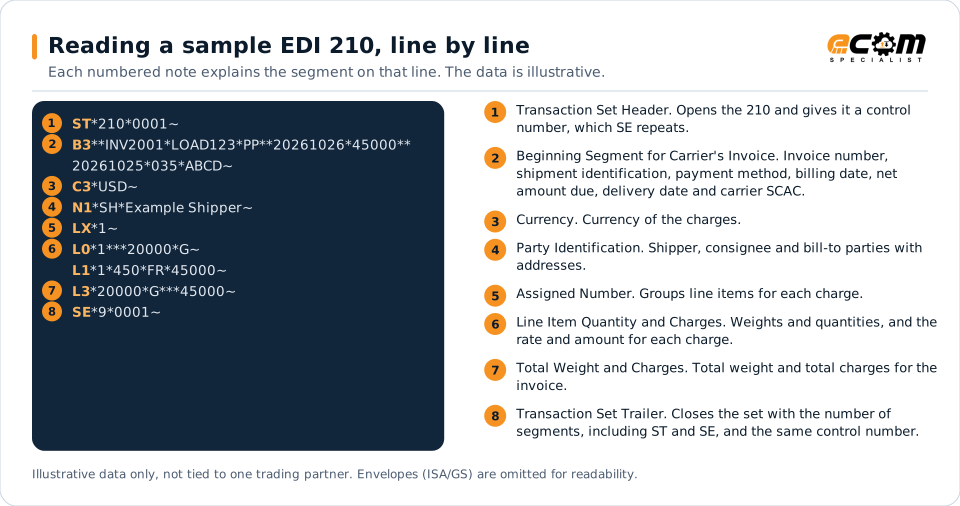
Carrier ABCD bills 450.00 (45000 with two implied decimals) for prepaid shipment LOAD123. The invoice is dated 26 October, the day after delivery on 25 October (B3 delivery date with qualifier 035, delivered). L1 shows the freight charge and L3 the totals.
Illustrative data only, not tied to one X12 release or trading partner. The interchange (ISA/IEA) and functional group (GS/GE) envelopes are omitted for readability.
ST*210*0001~
B3**INV2001*LOAD123*PP**20261026*45000**20261025*035*ABCD~
C3*USD~
N1*SH*Example Shipper~
LX*1~
L0*1***20000*G~
L1*1*450*FR*45000~
L3*20000*G***45000~
SE*9*0001~The sample is the same one shown above, with a note beside each segment the first time it appears. Segment IDs are highlighted at the start of each line; the fields after them are separated by asterisks, and each segment ends with a tilde.
Avoid problems
Common 210 errors and how to prevent them
Invoice cannot be matched to a load
The shipment identification must match the tender so the payer can audit the invoice automatically.
Unapproved accessorials
Charges not agreed in advance trigger disputes. Rate agreements should define approved accessorial codes.
Duplicate invoices
Resent invoices without correction indicators can be paid twice. Audit for duplicates before payment.
Trading partners
Integration guides that include the 210









How ECOM helps
Automate the 210 with ECOM
Solution
Logistics Automation
Automate tenders, status updates, freight invoices and warehouse orders with logistics partners.
Solution
Financial Document Automation
Automate invoices, remittances, payment files and bank statements from capture to posting.
Industry
Trucking and Transportation
Load tenders, responses, status and freight invoices for carriers, brokers and shippers, integrated with the TMS.
EDI 210 FAQs
What is an EDI 210 used for?
A carrier uses the 210 to bill a shipper or broker for transportation services, including freight and accessorial charges.
How are 210 invoices audited?
They are compared against the tender, contracted rates and shipment status before payment is approved.
How does the payer respond?
Typically with a 997 acknowledgment and, after payment, an 820 remittance advice in some relationships.
More general questions about EDI are answered in the EDI FAQ.
Related transactions
Related shipping and logistics documents
Need help with the EDI 210?
ECOM maps, tests and monitors X12 documents for your trading partners and integrates them with your ERP.