
X12 transaction guide · Shipping and logistics
EDI 753 Request for Routing Instructions
The X12 document a supplier sends to ask a customer, usually a retailer, how a ready-to-ship order should be routed and which carrier to use.
- Sent by
- Supplier or vendor
- Received by
- Retailer or buyer (or its routing provider)
- Standard
- ANSI ASC X12
What is an EDI 753?
The EDI 753 Request for Routing Instructions is the ANSI X12 transaction set a supplier uses to tell a customer that merchandise is ready to ship and to ask how it should be routed. It identifies the ship-from location, each ship-to location, the purchase orders involved and the quantity, weight and volume ready for each order, along with the date the goods will be ready for pickup.
The 753 is common in retail programs where the buyer controls inbound freight: the retailer, or the logistics provider that manages its routing, consolidates the requests and replies with an EDI 754 that names the carrier and pickup details. The 753 first appears in X12 release 4030, so partners using 4010 for other documents often specify a later release for routing.
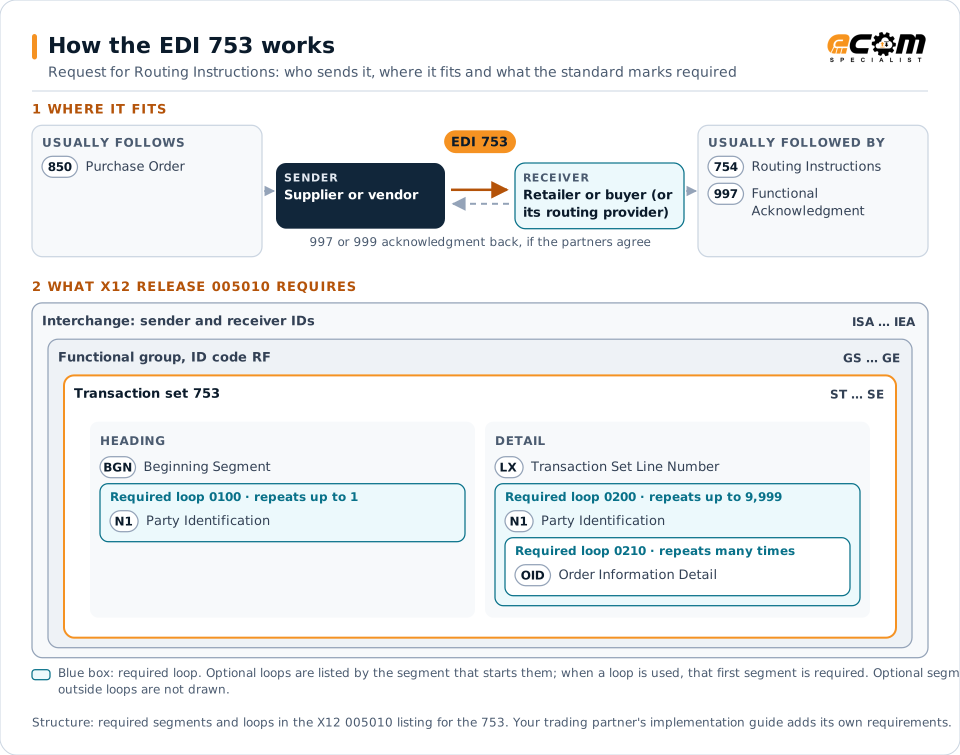
How to read this diagram: the top row shows who sends the 753, to whom, and which documents usually come before and after it. The lower part shows what X12 release 005010 itself requires: the envelopes around the 753 and the segments and loops the standard marks as required, area by area. Optional loops are listed by the segment that starts them rather than drawn in full. This is the standard's minimum, not a trading partner's requirement: each partner's implementation guide usually makes some optional loops mandatory, restricts the codes and may use a different release.
When it is used
- Asking a retailer for routing on collect or buyer-controlled freight
- Reporting quantities, weight and volume ready to ship per purchase order
- Giving the date goods will be ready for pickup
- Requesting routing for orders to several ship-to locations at once
Where it fits in the document flow
Structure
Key segments in the 753
The segments most implementations use, described in plain language. The last column shows what X12 release 005010 itself requires: "Required" marks a segment the standard requires in every 753; "Optional, common" marks a segment the standard leaves optional, or that sits in an optional loop, but that implementations often use. This is the standard's requirement, not your trading partner's: each partner's implementation guide names the release it uses, makes some optional segments mandatory and restricts the values, and requirements can differ between releases. The requirement status comes from one published X12 reference listing and has not been checked against a second source.
| Segment | Name | What it carries | In X12 005010 |
|---|---|---|---|
| BGN | Beginning Segment | Purpose code, the supplier's routing request reference number and the request date. | Required |
| N1 loop (ship from) | Party Identification | The ship-from location where the carrier will pick up, with address details in N3 and N4. | Required |
| LX | Transaction Set Line Number | Starts the detail section of the request. | Required |
| N1 loop (ship to) | Party Identification | Each ship-to location, such as a retailer distribution center, that the goods are destined for. | Required |
| G62 | Date/Time | Dates such as the requested ship or pickup date for the goods. | Optional, common |
| OID | Order Information Detail | For each purchase order, the quantity ready to ship with its unit, weight and volume. | Required |
Example
Sample EDI 753
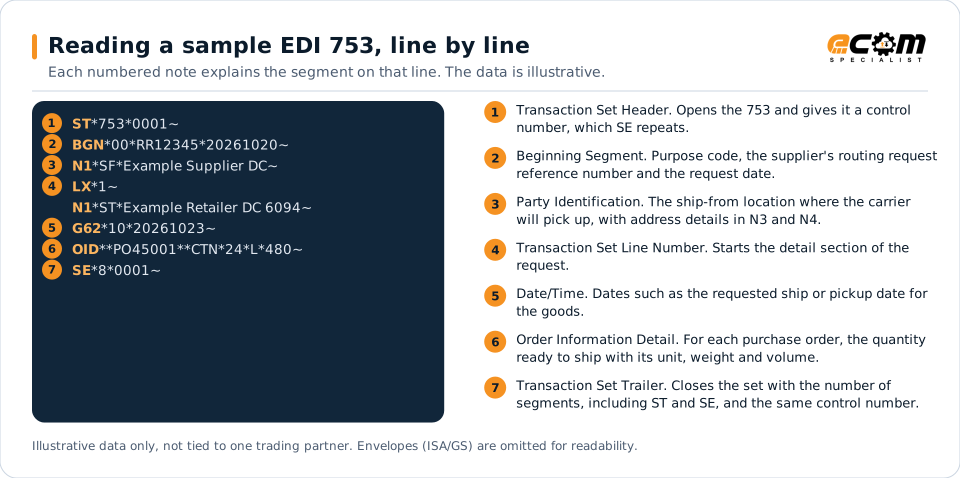
An original (00) routing request RR12345 from the supplier's distribution center. Purchase order PO45001 has 24 cartons (packaging form CTN) weighing 480 pounds (L) ready for the retailer's DC, with a requested ship or pickup date (G62 qualifier 10) of 23 October.
Illustrative data only, not tied to one X12 release or trading partner. The interchange (ISA/IEA) and functional group (GS/GE) envelopes are omitted for readability.
ST*753*0001~
BGN*00*RR12345*20261020~
N1*SF*Example Supplier DC~
LX*1~
N1*ST*Example Retailer DC 6094~
G62*10*20261023~
OID**PO45001**CTN*24*L*480~
SE*8*0001~The sample is the same one shown above, with a note beside each segment the first time it appears. Segment IDs are highlighted at the start of each line; the fields after them are separated by asterisks, and each segment ends with a tilde.
Avoid problems
Common 753 errors and how to prevent them
Requesting before goods are ready
Retailers plan pickups from the ready date in the request. Sending a 753 for goods that are not packed leads to missed pickups and chargebacks.
Weight and carton counts that do not match the shipment
Carriers and appointments are booked from the 753 figures. Build them from actual pack data so the ship notice and freight bill agree with the request.
Missing the routing reply
The supplier must act on the 754 that answers each request. Match replies to requests by reference number and alert the shipping team when a reply is late.
How ECOM helps
Automate the 753 with ECOM
Industry
Retail
Retail and eCommerce EDI for suppliers and retailers, from purchase order to payment, with compliance built in.
Industry
Trucking and Transportation
Load tenders, responses, status and freight invoices for carriers, brokers and shippers, integrated with the TMS.
Solution
EDI Integration
Exchange X12 and EDIFACT documents with partners and integrate them directly with your ERP.
EDI 753 FAQs
What is the difference between a 753 and a 754?
The supplier sends the 753 to request routing for goods that are ready to ship. The retailer or its routing provider replies with the 754, which gives the carrier and routing instructions to follow.
Do all retailers use the 753?
No. Many retailers use web-based routing portals instead of, or as well as, EDI. Each retailer's supplier requirements state whether the 753 is accepted or required.
Which X12 release includes the 753?
The 753 was added in release 4030 and is in later releases such as 5010. Partners that exchange other documents in 4010 often agree a later release for routing transactions.
More general questions about EDI are answered in the EDI FAQ.
Related transactions
Related shipping and logistics documents
- 754Routing Instructions
- 853Routing and Carrier Instruction
- 861Receiving Advice/Acceptance Certificate
- 204Motor Carrier Load Tender
- 210Motor Carrier Freight Details and Invoice
- 856Advance Ship Notice
- 990Response to a Load Tender
- 250Purchase Order Shipment Management Document
- 854Shipment Delivery Discrepancy Information
- 858Shipment Information
- 894Delivery/Return Base Record
- 895Delivery/Return Acknowledgment or Adjustment
Need help with the EDI 753?
ECOM maps, tests and monitors X12 documents for your trading partners and integrates them with your ERP.