
X12 transaction guide · Shipping and logistics
EDI 250 Purchase Order Shipment Management Document
The X12 document a retailer or manufacturer uses to give a transportation provider purchase order data to manage orders from pickup request to delivery.
- Sent by
- Retailer or manufacturer
- Received by
- Transportation or logistics provider
- Standard
- ANSI ASC X12
What is an EDI 250?
The EDI 250 Purchase Order Shipment Management Document is the ANSI X12 transaction set that lets a retailer or manufacturer communicate purchase order data to a transportation provider, to manage the purchase order cycle from the pickup request through delivery.
Logistics providers that manage inbound freight for retailers need to know which orders are expected from which suppliers, in what quantities and by when. With purchase order data, they can consolidate shipments, book capacity and report progress at order level rather than only by shipment.
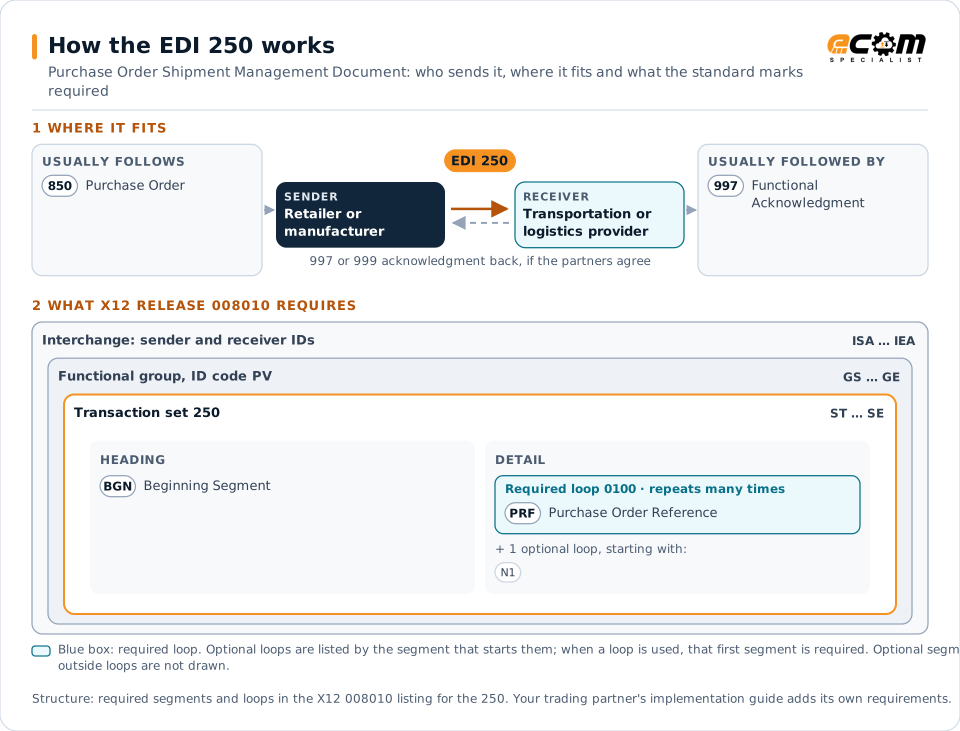
How to read this diagram: the top row shows who sends the 250, to whom, and which documents usually come before and after it. The lower part shows what X12 release 008010 itself requires: the envelopes around the 250 and the segments and loops the standard marks as required, area by area. Optional loops are listed by the segment that starts them rather than drawn in full. This is the standard's minimum, not a trading partner's requirement: each partner's implementation guide usually makes some optional loops mandatory, restricts the codes and may use a different release.
When it is used
- Giving a logistics provider open purchase orders to manage
- Supporting order-level inbound freight management
- Updating order quantities and dates
Where it fits in the document flow
Structure
Mandatory segments in the 250 (X12 release 008010)
The segments X12 release 008010 marks as mandatory at their level, in order. Segments inside optional loops are needed only when the loop is used. This is the standard's requirement, not your trading partner's: each partner's implementation guide names the release it uses, adds the optional segments it requires and restricts the values. The requirement status comes from one published X12 reference listing and has not been checked against a second source.
- ST
- BGN
- PRF
- N1
- SE
Practical example
The 250 in practice
A retailer outsources inbound transportation to a logistics provider. When it places orders with suppliers, it sends the provider a 250 with each order's supplier, ship-from point, quantities and delivery window. The provider plans pickups and consolidations around the orders and reports status by order.
Implementation
Implementation considerations for the 250
- Send order updates and cancellations as well as new orders.
- Use order references consistent with suppliers' ship notices.
- Agree the level of detail the provider needs.
- Protect commercially sensitive order data.
How ECOM helps
Automate the 250 with ECOM
Industry
Retail
Retail and eCommerce EDI for suppliers and retailers, from purchase order to payment, with compliance built in.
Industry
3PL and Warehousing
Warehouse orders, shipping advice, receipts and inventory reporting between brands, 3PLs, carriers and retailers.
Solution
Logistics Automation
Automate tenders, status updates, freight invoices and warehouse orders with logistics partners.
More general questions about EDI are answered in the EDI FAQ.
Related transactions
Related shipping and logistics documents
- 861Receiving Advice/Acceptance Certificate
- 753Request for Routing Instructions
- 754Routing Instructions
- 856Advance Ship Notice
- 214Transportation Carrier Shipment Status Message
- 853Routing and Carrier Instruction
- 894Delivery/Return Base Record
- 895Delivery/Return Acknowledgment or Adjustment
- 854Shipment Delivery Discrepancy Information
- 857Shipment and Billing Notice
- 858Shipment Information
Need help with the EDI 250?
ECOM maps, tests and monitors X12 documents for your trading partners and integrates them with your ERP.