
B2B communication protocols
SFTP: secure file transfer over SSH
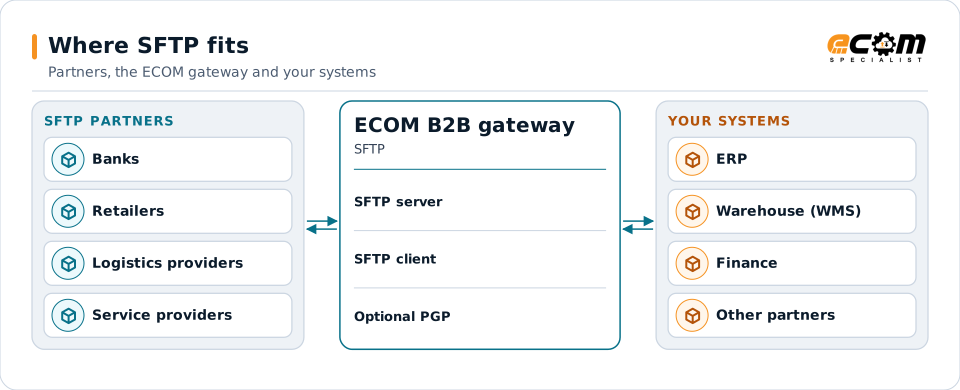
SFTP is the most common way to exchange files securely with partners, banks and service providers. It runs over SSH, which encrypts the whole session. ECOM runs SFTP as a server for partners to connect to, and as a client that connects to partners' servers.
- Full name
- SSH File Transfer Protocol
- Runs over
- SSH (version 2), usually port 22
- Authentication
- SSH keys, passwords or both
- Modes
- Server (partners connect) and client
Partners connect to ECOM's SFTP server, or ECOM connects to theirs. Either way, files reach your systems mapped and logged.
Overview
What SFTP is
SFTP transfers files over an SSH connection. Everything in the session, including the login, commands and file contents, is encrypted. Despite the name, it is not FTP with security added; it is a separate protocol from FTPS.
Partners authenticate with a public key, a password or both. The client checks the server's host key the first time it connects and every time after, which protects against connecting to an impostor server.
Where businesses use it
Banks and payments
Payment files, statements and remittance exchanged with banks.
Retail and logistics
EDI, inventory and catalog files with partners that prefer file exchange.
Service providers
Payroll, benefits, marketplaces and data providers.
How it works
How an SFTP transfer works
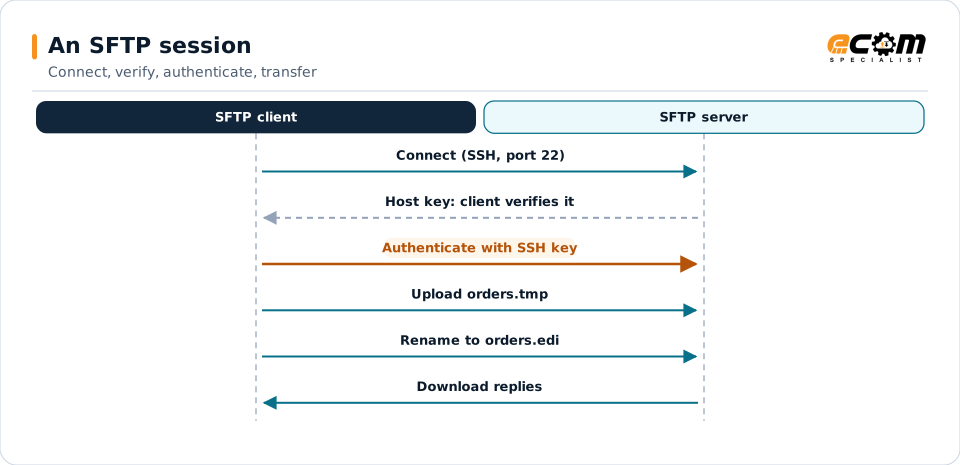
The client opens an SSH connection, checks the server's host key, agrees encryption algorithms and authenticates. It then lists folders, uploads files, downloads files and renames or deletes them, all inside the encrypted session.
Partners usually agree a folder structure, such as inbound and outbound, and naming rules. Files are often uploaded under a temporary name and renamed when complete, so the receiver never picks up half a file.
The host key check and the key-based login happen before any file moves. Renaming after upload prevents half-written files from being processed.
In depth
SFTP security and operations
Key authentication
Public key authentication avoids shared passwords. Partners send their public key; private keys never leave their owner.
Host key verification
Clients record the server's host key and refuse a server whose key changes unexpectedly.
Algorithms
Modern key exchange, cipher and MAC algorithms are used; old ones are disabled where partners allow.
Files at rest
SSH protects the transfer, not the file afterwards. Where files must stay protected, they are also encrypted with PGP.
Server mode
ECOM hosts accounts and folders for partners, with IP allow lists and per-partner access.
Client mode
ECOM connects to partners' servers on a schedule or when files are ready, with retries.
In practice
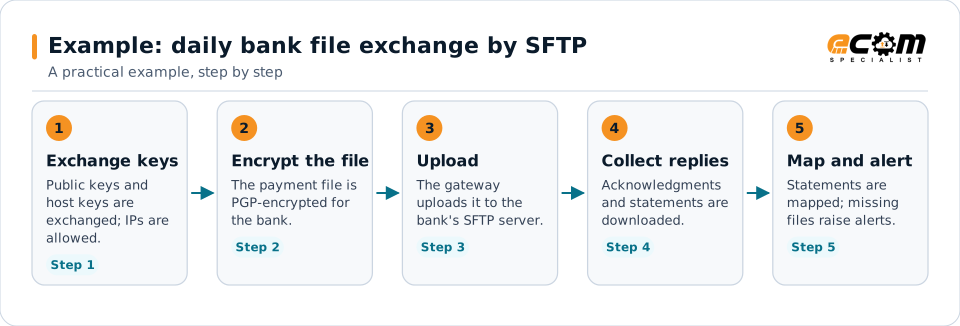
Example: daily bank file exchange by SFTP
A company sends payment files to its bank and collects statements each morning.
SFTP protects the session; PGP keeps the file protected on the bank's server.
Connections
How SFTP connects your business
Trading partners and banks
Each partner has its own account or connection settings.
Translation and mapping
Files received are translated; files to send are produced by maps.
ERP and finance
Payments, statements and documents reach your systems.
Monitoring
Every transfer is logged; failures and gaps raise alerts.
ECOM
How ECOM supports SFTP
ECOM supports SFTP with dedicated implementation, mapping, communication and support teams, and with specialists who know the industries your partners work in.
Implementation team
Plans the SFTP setup with you, configures it on the gateway and runs the tests with your partners and systems.
Mapping team
Builds and maintains the maps, code conversions and validation rules between partner data and your applications.
Communication team
Sets up and monitors partner connections, certificates, keys and credentials, and coordinates changes with each partner.
Support team
Watches the flows, investigates failed or missing documents, and works the issue through with you and your partner.
For SFTP in particular
- SFTP server accounts for partners and SFTP client connections to partners' servers.
- SSH key and PGP key management, with expiry and rotation tracking.
- Partner onboarding for SFTP: exchanging connection details, testing in both directions and confirming the go-live date with each partner.
- Monitoring of every connection, with alerts for failed, missing or unacknowledged transfers.
Frequently asked questions
Is SFTP the same as FTPS?
No. SFTP runs over SSH, usually on port 22. FTPS is FTP with TLS added. Both encrypt the transfer, but they are different protocols and are not interchangeable.
Should we use keys or passwords?
Keys are preferred: there is no shared secret to leak. Some partners require both a key and a password.
Does SFTP encrypt files after they arrive?
No, it protects the transfer. For files that must stay encrypted on the server, PGP encryption is added.
Can ECOM host an SFTP server for our partners?
Yes. ECOM can host accounts and folders for your partners, and also connect to partners' own SFTP servers.
Talk to an EDI/API Expert
Tell us which partners, systems and SFTP requirements you are working with. An ECOM specialist will review them with you and outline the setup, the maps and the tests.