
B2B communication protocols
FTP: supporting legacy connections safely
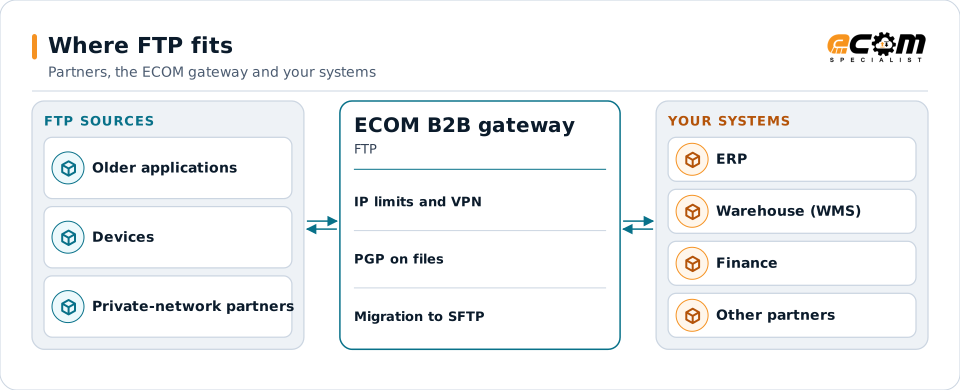
FTP is the original internet file transfer protocol. It is still found in older systems and internal networks, but it sends passwords and files without encryption. ECOM supports FTP where a partner requires it, with safeguards, and plans moves to SFTP, FTPS or AS2.
- Full name
- File Transfer Protocol
- Ports
- 21 for commands, plus data ports
- Encryption
- None
- Recommended alternatives
- SFTP, FTPS or AS2
FTP connections are kept behind safeguards until they can move to a secure protocol.
Overview
What FTP is
FTP moves files between a client and a server using a command connection and separate data connections. It is simple and widely supported, which is why many older applications and devices still use it.
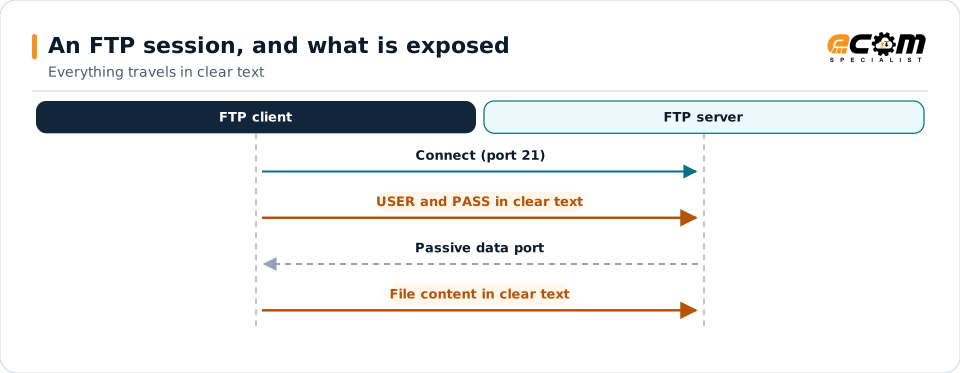
FTP has no encryption. User names, passwords and file contents travel in clear text and can be read by anyone who can see the network traffic. It should only be used where the network itself is protected, or with the files encrypted before transfer.
Where businesses use it
Older systems and devices
Applications and equipment that support nothing else.
Private networks
Transfers inside a protected network or over a VPN.
Migration projects
Moving FTP partners to secure protocols.
How it works
How an FTP session works
The client connects to port 21, sends user name and password, and issues commands to list folders and transfer files. Each transfer opens a data connection, either from the server to the client (active mode) or from the client to a port the server provides (passive mode).
Because everything is in clear text, any risk mitigation has to come from outside FTP: a VPN or private line, IP restrictions, and PGP encryption of the files themselves.
Highlighted steps are readable by anyone on the network path. Encrypting the file with PGP or using a VPN reduces that exposure.
In depth
Using FTP with care
No encryption
Credentials and data can be read in transit. FTP should not cross the open internet unprotected.
Network protection
Use a VPN or private connection, and restrict access by IP address.
Encrypt the files
PGP-encrypting files before transfer protects their content even over FTP.
Dedicated accounts
Separate accounts per partner with access only to their folders.
Active and passive modes
The mode and port ranges are agreed so firewalls allow the data connections.
Migration path
SFTP is usually the simplest replacement; AS2 adds receipts.
In practice
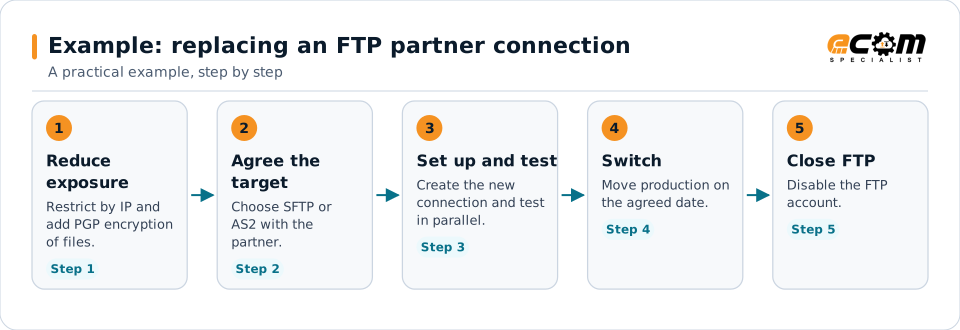
Example: replacing an FTP partner connection
A partner still sends files by FTP. ECOM keeps it running safely, then moves it to SFTP.
The connection stays protected while the move is planned and tested.
Connections
How FTP connects your business
Trading partners
FTP partners are handled like any others, with extra safeguards.
Translation
Files go to translation and mapping.
ERP
Data reaches your systems.
Monitoring
Transfers are logged and failures alerted.
ECOM
How ECOM supports FTP
ECOM supports FTP with dedicated implementation, mapping, communication and support teams, and with specialists who know the industries your partners work in.
Implementation team
Plans the FTP setup with you, configures it on the gateway and runs the tests with your partners and systems.
Mapping team
Builds and maintains the maps, code conversions and validation rules between partner data and your applications.
Communication team
Sets up and monitors partner connections, certificates, keys and credentials, and coordinates changes with each partner.
Support team
Watches the flows, investigates failed or missing documents, and works the issue through with you and your partner.
For FTP in particular
- FTP support for partners that require it, behind IP restrictions, VPNs and file encryption.
- Planned migration of FTP partners to SFTP, FTPS or AS2.
- Partner onboarding for FTP: exchanging connection details, testing in both directions and confirming the go-live date with each partner.
- Monitoring of every connection, with alerts for failed, missing or unacknowledged transfers.
Frequently asked questions
Is FTP secure?
No. FTP sends passwords and files in clear text. It should only be used on protected networks or with files encrypted before transfer.
What should replace FTP?
SFTP is usually the simplest replacement. FTPS works for partners that already run FTP servers, and AS2 adds signed receipts.
Can ECOM still connect to an FTP partner?
Yes, where the partner requires it, with safeguards such as IP restrictions, VPN connections and PGP file encryption.
How long does a migration take?
It depends on the partner. The new connection is set up and tested in parallel, then switched on an agreed date.
Talk to an EDI/API Expert
Tell us which partners, systems and FTP requirements you are working with. An ECOM specialist will review them with you and outline the setup, the maps and the tests.