
B2B communication protocols
FTPS: FTP secured with TLS
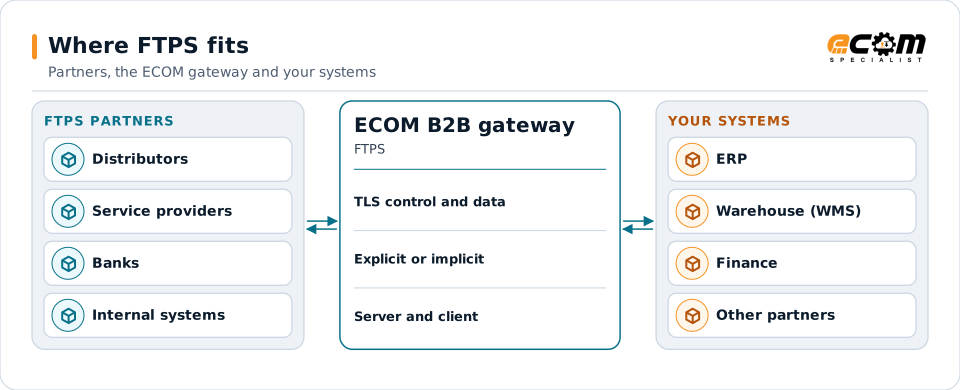
FTPS adds TLS encryption to the classic FTP protocol. Partners that already run FTP servers often offer FTPS as their secure option. ECOM connects to partners' FTPS servers and hosts FTPS for partners that need it.
- Full name
- FTP over TLS (sometimes FTP-SSL)
- Modes
- Explicit (port 21) or implicit (port 990)
- Security
- TLS on control and data channels
- Authentication
- Password, optionally client certificate
FTPS partners exchange files with the gateway over TLS-protected connections.
Overview
What FTPS is
FTP uses two connections: a control channel for commands and a data channel for each file or listing. FTPS wraps both in TLS. In explicit mode the client connects normally and asks to switch to TLS; in implicit mode TLS starts immediately on a dedicated port.
The data channel must also be protected, which the client requests with the PROT P command. Without it, commands are encrypted but file contents are not.
Where businesses use it
Partners with FTP servers
Companies that added TLS to an existing FTP setup.
Bank and service provider connections
Some providers offer FTPS alongside or instead of SFTP.
Internal transfers
Moving files between systems that support FTPS.
How it works
How an FTPS session works
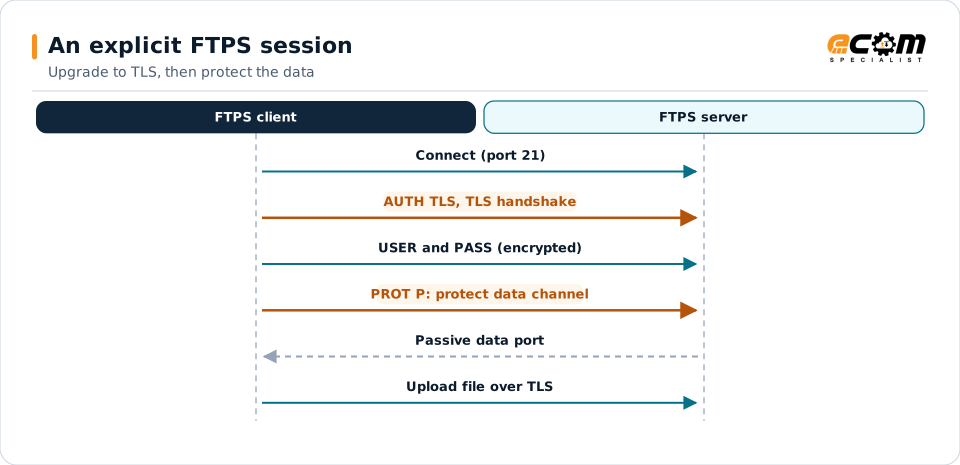
In explicit FTPS, the client connects to port 21, sends AUTH TLS, completes the TLS handshake, logs in, and sends PROT P so data transfers are encrypted. In implicit FTPS, the TLS handshake happens as soon as the client connects to port 990.
Each file transfer opens a separate data connection, usually in passive mode on a range of ports the server provides. Firewalls must allow that range, and because the commands are encrypted, firewalls cannot inspect them to open ports automatically.
AUTH TLS protects the commands and login; PROT P protects the file itself.
In depth
FTPS in practice
Explicit or implicit
Explicit (AUTH TLS on 21) is more common; implicit (990) is older. The partner's server decides.
Protected data channel
PROT P is required so file contents are encrypted, not just commands.
Certificates
The server presents a certificate that the client verifies; some partners also require client certificates.
TLS versions
TLS 1.2 or 1.3 should be used; SSL and TLS 1.0 and 1.1 are deprecated.
Firewalls and passive ports
The passive port range is agreed and opened on both sides; this is the most common setup issue.
FTPS versus SFTP
Both are secure when configured well. SFTP needs one port and is easier through firewalls.
In practice
Example: collecting files from a partner's FTPS server
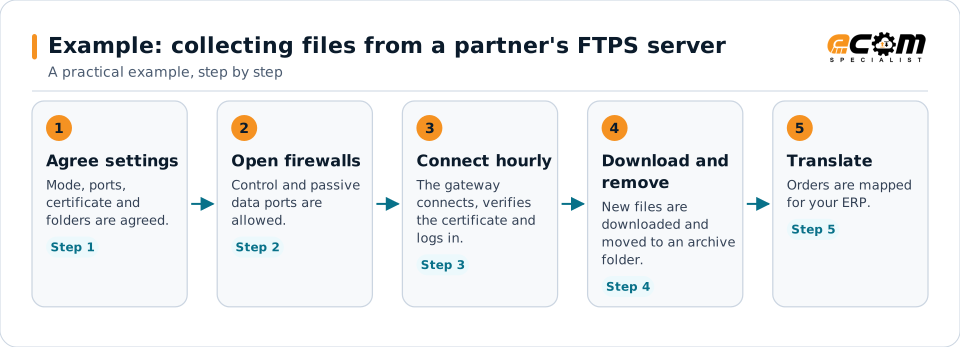
A distributor publishes order files on its FTPS server every hour.
Most FTPS issues are settled in steps one and two; the rest is routine and monitored.
Connections
How FTPS connects your business
Trading partners
FTPS partners run alongside SFTP and AS2 partners.
Translation
Downloaded files go to translation.
ERP
Mapped data reaches your systems.
Monitoring
Connection failures and missing files raise alerts.
ECOM
How ECOM supports FTPS
ECOM supports FTPS with dedicated implementation, mapping, communication and support teams, and with specialists who know the industries your partners work in.
Implementation team
Plans the FTPS setup with you, configures it on the gateway and runs the tests with your partners and systems.
Mapping team
Builds and maintains the maps, code conversions and validation rules between partner data and your applications.
Communication team
Sets up and monitors partner connections, certificates, keys and credentials, and coordinates changes with each partner.
Support team
Watches the flows, investigates failed or missing documents, and works the issue through with you and your partner.
For FTPS in particular
- FTPS client and server setup, including certificates, TLS settings and passive port ranges.
- Guidance on moving FTPS partners to SFTP or AS2 where that simplifies operations.
- Partner onboarding for FTPS: exchanging connection details, testing in both directions and confirming the go-live date with each partner.
- Monitoring of every connection, with alerts for failed, missing or unacknowledged transfers.
Frequently asked questions
What is the difference between explicit and implicit FTPS?
Explicit FTPS starts as normal FTP on port 21 and upgrades to TLS with AUTH TLS. Implicit FTPS starts TLS immediately, usually on port 990.
Why do FTPS transfers fail at the data step?
Usually because the passive data ports are blocked by a firewall, or the data channel is not protected as the server requires. Both are settled during setup.
Is FTPS as secure as SFTP?
Both are secure when configured with current TLS or SSH settings. SFTP is usually simpler to run through firewalls.
Can ECOM host FTPS for partners?
Yes, and connect to partners' FTPS servers as a client.
Talk to an EDI/API Expert
Tell us which partners, systems and FTPS requirements you are working with. An ECOM specialist will review them with you and outline the setup, the maps and the tests.