
B2B communication protocols
AS3: secure, receipted transfers over FTP
AS3 applies the same S/MIME security and receipts as AS1 and AS2 to file transfers over FTP. A small number of partners use it. ECOM supports AS3 connections and helps partners move to more common protocols when they choose.
- Specification
- IETF RFC 4823 (EDIINT AS3)
- Transport
- FTP (optionally over TLS)
- Message security
- S/MIME encryption and signatures
- Receipts
- MDN files
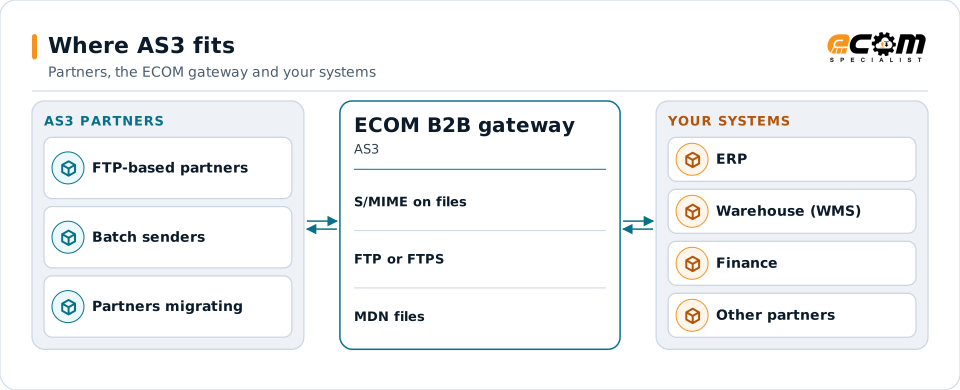
AS3 partners exchange protected files and receipts with the gateway through an FTP server.
Overview
What AS3 is
AS3 was defined for companies that already exchanged files by FTP and wanted the security and proof of delivery AS2 offers. Each file is packaged with S/MIME before it is uploaded, and the receiver places an MDN receipt file for the sender to collect.
Because plain FTP sends passwords and commands in clear text, the S/MIME layer is essential, and FTP over TLS is preferable for the connection. AS3 is rarely chosen for new connections; AS2 or SFTP are more common.
Where businesses use it
FTP-based partners
Partners whose systems are built around FTP servers.
Large batch files
Batch transfers where an FTP server holds files for collection.
Migration projects
Moving AS3 partners to AS2 or SFTP.
How it works
How an AS3 exchange works
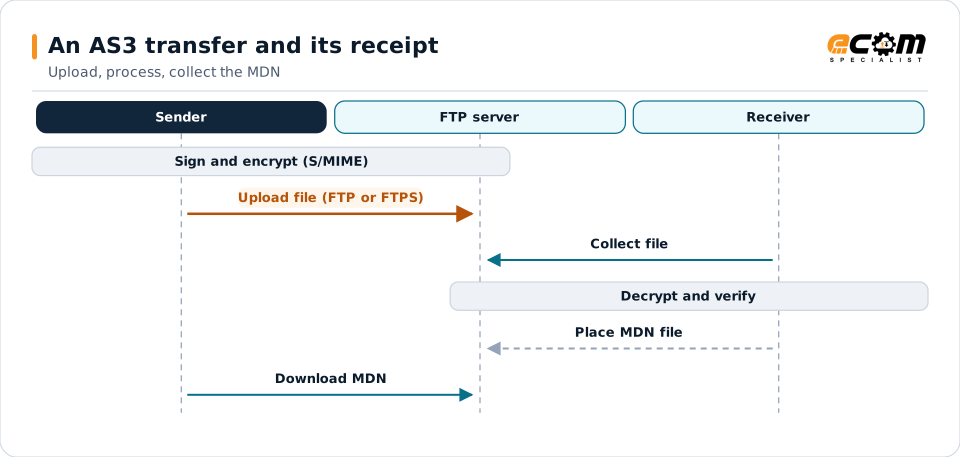
The sender signs and encrypts the file with S/MIME and uploads it to the receiver's FTP server, or to its own server for the partner to collect. The receiver decrypts and verifies the file and writes an MDN file that the sender retrieves.
The protocol does not require a constant connection; files and receipts wait on the server until collected.
Files and receipts wait on the FTP server until each side collects them.
In depth
AS3 in practice
S/MIME on every file
Encryption and signatures protect the content regardless of the FTP connection.
Protect the connection
Plain FTP sends credentials in clear text. FTPS or a private network is used where the partner supports it.
Receipts
MDN files are collected and matched to the files sent; missing receipts raise alerts.
Folders and naming
Inbound, outbound and receipt folders and file naming are agreed with the partner.
Migration
AS2 or SFTP are more widely supported; ECOM plans the move when the partner is ready.
In practice
Example: a nightly batch by AS3
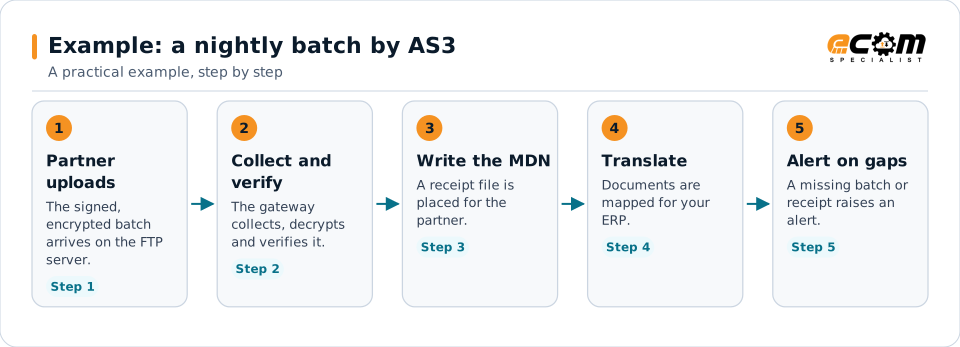
A partner sends a nightly batch of documents by AS3 and expects receipts by morning.
The receipt and the alert on missing files give both sides confidence the batch was handled.
Connections
How AS3 connects your business
Trading partners
AS3 partners run alongside AS2, SFTP and VAN partners.
EDI translation
Verified files go straight to translation.
ERP
Mapped documents reach your systems.
Monitoring
Files and receipts are logged.
ECOM
How ECOM supports AS3
ECOM supports AS3 with dedicated implementation, mapping, communication and support teams, and with specialists who know the industries your partners work in.
Implementation team
Plans the AS3 setup with you, configures it on the gateway and runs the tests with your partners and systems.
Mapping team
Builds and maintains the maps, code conversions and validation rules between partner data and your applications.
Communication team
Sets up and monitors partner connections, certificates, keys and credentials, and coordinates changes with each partner.
Support team
Watches the flows, investigates failed or missing documents, and works the issue through with you and your partner.
For AS3 in particular
- AS3 setup with S/MIME certificates, FTP or FTPS folders and receipt handling.
- Migration to AS2 or SFTP when the partner is ready.
- Partner onboarding for AS3: exchanging connection details, testing in both directions and confirming the go-live date with each partner.
- Monitoring of every connection, with alerts for failed, missing or unacknowledged transfers.
Frequently asked questions
How is AS3 different from plain FTP?
AS3 encrypts and signs each file with S/MIME and adds MDN receipts. Plain FTP has no encryption and no proof of delivery.
Is AS3 common?
No. Few partners use it today. AS2 and SFTP are far more common for new connections.
Can AS3 run over FTPS?
Where the partner supports it, yes, which also protects credentials and commands on the connection.
Does ECOM support AS3?
Yes, for partners that require it, and ECOM can help move them to AS2 or SFTP.
Talk to an EDI/API Expert
Tell us which partners, systems and AS3 requirements you are working with. An ECOM specialist will review them with you and outline the setup, the maps and the tests.