
EDI and B2B standards
UN/EDIFACT for international trading partners
EDIFACT is the United Nations EDI standard used by European and international partners for orders, dispatch advice, invoices, customs and transport. ECOM maps every EDIFACT directory and message type your partners use, including industry subsets such as EANCOM.
- Maintained by
- UN/CEFACT (United Nations)
- Used mainly in
- Europe, Asia and international trade
- Releases
- Directories such as D.96A, D.01B, D.21A
- Acknowledgment
- CONTRL (syntax), APERAK (application)
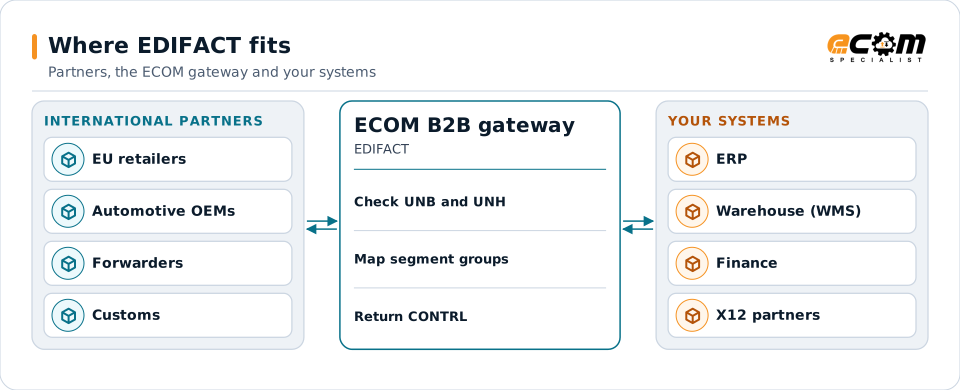
International partners send EDIFACT. The gateway checks it, translates it for your systems and returns CONTRL acknowledgments.
Overview
What EDIFACT is
UN/EDIFACT (Electronic Data Interchange for Administration, Commerce and Transport) defines standard messages identified by six-letter names: ORDERS for a purchase order, DESADV for a dispatch advice, INVOIC for an invoice. It is the international counterpart to X12.
Messages are published in directories, released over the years and named by year and edition, such as D.96A or D.01B. Industry groups publish subsets that narrow a directory for their sector: EANCOM for retail and consumer goods, ODETTE for European automotive, and others.
Where businesses use it
European retail and consumer goods
Retailers exchange ORDERS, ORDRSP, DESADV, INVOIC and PRICAT, usually following the EANCOM subset.
Automotive and manufacturing
Delivery schedules (DELFOR, DELJIT) and dispatch advice between manufacturers and suppliers.
Transport, customs and trade
Booking, status and customs messages between shippers, forwarders, ports and authorities.
Structure
How an EDIFACT interchange is structured
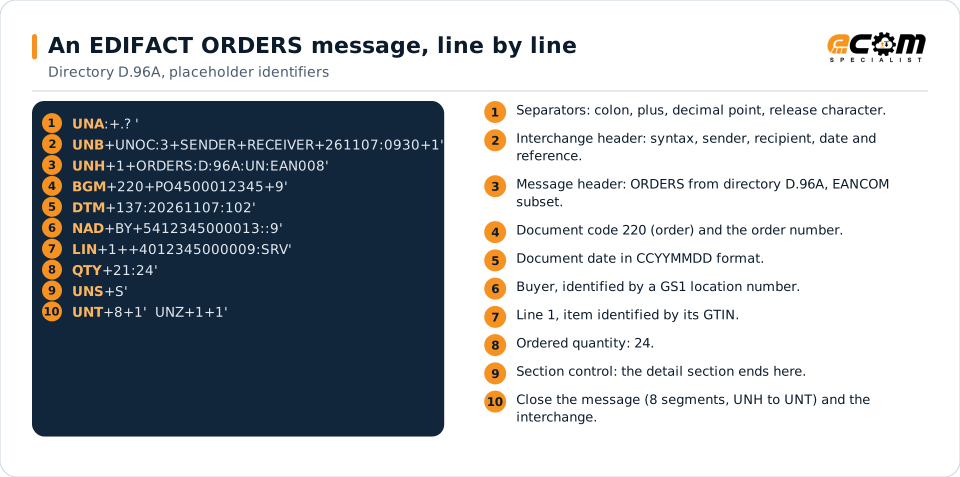
An interchange starts with an optional UNA segment that declares the separators, then UNB, which names sender, recipient, date and a control reference. Each message inside starts with UNH, which states the message type, directory version and agency, and ends with UNT and a segment count. UNZ closes the interchange.
Segments use a plus sign between data elements, a colon between components, and an apostrophe at the end. Segment groups repeat related data, such as one group per line item (LIN, QTY, PRI).
Separators are declared first, then the interchange header, the order header with its date and buyer, one order line with its quantity, and the closing segments. Identifiers are placeholders.
In depth
Directories, subsets, acknowledgments and validation
Every directory
Partners name the directory they use. ECOM maps each partner on its own directory, from long-established ones such as D.96A to recent releases, and can run several directories side by side.
Subsets and guides
EANCOM, ODETTE and other subsets restrict which segments and codes are used. A partner's message implementation guide narrows it further; maps follow that guide.
CONTRL and APERAK
CONTRL reports whether an interchange or message passed syntax checks. APERAK reports an application result, such as an order line rejected for an unknown item.
Character sets
Syntax identifiers such as UNOA, UNOB and UNOC define which characters are allowed. Accented names and addresses are handled according to the partner's choice.
Release character
The question mark lets a separator appear inside data, as in a company name with an apostrophe. The translator handles it on input and output.
Reference pages
Every current EDIFACT message type has its own page in the ECOM Learning Center, with its purpose and structure.
Mapping
How a mapper reads and writes EDIFACT
EDIFACT as input
The translator reads UNA or the default separators, checks UNB and each UNH, then reads segments and segment groups in order. Repeating groups such as LIN become order lines; qualifiers such as DTM 137 decide which date field receives a value.
EDIFACT as output
Outbound, the map writes the segments your partner's guide requires, applies its qualifiers and code lists, escapes separators found in data, counts segments for UNT and adds new control references.
What the mapping handles
Fields
Composite elements such as DTM 137:20261107:102 are split into the qualifier, the value and the format code.
Loops
Segment groups (for example group 28 for line items) become lines; nested groups carry packaging or delivery detail.
Validation
Mandatory segments, code lists, lengths and counts are checked and reported in CONTRL.
Code conversions
GS1 location numbers and GTINs are converted to your customer, ship-to and item numbers.
Business rules
Delivery date calculation, price checks and partner-specific defaults are applied.
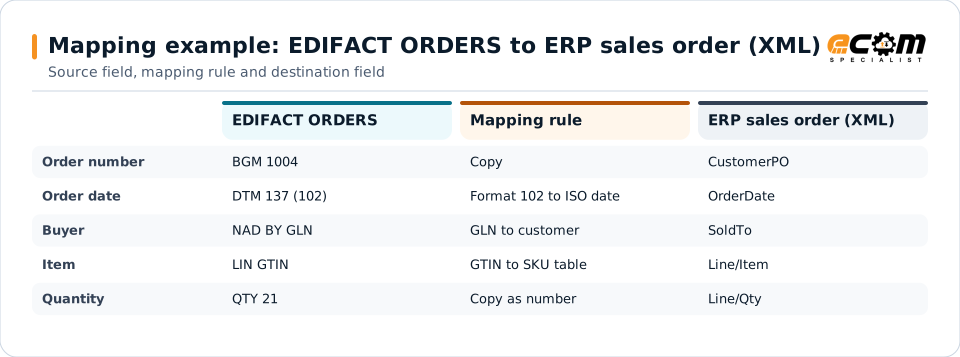
Example: source, mapping, destination
BGM+220+PO4500012345+9'
DTM+137:20261107:102'
NAD+BY+5412345000013::9'
LIN+1++4012345000009:SRV'
QTY+21:24'<SalesOrder>
<CustomerPO>PO4500012345</CustomerPO>
<OrderDate>2026-11-07</OrderDate>
<SoldTo>C-10045</SoldTo>
<Line no="1">
<Item>SKU-88812</Item>
<Qty>24</Qty>
</Line>
</SalesOrder>Each row follows one value from the partner's ORDERS message to your ERP. Qualifiers tell the map which value is which.
Connections
How EDIFACT connects your business
International partners
EDIFACT usually travels over AS2, OFTP2, SFTP or a VAN, depending on the partner's country and industry.
ERP and warehouse
Orders, dispatch advice and invoices are translated to and from your ERP and warehouse formats.
X12 partners
Companies trading in both regions often keep one internal format, with X12 and EDIFACT maps on either side.
Customs and transport
Shipping and customs messages connect with forwarders and carriers in the same flow.
ECOM
How ECOM supports EDIFACT
ECOM supports EDIFACT with dedicated implementation, mapping, communication and support teams, and with specialists who know the industries your partners work in.
Implementation team
Plans the EDIFACT setup with you, configures it on the gateway and runs the tests with your partners and systems.
Mapping team
Builds and maintains the maps, code conversions and validation rules between partner data and your applications.
Communication team
Sets up and monitors partner connections, certificates, keys and credentials, and coordinates changes with each partner.
Support team
Watches the flows, investigates failed or missing documents, and works the issue through with you and your partner.
For EDIFACT in particular
- Maps for any EDIFACT directory and message type, including EANCOM and other industry subsets.
- CONTRL and APERAK generation and reconciliation.
- Partner onboarding with European and Asian partners, including OFTP2 and AS2 connections.
- Learning Center pages for every current EDIFACT message type.
Frequently asked questions
What is the difference between EDIFACT and X12?
Both define standard business documents. X12 is used mainly in North America and numbers its documents (850, 856). EDIFACT is the United Nations standard used internationally and names its messages (ORDERS, DESADV). The syntax, envelopes and acknowledgments differ, but a translator maps both to the same internal data.
What is EANCOM?
EANCOM is GS1's subset of EDIFACT for retail and consumer goods. It narrows the standard messages to the segments and codes retailers and suppliers use, and adds GS1 identifiers such as GTINs and location numbers.
Which EDIFACT directory should we use?
The one your partner specifies in its implementation guide. Many retail partners still use D.96A or D.01B; others use newer directories. ECOM can run different directories for different partners.
Does ECOM send CONTRL messages?
Yes, when a partner requires them. ECOM generates CONTRL for inbound interchanges and reconciles the CONTRL messages partners send back for your outbound messages.
Talk to an EDI/API Expert
Tell us which partners, systems and EDIFACT requirements you are working with. An ECOM specialist will review them with you and outline the setup, the maps and the tests.