
EDI and B2B standards
OAGIS for application and partner integration
OAGIS (Open Applications Group Integration Specification) defines Business Object Documents, or BODs: XML and JSON messages for orders, items, shipments, invoices and many other business objects. Manufacturers, software vendors and industry groups use it to connect applications and partners. ECOM maps BODs to and from your systems.
- Published by
- Open Applications Group (OAGi)
- Message type
- Business Object Documents (BODs)
- Formats
- XML schemas, with JSON in newer releases
- Used in
- Manufacturing, automotive retail, ERP integration
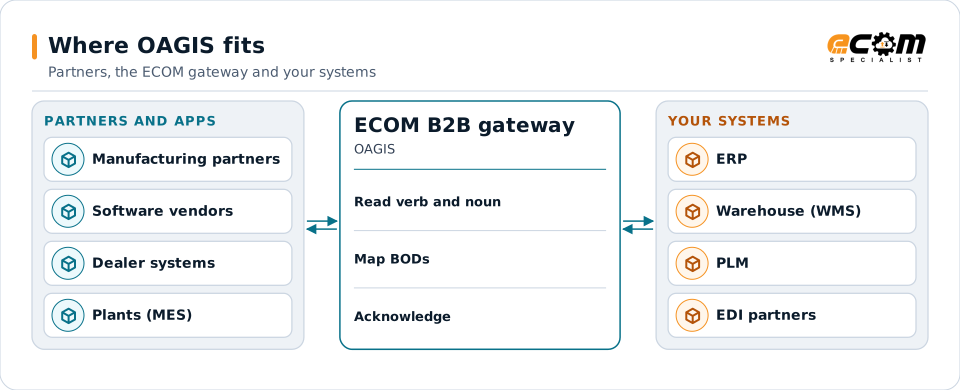
Applications and partners exchange BODs; the gateway maps them to your systems and to other partners' formats.
Overview
What OAGIS is
OAGIS describes business messages as a verb plus a noun: ProcessPurchaseOrder asks the receiver to process an order, SyncItemMaster keeps item data in step, AcknowledgePurchaseOrder replies to an order. The noun is the business object; the verb is what to do with it.
Every BOD has an ApplicationArea, which says who sent it, when, and with what identifier, and a DataArea, which holds the verb and one or more nouns. Industry groups build on OAGIS; for example, automotive retail standards for dealer communication are based on it.
Where businesses use it
ERP to ERP and MES
Exchanging orders, items, production and inventory between applications in a manufacturing group.
Industry standards
Industry groups that base their own messages on OAGIS, such as automotive retail.
Software integration
Vendors that publish OAGIS interfaces for their applications.
Structure
How a BOD is structured
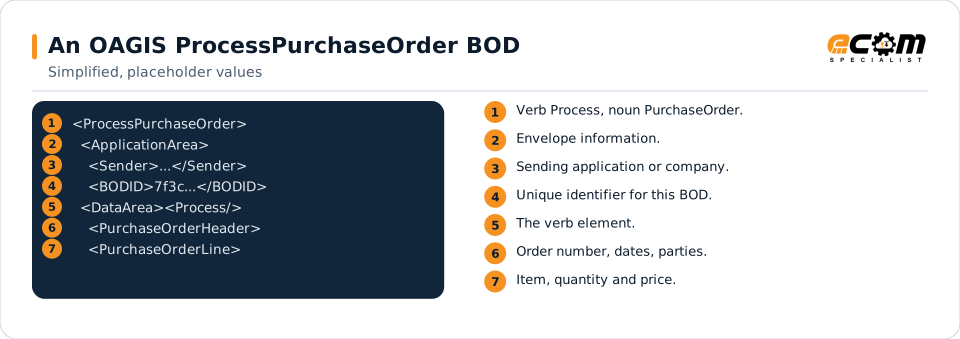
A BOD's root element names the verb and noun. The ApplicationArea carries the sender, creation date and BOD identifier. The DataArea holds the verb element (Process, Sync, Get, Show, Acknowledge and so on) and the noun, for example a PurchaseOrder with a header and lines.
Because nouns are shared across verbs, the same purchase order structure is used whether it is being sent, changed or acknowledged, which keeps maps consistent.
The ApplicationArea says who sent the BOD and when. The DataArea says what to do (Process) and with what (a PurchaseOrder).
In depth
Working with OAGIS
Verbs and nouns
Process, Sync, Get, Show, Acknowledge, Cancel, Change and others combine with nouns such as PurchaseOrder, ItemMaster or Shipment.
Releases
OAGi publishes releases over time; partners state which release and BODs they use.
Extensions
OAGIS allows controlled extensions, so companies add fields without breaking the standard. Maps include the partner's extensions.
Acknowledgments
Confirm and Acknowledge BODs report whether a BOD was received and accepted.
XML and JSON
Newer releases offer JSON as well as XML; the gateway reads and writes both.
Transport
BODs travel over HTTPS, web services, message queues or files, as the partners agree.
Mapping
How a mapper reads and writes OAGIS
OAGIS as input
The map reads the ApplicationArea for routing and duplicate checks, then the verb and noun to decide what to do, and maps the noun's fields to your ERP.
OAGIS as output
An ERP event becomes the right verb and noun with a new BOD identifier and the partner's release and extensions.
What the mapping handles
Fields
Header and line elements map to ERP fields.
Loops
Repeating lines and schedules become ERP lines.
Validation
Schema validation and duplicate BOD checks.
Code conversions
Units, parties and items are converted.
Business rules
The verb decides create, change or cancel.
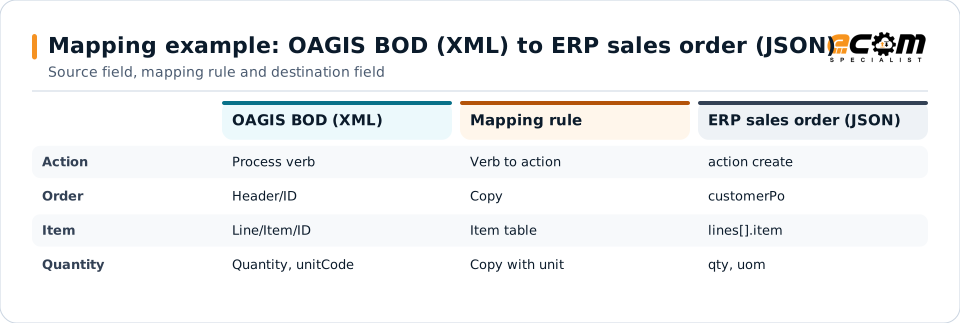
Example: source, mapping, destination
<ProcessPurchaseOrder>
 <DataArea><Process/>
  <PurchaseOrder>
   <PurchaseOrderHeader>
    <ID>PO-7781</ID>
   </PurchaseOrderHeader>
   <PurchaseOrderLine>
    <Item><ID>A-100</ID></Item>
    <Quantity unitCode="EA">50</Quantity>
   </PurchaseOrderLine>
  </PurchaseOrder>
 </DataArea>
</ProcessPurchaseOrder>{
"action": "create",
"customerPo": "PO-7781",
"lines": [{ "item": "A-100",
"qty": 50, "uom": "EA" }]
}The verb tells the map what to do; the noun carries the data. Here Process creates a new order.
Connections
How OAGIS connects your business
Applications
ERP, MES, PLM and warehouse systems exchange BODs inside the company.
Partners
Partners that publish OAGIS interfaces connect over HTTPS, web services or queues.
EDI partners
The same data can be produced as X12 or EDIFACT for other partners.
APIs
JSON BODs fit REST APIs and event streams.
ECOM
How ECOM supports OAGIS
ECOM supports OAGIS with dedicated implementation, mapping, communication and support teams, and with specialists who know the industries your partners work in.
Implementation team
Plans the OAGIS setup with you, configures it on the gateway and runs the tests with your partners and systems.
Mapping team
Builds and maintains the maps, code conversions and validation rules between partner data and your applications.
Communication team
Sets up and monitors partner connections, certificates, keys and credentials, and coordinates changes with each partner.
Support team
Watches the flows, investigates failed or missing documents, and works the issue through with you and your partner.
For OAGIS in particular
- Maps for OAGIS BODs in the release and extensions your partners use, in XML or JSON.
- Acknowledge and Confirm BOD handling.
- Conversion between OAGIS and X12, EDIFACT or your ERP's own formats.
Frequently asked questions
What is a BOD?
A Business Object Document is an OAGIS message. Its name combines a verb and a noun, such as ProcessPurchaseOrder, and it has an ApplicationArea with sender information and a DataArea with the business data.
Is OAGIS an EDI standard?
OAGIS is an XML and JSON integration standard. It is used both between applications inside a company and between companies, and it can be mapped to and from EDI standards such as X12.
Can ECOM map OAGIS to our ERP?
Yes. BODs are mapped to your ERP's formats or APIs, and ERP events are turned into the BODs your partners expect.
How are BODs transported?
Over HTTPS, web services, message queues or files, whichever the partners agree on.
Talk to an EDI/API Expert
Tell us which partners, systems and OAGIS requirements you are working with. An ECOM specialist will review them with you and outline the setup, the maps and the tests.