
Insurance integration
Kaiser Permanente EDI and data integration
A guide to exchanging claim, eligibility, payment and enrollment data with Kaiser Permanente: company facts from its website, what health insurers and payers typically exchange, and what to confirm before setup.
Overview
Understanding Kaiser Permanente integration
Who this is for: Providers, billing services, clearinghouses, employers, brokers and benefits platforms that exchange data with Kaiser Permanente.
Kaiser Permanente provides health care and health coverage together as one organization. Its website is kp.org. It is also searched for as KP, Kaiser.
This page is an integration guide. It uses the public pages and documents of Kaiser Permanente that are listed under Sources, which we read on November 10, 2026 and summarize in our own words; it does not reproduce them, and no private specification was used. Connection requirements usually come from Kaiser Permanente itself, through its onboarding team, its companion guides or its partner portal, and they can differ by line of business, program, state and region.
What Kaiser Permanente's own pages say: Kaiser Permanente's regional provider pages publish EDI and HIPAA FAQs covering the 837, 835, 270/271, 276/277 and 278. This page uses the Washington region's FAQ and the national claims administration flyer; other regions publish their own pages. We read both on November 10, 2026.
Health insurers and payers exchange administrative transactions with providers, clearinghouses, employers and brokers. HIPAA names the X12 version 5010 standards for these: the 837 claim, 835 payment and remittance advice, 270 and 271 eligibility, 276 and 277 claim status, 278 authorization, 834 enrollment and 820 premium payment. Payers commonly add their own rules in companion guides and offer portals as well as file exchange. The member and claim data involved is protected health information, so files need encrypted connections and an audit trail. Everything on this page that is not attributed to Kaiser Permanente's own pages is general practice, not Kaiser Permanente's published requirement; confirm each point with Kaiser Permanente before you build maps or test.
Requirements at a glance
What Kaiser Permanente publishes for trading partners
Kaiser Permanente's regional provider pages publish EDI and HIPAA FAQs covering the 837, 835, 270/271, 276/277 and 278. This page uses the Washington region's FAQ and the national claims administration flyer; other regions publish their own pages. We read both on November 10, 2026.
Kaiser Permanente Washington, EDI and HIPAA FAQs
Answers on the ANSI transactions, clearinghouse and direct exchange, and testing.
Business units and channels
Kaiser Permanente business units suppliers trade with
Large retailers often handle each business unit or channel as a separate EDI relationship, with its own documents, guides and setup. Confirm with Kaiser Permanente which of these you supply before mapping.
Other channel
Kaiser Permanente regional claims
Regional provider sites publish their own EDI pages; this page uses the Washington region FAQ and the national claims administration flyer.
Named in a public Kaiser Permanente document title; contents not reviewed
Workflows
Typical Kaiser Permanente business workflows
The steps summarize the documents below. Where a step is not in Kaiser Permanente's published documents, it reflects common practice.
Claim and payment flow
- 1Check eligibility (270 and 271)
- 2Submit the claim (837)
- 3Receive acknowledgments
- 4Receive payment advice (835)
- 5Post and reconcile
Documents and APIs
Kaiser Permanente documents by program
Every document this guide names, with the program it applies to and its status. Required, optional and conditional come from Kaiser Permanente's published documents cited below; documents marked general guidance are common in this industry but not confirmed for Kaiser Permanente.
Scroll sideways to see every column. With a keyboard, select the table and use the left and right arrow keys.
| Document | Name | Direction | Program | Status | Purpose |
|---|---|---|---|---|---|
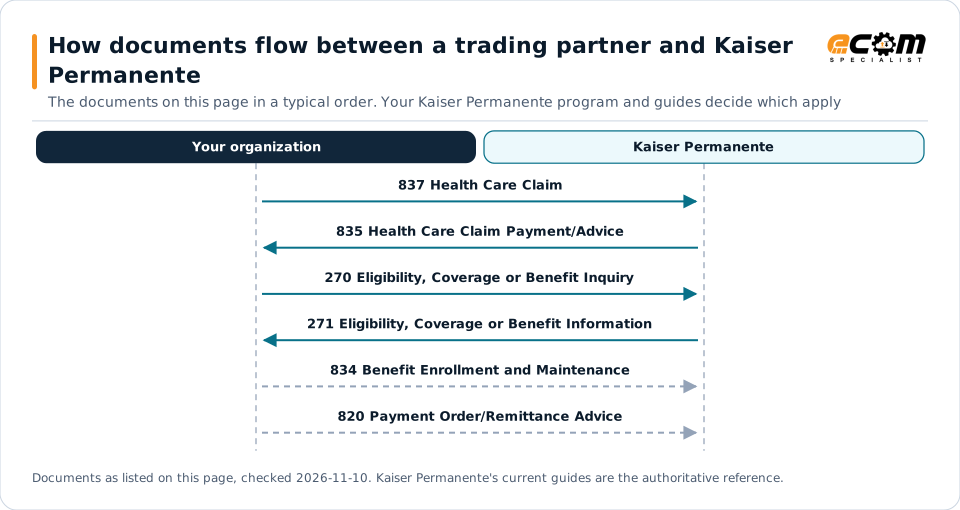
| 837 | Health Care Claim | You send to Kaiser Permanente | Not stated | Named; level not stated | Typically how a provider or billing service submits a claim. |
| 835 | Health Care Claim Payment/Advice | You receive from Kaiser Permanente | Not stated | Named; level not stated | Typically the payment and remittance advice returned for submitted claims. |
| 270 | Eligibility, Coverage or Benefit Inquiry | You send to Kaiser Permanente | Not stated | Named; level not stated | Typically asks whether a member is covered before a service. |
| 271 | Eligibility, Coverage or Benefit Information | You receive from Kaiser Permanente | Not stated | Named; level not stated | Typically answers an eligibility inquiry with coverage and benefit details. |
| 834 | Benefit Enrollment and Maintenance | You send to Kaiser Permanente | Not stated | General guidance | Typically how an employer or benefits platform sends enrollment changes. |
| 820 | Payment Order/Remittance Advice | You send to Kaiser Permanente | Not stated | General guidance | Typically sends premium payment with remittance by group or member. |
Read from top to bottom. Solid arrows are documents Kaiser Permanente names in its own public documentation; dashed arrows are common practice that this page could not confirm for Kaiser Permanente, or acknowledgments. The order is typical, not a Kaiser Permanente rule: claims, eligibility, benefits enrollment, agency downloads, invoicing and reinsurance each use their own documents and timing.
Verification
What we checked, and where
Each statement below shows its source and the date we checked it. Statements we could not confirm from an official Kaiser Permanente source are labelled as such.
Scroll sideways to see every column. With a keyboard, select the table and use the left and right arrow keys.
| Topic | Statement | Evidence | Checked |
|---|---|---|---|
| Documents | The Washington FAQ has sections for the ANSI 837 claim, 835 remittance advice, 270/271 eligibility, 276/277 claim status and 278 authorization transactions. | Confirmed on a public Kaiser Permanente page | Nov 10, 2026 |
| Connectivity | Kaiser Permanente accepts claims from clearinghouses or from providers who choose to exchange files directly; the FAQ names secure FTP and clearinghouse interchange. | Confirmed on a public Kaiser Permanente page | Nov 10, 2026 |
| Onboarding | Providers who exchange ANSI files directly with Kaiser Permanente are asked to complete third-party testing beforehand. | Confirmed on a public Kaiser Permanente page | Nov 10, 2026 |
| Payments | EFT and ERA registration and account changes go through the Council for Affordable Quality Healthcare (CAQH) enrollment tool. | Confirmed on a public Kaiser Permanente page | Nov 10, 2026 |
Available only after partner login
Kaiser Permanente keeps these behind its partner portal. This guide does not reproduce them; use your own Kaiser Permanente access or ask your Kaiser Permanente contact.
- Not in the public pages we read: region-specific clearinghouse lists and any direct-exchange agreements, which are arranged through Kaiser Permanente EDI support
Not confirmed
We could not confirm these from an official public source, so we do not state them as Kaiser Permanente requirements.
- Whether other regions follow the Washington region's rules
- The third-party test tool or steps beyond the FAQ answer
- Region-specific clearinghouse lists, which vary
Checklist
Kaiser Permanente EDI readiness checklist
- Decide between a clearinghouse and direct exchange; most providers use a clearinghouse.
- If you exchange directly, plan third-party testing before sending files.
- Check your own Kaiser Permanente region's EDI page, because requirements differ by region.
- Register EFT and ERA through the CAQH enrollment tool the flyer names.
- Confirm the clearinghouse is on, or can route to, Kaiser Permanente.
Connectivity and contacts
How Kaiser Permanente connects with trading partners
What Kaiser Permanente's public documents say about networks and setup, and the department contacts it publishes for trading partners. Connection credentials and trading-partner IDs are exchanged with Kaiser Permanente during setup and are never shown on this page.
What Kaiser Permanente states about connecting
- Claims arrive through clearinghouses or by direct exchange, including secure FTP. Source: Kaiser Permanente Washington, EDI and HIPAA FAQs (web page), Nov 10, 2026
Connectivity
Your options for connecting to Kaiser Permanente
AS2 or SFTP
Many insurers and administrators exchange files directly over SFTP or AS2. Confirm which methods Kaiser Permanente accepts.
General guidance
Network or clearinghouse
Some exchanges run through a value-added network or clearinghouse that translates and routes files to the partner.
General guidance
Portals and APIs
Some insurers offer partner portals or APIs for enrollment, policy, claims or payment data; access usually requires an account and a login.
General guidance
Stated by Kaiser Permanente
Kaiser Permanente accepts claims from clearinghouses or from providers who choose to exchange files directly; the FAQ names secure FTP and clearinghouse interchange.
From Kaiser Permanente's published documents
Challenges
Common integration challenges
A companion guide per payer
Each payer adds its own rules to the HIPAA standards, so the same claim or enrollment file is mapped and validated differently for every payer.
Rejections and reconciliation
Rejected claims, denials and unmatched payments must be traced back to the source record and corrected.
Protected health information
Member and claim data must travel over encrypted connections with access control and a clear audit trail.
Confirm the current requirements
Document sets, versions and delivery rules change, and they come from Kaiser Permanente directly, so confirm the current ones before building maps or testing.
How ECOM helps
How ECOM can support your Kaiser Permanente integration
EDI Integration
Integrate Kaiser Permanente files with your policy, claims, benefits and finance systems.
IndustryHealthcare
See how ECOM supports healthcare claims and administrative standards.
IndustryInsurance
See how ECOM supports insurance data exchange, from enrollment to claims.
ServiceFully Managed EDI
Have ECOM run your connections, monitoring and partner changes.
ERP integration options
ECOM connects the files Kaiser Permanente asks for with your policy administration, claims, benefits and finance systems, so data moves without re-keying and exceptions are shown before a partner reports them.
Visibility and exception management
ECOM can monitor each Kaiser Permanente exchange and show late, missing or rejected files and mismatches, so your team can resolve exceptions before they affect payments or coverage.
Next step
Get help with your Kaiser Permanente program
Each request goes to an ECOM EDI specialist with Kaiser Permanente's name attached, so the reply starts from your program.
-
Review Kaiser Permanente's requirements
Send us Kaiser Permanente's guide or your program details; we explain the documents, rules and options for meeting them.
Request a requirements review -
Connect Kaiser Permanente to your ERP
Policy, claim, enrollment, billing and payment data in and out of the policy, claims, benefits and finance systems you already run.
Discuss ERP integration -
Testing and certification
Build, test and certify each Kaiser Permanente document, then go live with monitoring from the first file.
Plan testing and certification
Typical requirements
Which Kaiser Permanente exchange applies to you
Typical requirements—confirm with your trading partner. These notes are general practice for this type of insurer, not requirements published by Kaiser Permanente.
Claims, eligibility and payments
Providers and billing services typically submit claims (837), check eligibility (270 and 271) and receive payment advice (835). These are provider transactions and are separate from employer enrollment and premium.
Enrollment and premium
Employers, brokers and benefits platforms send enrollment (834) and premium payment (820). Reinsurance or stop-loss data is a different exchange again.
Protected health information
Member and claim data is protected health information, so files need encrypted connections and access control. Many payers publish provider guides by plan or region; confirm which one applies to you.
Regions, states and affiliates
Kaiser Permanente may operate through different legal entities, states and regions. Requirements, contacts and connection methods can differ by entity, state, region, line of business and program, so confirm which Kaiser Permanente entity and region applies to you before you build or test.
Kaiser Permanente integration FAQs
Which documents or files do partners of Kaiser Permanente usually exchange?
Partners of health insurers and payers typically exchange health care claim, health care claim payment/advice, eligibility, coverage or benefit inquiry, eligibility, coverage or benefit information, benefit enrollment and maintenance, payment order/remittance advice. That is general practice, not Kaiser Permanente's published list; confirm the set with Kaiser Permanente.
Where do the requirements for connecting with Kaiser Permanente come from?
From Kaiser Permanente itself, usually through its onboarding team, companion guides or partner portal. This page does not reproduce them, and they can differ by line of business, program and region.
Do I need Kaiser Permanente's implementation guide to start?
No. It helps to share any companion guide or file layout you already have, but if you have none, ECOM can help gather the requirements from Kaiser Permanente and start from there.
What does Kaiser Permanente publish about EDI and integration?
The Washington FAQ has sections for the ANSI 837 claim, 835 remittance advice, 270/271 eligibility, 276/277 claim status and 278 authorization transactions. Kaiser Permanente accepts claims from clearinghouses or from providers who choose to exchange files directly; the FAQ names secure FTP and clearinghouse interchange. Providers who exchange ANSI files directly with Kaiser Permanente are asked to complete third-party testing beforehand. EFT and ERA registration and account changes go through the Council for Affordable Quality Healthcare (CAQH) enrollment tool. Source links are listed on this page; confirm current details with Kaiser Permanente.
What is not covered on this page about Kaiser Permanente?
Beyond the sources listed on this page, which documents and file layouts Kaiser Permanente accepts for your program, the versions it uses, the testing steps and any security or compliance requirements were not reviewed.
Can ECOM help connect with Kaiser Permanente?
Yes. Once Kaiser Permanente provides its requirements, ECOM can map, test and run the exchanges with your systems. This page is an integration guide and does not indicate a partnership with Kaiser Permanente.
Sources and accuracy
This guide summarizes publicly available information as of November 2026. Kaiser Permanente sets its own requirements and can change them at any time; your Kaiser Permanente implementation guide, partner portal or account contact is the authoritative source for your program.
- Kaiser Permanente, company website Official Kaiser Permanente source
- Kaiser Permanente Washington, EDI and HIPAA FAQs (web page) Official Kaiser Permanente source
- Kaiser Permanente National Claims Administration, Electronic Data Interchange flyer Official Kaiser Permanente source
Kaiser Permanente documents cited on this page
- Kaiser Permanente Washington, EDI and HIPAA FAQs (web page) dated 2026-11-10; checked Nov 10, 2026
- Kaiser Permanente National Claims Administration, Electronic Data Interchange flyer dated 2026-11-10; checked Nov 10, 2026
Learn the general practice
- Trading partner onboarding checklist
- Preventing EDI chargebacks
- EDI VAN or AS2?
- Reducing EDI exceptions
- All X12 transaction guides
Kaiser Permanente is a trademark of its owner. Its mention does not imply endorsement of, or a partnership with, ECOM Specialist.
Related integrations
More insurance integration guides
Aflac EDI
A guide to exchanging enrollment, premium and claim data with Aflac: company facts from its website, what life and group benefits insurers typically exchange, and what to confirm before setup.
AIG EDI
A guide to exchanging policy, billing, commission, claim and payment data with AIG: company facts from its website, what property and casualty insurers typically exchange, and what to confirm before setup.
Allstate EDI
A guide to exchanging policy, billing, commission, claim and payment data with Allstate: company facts from its website, what property and casualty insurers typically exchange, and what to confirm before setup.

American Family Insurance EDI
A guide to exchanging policy, billing, commission, claim and payment data with American Family Insurance: company facts from its website, what property and casualty insurers typically exchange, and what to confirm before setup.
American Financial Group EDI
A guide to exchanging policy, bordereaux, claim and payment data with American Financial Group: company facts from its website, what specialty insurers typically exchange, and what to confirm before setup.

Assurant EDI
A guide to exchanging policy, bordereaux, claim and payment data with Assurant: company facts from its website, what specialty insurers typically exchange, and what to confirm before setup.
Request Kaiser Permanente integration assistance
Tell us about your Kaiser Permanente program, documents and ERP. We will outline the connection, mapping and testing plan.