Retail integration

Dillard's EDI requirements for vendors

What Dillard's publishes in its Vendor Information and Implementation Guide about EDI, including the mandatory documents, the 60-day grace period, ASN and 128 carton label rules, drop ship and the processing charges.

Overview

Understanding Dillard's integration

Who this is for: Apparel, accessories, cosmetics and home vendors shipping to Dillard's distribution centers, and the EDI, logistics and accounts receivable teams that support them.

Dillard's publishes its vendor requirements in the Vendor Information and Implementation Guide on its eBiz vendor site. The edition we read is dated September 1, 2020. It treats EDI as a condition of doing business: once you become an active vendor, you have a 60-day grace period to put the mandatory documents in place. After that, Dillard's assesses non-compliance processing charges, such as $50 for each paper purchase order or invoice.

The mandatory set is the 850 purchase order, 860 change, 816 store and DC list, 864 text message, 856 advance ship notice, 810 invoice and 997 acknowledgment, together with GS1-128 carton labels. Dillard's supports the VICS 004010 and 004030 versions. It trades only through the two value-added networks named in its EDI requirements, and does not allow interconnects with other networks.

The guide is specific about the ASN. Every shipment needs one at the item level, and it must be processed before the freight reaches the DC; otherwise Dillard's charges $250 per PO plus $50 per carton. Drop ship vendors trade the 846, 850, 870 and 810 instead. This guide records what the Vendor Guide says, notes its 2020 date, and lists what we could not confirm.

Requirements at a glance

What Dillard's publishes for suppliers

Dillard's uses the VICS EDI standards and supports versions 004010VICS and 004030VICS for all documents, except the 812 and the return-to-vendor 856, which are 004030VICS only. The Vendor Guide we read is dated September 1, 2020; it says Dillard's will give at least six months' notice of a version change. We read it on October 31, 2026.

Dillard's eBiz vendor site

EDI mapping, the Corporate Routing Guide, store and DC list, PO inquiry, PO re-transmit, accounts payable and the vendor report card.

Public landing page; some documents need a login Official site

Dillard's Vendor Guide

The Vendor Information and Implementation Guide, including the EDI sections and the processing charge policy.

Public Official site

Business units and channels

Dillard's business units suppliers trade with

Large retailers often handle each business unit or channel as a separate EDI relationship, with its own documents, guides and setup. Confirm with Dillard's which of these you supply before mapping.

Stores and distribution centers

Distribution center orders

Purchase orders shipped to Dillard's distribution centers, where cartons are tracked by ASN and 128 label and some are cross-docked to stores.

Documents: 850,860,816,856,810,997

Confirmed on a public Dillard's page

Stores and distribution centers

Automatic replenishment

System-generated replenishment orders identified in the 850, some flagged ship and cancel, accepting one shipment and one ASN.

Documents: 850,856

Confirmed on a public Dillard's page

Stores and distribution centers

Direct store shipments

Allowed only with the merchant's prior approval; no ASN is required, but the 810 carries the store number, carrier and tracking or BOL number.

Documents: 850,810

Confirmed on a public Dillard's page

E-commerce

Internet store (Dillards.com)

Purchase orders for the internet store ship through a Dillard's distribution center, with extra poly bag and UPC marking rules.

Confirmed on a public Dillard's page

Drop-ship

Drop ship

Vendors selected by an internet merchant ship customer orders directly, trading the 846, 850, 870 and 810.

Documents: 846,850,870,810

Confirmed on a public Dillard's page

Workflows

Typical Dillard's business workflows

The steps summarize the documents below. Where a step is not in Dillard's published documents, it reflects common practice.

Distribution center orders

  1. 1Receive 850 and 816
  2. 2Return 997 within 24 hours
  3. 3Process 860 changes
  4. 4Label cartons with 128 label
  5. 5Send 856 before DC arrival
  6. 6Send 810 per PO per shipment

Drop ship (Dillards.com)

  1. 1Send daily 846 inventory
  2. 2Receive 850 customer order
  3. 3Ship by next business day
  4. 4Send 870 if an item cannot ship
  5. 5Send 810 at shipment

Documents and APIs

Dillard's documents by program

Every document this guide names, with the program it applies to and its status. Required, optional and conditional come from Dillard's published documents cited below; documents marked general guidance are common in this industry but not confirmed for Dillard's.

DocumentNameDirectionProgramStatusPurpose
850 Purchase Order You receive from Dillard's Distribution center orders, Automatic replenishment, Direct store shipments, Drop ship Required The first document to implement; sent automatically when a Dillard's merchant approves an order, including automatic replenishment orders.
860 Purchase Order Change You receive from Dillard's Distribution center orders Required Cancellations, added or deleted lines, quantity, date and cost changes, transmitted the night of the change.
816 Organizational Relationship You receive from Dillard's Distribution center orders Required Dillard's distribution center list, or DC and store list, with change transmissions when the master file is updated.
864 Text Message You receive from Dillard's Not stated Required Notices of missing 997s, problems affecting your EDI, and policy or procedure changes.
856 Advance Ship Notice You send to Dillard's Distribution center orders, Automatic replenishment Required Item-level ASN sent as soon as goods ship, matching the 128 carton labels and processed before the shipment reaches the DC.
810 Invoice You send to Dillard's Distribution center orders, Direct store shipments, Drop ship Required One invoice per PO per shipment, with the GS1 bill of lading number or parcel tracking number.
997 Functional Acknowledgment Both directions Distribution center orders Required Returned by you within 24 hours for each 820, 850 and 860; sent by Dillard's for each 810 and 856 file.
820 Payment Order/Remittance Advice You receive from Dillard's Not stated OptionalSame detail is on the eBiz site Optional remittance detail with electronic funds transfer; the same detail is available on eBiz.
846 Inventory Inquiry/Advice You send to Dillard's Drop ship Named; level not stated Drop ship vendors send it at least once a day with every UPC in the program, including zero quantities.
870 Order Status Report You send to Dillard's Drop ship Named; level not stated Drop ship vendors send it when any item on an order cannot be shipped.
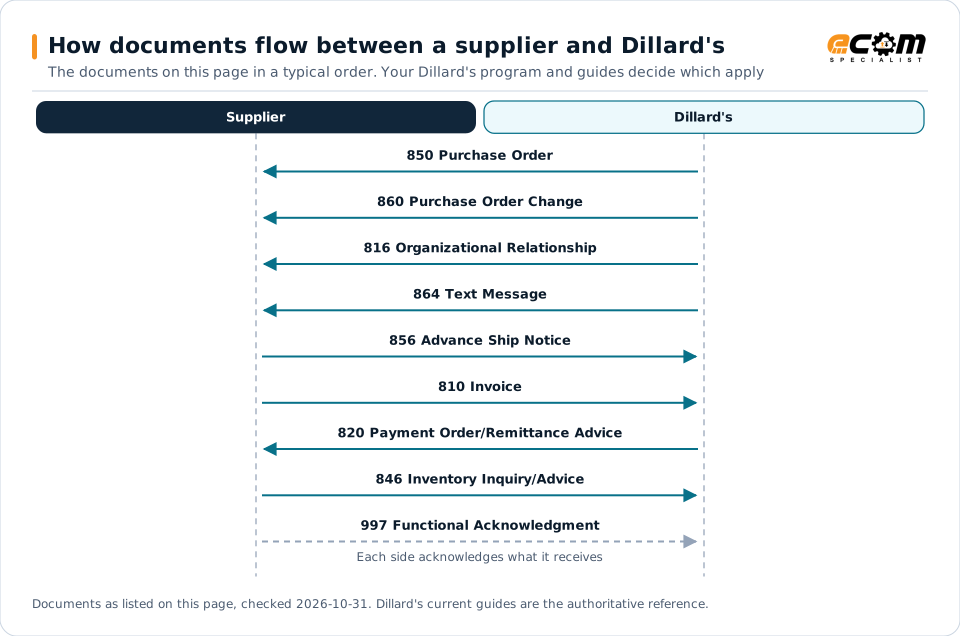
How documents flow between a supplier and Dillard'sSequence diagram of EDI documents between a supplier and Dillard's: 850 Purchase Order from Dillard's, 860 Purchase Order Change from Dillard's, 816 Organizational Relationship from Dillard's, 864 Text Message from Dillard's, 856 Advance Ship Notice to Dillard's, 810 Invoice to Dillard's, 820 Payment Order/Remittance Advice from Dillard's, 846 Inventory Inquiry/Advice to Dillard's and 997 Functional Acknowledgment to Dillard's.How documents flow between a supplier and Dillard'sThe documents on this page in a typical order. Your Dillard's program and guides decide which applySupplierDillard's850 Purchase Order860 Purchase Order Change816 Organizational Relationship864 Text Message856 Advance Ship Notice810 Invoice820 Payment Order/Remittance Advice846 Inventory Inquiry/Advice997 Functional AcknowledgmentEach side acknowledges what it receivesDocuments as listed on this page, checked 2026-10-31. Dillard's current guides are the authoritative reference.
How documents flow between a supplier and Dillard'sSequence diagram of EDI documents between a supplier and Dillard's: 850 Purchase Order from Dillard's, 860 Purchase Order Change from Dillard's, 816 Organizational Relationship from Dillard's, 864 Text Message from Dillard's, 856 Advance Ship Notice to Dillard's, 810 Invoice to Dillard's, 820 Payment Order/Remittance Advice from Dillard's, 846 Inventory Inquiry/Advice to Dillard's and 997 Functional Acknowledgment to Dillard's.How documents flow between asupplier and Dillard'sThe documents on this page in a typical order.Your Dillard's program and guides decide whichapplySupplierDillard's850 Purchase Order860 Purchase OrderChange816 OrganizationalRelationship864 Text Message856 Advance Ship Notice810 Invoice820 PaymentOrder/Remittance Advice846 InventoryInquiry/Advice997 FunctionalAcknowledgmentEach side acknowledges whatit receivesDocuments as listed on this page, checked2026-10-31. Dillard's current guides are theauthoritative reference.

Read from top to bottom. Solid arrows are documents Dillard's names in its own public documentation; the dashed arrow is the acknowledgment. The order is typical, not a Dillard's rule: programs such as vendor direct to consumer use their own documents and timing.

Expand diagram Download SVG

Document by document

What each Dillard's document needs

For each document: what it does for you as the supplier, what Dillard's own documents say about it (with the source and its date), and general EDI practice that helps, labelled as such. Your Dillard's mapping guide for your version is the final word on fields and codes.

850

Purchase Order

You receive

The 850 is the first document to implement. Once it is in production, accept orders only by EDI.

What Dillard's states

How the 850 works in X12

860

Purchase Order Change

You receive

Changes made by a Dillard's merchant are transmitted by 860 the night of the change.

What Dillard's states

How the 860 works in X12

856

Advance Ship Notice

You send · Distribution center orders

An item-level ASN for every shipment, processed before the freight reaches the DC and matching each 128 carton label.

What Dillard's states

General EDI practice

  • Check the ASN error mailbox every couple of hours on shipping days, and resend a corrected ASN before the trailer arrives.

How the 856 works in X12

810

Invoice

You send

Dillard's requires invoices by EDI 810, one per PO per shipment.

What Dillard's states

How the 810 works in X12

997

Functional Acknowledgment

Both directions

You acknowledge Dillard's orders, changes and remittances within 24 hours; Dillard's acknowledges your ASNs and invoices.

What Dillard's states

How the 997 works in X12

846

Inventory Inquiry/Advice

You send · Drop ship

Drop ship vendors send a daily 846 with current inventory for every UPC in the program.

What Dillard's states

How the 846 works in X12

Deductions

What Dillard's charges for EDI problems

Appendix C of the Vendor Guide sets these EDI processing charges. Other charges cover UPC marking, catalog, packing and refusals; the guide says to contact Vendor Compliance about EDI-related chargebacks.

ProblemCharge stated by Dillard'sSource
Shipment received without an ASN$250 per PO plus $50 per cartonSource: Dillard's, Vendor Information & Implementation Guide, Sep 1, 2020, p. 71
ASN carton quantity or UPCs do not match what is scanned$100 per cartonSource: Dillard's, Vendor Information & Implementation Guide, Sep 1, 2020, p. 71
128 carton label missing or not scannable$50 per carton plus $250 per POSource: Dillard's, Vendor Information & Implementation Guide, Sep 1, 2020, p. 71
Missing or invalid bill of lading number on ASN or invoice$500 flat per month per document type plus $50 per invoice and per ASNSource: Dillard's, Vendor Information & Implementation Guide, Sep 1, 2020, p. 71
Missing or invalid carrier code (SCAC)$50 per invoice and per ASNSource: Dillard's, Vendor Information & Implementation Guide, Sep 1, 2020, p. 71
Paper invoice once the 810 is in production$55 per paper invoiceSource: Dillard's, Vendor Information & Implementation Guide, Sep 1, 2020, p. 71
Paper purchase order sent or paper invoice received (before EDI)$50 eachSource: Dillard's, Vendor Information & Implementation Guide, Sep 1, 2020, p. 71
Repeatedly failing to send a 997 for an 820, 850 or 860$50 per fileSource: Dillard's, Vendor Information & Implementation Guide, Sep 1, 2020, p. 8

General practice for handling deductions

  • Reconcile each month's charges against the vendor report card on eBiz, which shows PO and carton detail for ASN chargebacks.

Scorecard and audits

How Dillard's measures supplier performance

Dillard's eBiz vendor report card shows ASN performance, financials, orders and receipts, with PO and carton detail for late or missing ASN and 128 label chargebacks and carton discrepancies.

MeasureTarget stated by Dillard'sSource
ASN received and processed before the shipment reaches the DCEvery shipmentSource: Dillard's, Vendor Information & Implementation Guide, Sep 1, 2020, p. 17
ASN quantity and UPCs match the carton contents scanned at the DCEvery cartonSource: Dillard's, Vendor Information & Implementation Guide, Sep 1, 2020, p. 16
  • Give your compliance team eBiz access to the vendor report card, so late ASN charges are checked against your own send times.

Onboarding

Getting set up with Dillard's, step by step

Steps with a source come from Dillard's own onboarding material; the others are general practice that keeps the project on track.

  1. Map the Dillard's documents

    Download Dillard's mapping from eBiz and map the required documents into your translator, starting with the 850.

    Source: Dillard's, Vendor Information & Implementation Guide, Sep 1, 2020
  2. Test through a designated network

    The network sends generic test files of the 812, 816, 820, 850, 860 and 864; return a 997 for each, and the network sends Dillard's a pass notice.

    Source: Dillard's, Vendor Information & Implementation Guide, Sep 1, 2020
  3. Confirm setup with Dillard's

    Dillard's EDI testing manager verifies your network information and sets up your vendor number for the tested documents.

    Source: Dillard's, Vendor Information & Implementation Guide, Sep 1, 2020
  4. Test the 810 and 856 with Dillard's

    Send test 810 and 856 files to Dillard's, correct anything its compliance check finds, and resend until approved.

    Source: Dillard's, Vendor Information & Implementation Guide, Sep 1, 2020
  5. Approve your 128 label

    Mail a sample 128 carton label from your production printer to Dillard's EDI marking manager for a scan test.

    Source: Dillard's, Vendor Information & Implementation Guide, Sep 1, 2020
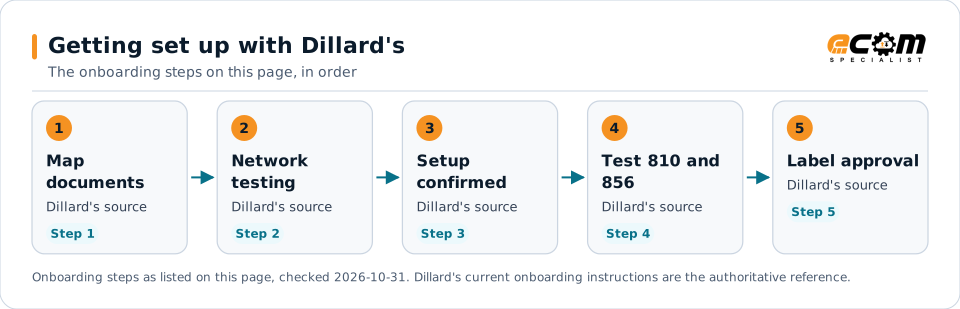
Getting set up with Dillard'sFlow diagram of 5 onboarding steps with Dillard's: Map the Dillard's documents, Test through a designated network, Confirm setup with Dillard's, Test the 810 and 856 with Dillard's and Approve your 128 label.Getting set up with Dillard'sThe onboarding steps on this page, in order1MapdocumentsDillard's sourceStep 12NetworktestingDillard's sourceStep 23SetupconfirmedDillard's sourceStep 34Test 810 and856Dillard's sourceStep 45Label approvalDillard's sourceStep 5Onboarding steps as listed on this page, checked 2026-10-31. Dillard's current onboarding instructions are the authoritative reference.
Getting set up with Dillard'sFlow diagram of 5 onboarding steps with Dillard's: Map the Dillard's documents, Test through a designated network, Confirm setup with Dillard's, Test the 810 and 856 with Dillard's and Approve your 128 label.Getting set up with Dillard'sThe onboarding steps on this page, in order1Map documentsDillard's sourceStep 12Network testingDillard's sourceStep 23Setup confirmedDillard's sourceStep 34Test 810 and 856Dillard's sourceStep 45Label approvalDillard's sourceStep 5Onboarding steps as listed on this page, checked2026-10-31. Dillard's current onboarding instructionsare the authoritative reference.

Read left to right, or top to bottom on a phone. 5 of the 5 steps come from Dillard's own published material and are marked "Dillard's source"; the rest are general practice. Week numbers are given only where Dillard's states them.

Expand diagram Download SVG

Verification

What we checked, and where

Each statement below shows its source and the date we checked it. Statements we could not confirm from an official Dillard's source are labelled as such.

TopicStatementEvidenceChecked
OnboardingNew vendors have a 60-day grace period after becoming active to implement the mandatory EDI documents.Confirmed on a public Dillard's pageOct 31, 2026
ConnectivityDillard's trades EDI only through its two designated value-added networks and does not authorize interconnects with other networks.Confirmed on a public Dillard's pageOct 31, 2026
StandardsDillard's supports VICS versions 004010 and 004030, with the 812 and return-to-vendor 856 at 004030 only.Confirmed on a public Dillard's pageOct 31, 2026
Shipping and labelsShipments received without an ASN are charged $250 per purchase order plus $50 per carton.Confirmed on a public Dillard's pageOct 31, 2026
PaymentsPayment terms for merchandise vendors are 60 days from receipt of the merchandise at the processing location.Confirmed on a public Dillard's pageOct 31, 2026
Recent changeThe edition we read is dated September 1, 2020; a newer edition may exist on eBiz.Confirmed on a public Dillard's pageOct 31, 2026

Available only after supplier login

Dillard's keeps these behind its supplier portal. This guide does not reproduce them; use your own Dillard's access or ask your Dillard's contact.

  • Purchase order inquiry, PO re-transmit, accounts payable detail and the vendor report card on eBiz, which need a user ID from your company's eBiz administrators
  • The Corporate Routing Guide and current EDI mapping documents on eBiz

Not confirmed

We could not confirm these from an official public source, so we do not state them as Dillard's requirements.

  • Whether a newer edition of the Vendor Guide has replaced the September 2020 edition
  • The current Corporate Routing Guide and its ASN timing for vendors close to a Dillard's DC
  • Whether the processing charge amounts have changed since 2020

Checklist

Dillard's EDI readiness checklist

  1. Implement the 850 first, then the 816, 860, 864, 856 and 810, within the 60-day grace period.
  2. Connect through one of the two networks named in Dillard's EDI requirements, or a service provider with a mailbox on either.
  3. Return a 997 within 24 hours for every 820, 850 and 860 file.
  4. Mail a sample 128 carton label from your production printer for approval.
  5. Send an item-level 856 as soon as goods ship, so it is processed before the freight reaches the DC.
  6. Put the GS1 17-digit bill of lading number in the 856 and 810, or the parcel tracking number on parcel shipments.
  7. Send one 810 per PO per shipment and stop paper invoices once the 810 is in production.
  8. Map a generic mailbox into the ASN contact segment and check it for ASN error notices.

Connectivity and contacts

How Dillard's connects with suppliers

What Dillard's public documents say about networks and setup, and the department contacts it publishes for suppliers. Connection credentials and trading-partner IDs are exchanged with Dillard's during setup and are never shown on this page.

What Dillard's states about connecting

Department contacts Dillard's publishes

Listed as Dillard's published them. These are Dillard's contacts, not ECOM's; check the source for the current details.

Avoid these

Common mistakes with Dillard's EDI

ASN arriving after the freight

If the shipment reaches the DC before Dillard's has processed the ASN, the ASN cannot be used and charges apply.

Source: Dillard's, Vendor Information & Implementation Guide, Sep 1, 2020, p. 16

Using an unauthorized network

Dillard's does not accept files through interconnects from networks other than its two designated networks.

Source: Dillard's, Vendor Information & Implementation Guide, Sep 1, 2020, p. 7

Shipping against a duplicate PO

A re-transmitted PO arrives as a duplicate, and Dillard's will not receive a double shipment against one PO.

Source: Dillard's, Vendor Information & Implementation Guide, Sep 1, 2020, p. 22

Paper invoices after the 810 goes live

Once the 810 is in production, every paper invoice brings a $55 manual processing charge.

Source: Dillard's, Vendor Information & Implementation Guide, Sep 1, 2020, p. 10

Connectivity

Your options for connecting to Dillard's

  • Two designated VANs only

    Dillard's sends and receives EDI only through the two value-added networks named in its EDI requirements and does not support interconnects with any other third-party network. Service providers with a mailbox on either network qualify.

    From Dillard's published documents

  • Dillard's eBiz vendor site

    EDI mapping, the Corporate Routing Guide, the store and DC list, PO inquiry, PO re-transmit, accounts payable and the vendor report card are on ebiz.dillards.com.

    From Dillard's published documents

  • Vendor Portal for non-EDI vendors

    Until you are in production on EDI, purchase orders and invoices are handled through the Vendor Portal on eBiz.

    From Dillard's published documents

Challenges

Common integration challenges

  • ASN timing at the DC

    The ASN must be received and processed before the shipment docks; Dillard's charges $250 per PO plus $50 per carton when it is not.

  • Carton accuracy

    ASN quantities and UPCs must match what is scanned from each carton, or Dillard's charges $100 per carton.

  • Two networks only

    Vendors whose provider is on another network must route through one of Dillard's two designated networks, because Dillard's refuses interconnects.

Automation options for Dillard's suppliers

Four ways to automate. One foundation.

Dillard's requirements on this page cover the 850, 860, 816, 864, 856, 810, 997, 820, 846 and 870. ECOM helps you automate them, meet Dillard's labeling and ship notice requirements, and see what needs action. Dillard's sets its program's rules; ECOM confirms which options fit yours.

PRISM Supply Chain Automation Foundation

One platform beneath every option. Use one, or combine them for different partners and documents.

Compliance and actionable visibility

Connect order processing, shipping documentation, trading partner requirements, and performance monitoring through one coordinated workflow. These capabilities help teams improve shipment accuracy, reduce manual work, address compliance risks, and respond to exceptions before they affect customers.

Discuss Your Trading Partner Requirements

Connect Dillard's documents to your ERP

ECOM integrates Dillard's VICS purchase orders, changes, ship notices, invoices and remittance with your ERP and warehouse systems, connected through the networks Dillard's accepts.

Next step

Get help with your Dillard's program

Each request goes to an ECOM EDI specialist with Dillard's name attached, so the reply starts from your program.

  • Review Dillard's requirements

    Send us Dillard's guide or your program details; we explain the documents, rules and options for meeting them.

    Request a requirements review
  • Connect Dillard's to your ERP

    Orders in, ship notices and invoices out, from the ERP and warehouse systems you already run.

    Discuss ERP integration
  • Testing and certification

    Build, test and certify each Dillard's document, then go live with monitoring from the first file.

    Plan testing and certification
  • Shipping labels and ASNs

    Labels and ship notices that match Dillard's rules, to help avoid receiving problems and compliance deductions.

    Review shipping compliance

Dillard's integration FAQs

Which EDI documents does Dillard's require?

Dillard's Vendor Guide lists the 850, 860, 816, 864, 856, 810 and 997 as mandatory, with GS1-128 carton labels. The 812 and 820 are optional, because the same detail is on Dillard's eBiz site.

How long do new Dillard's vendors have to implement EDI?

Dillard's gives a 60-day grace period after you become an active vendor. After that, non-compliance processing charges apply to the mandatory documents.

Which EDI network does Dillard's use?

Dillard's trades EDI only through its two designated value-added networks, and does not support or authorize interconnects with any other third-party network.

What happens if a shipment reaches Dillard's without an ASN?

The Vendor Guide sets a charge of $250 per purchase order received without an ASN, plus $50 per carton without a 128 label or without ASN detail.

Is ECOM a Dillard's-approved provider?

This page is an integration guide and does not indicate an approval or partnership with Dillard's. ECOM builds integrations to the requirements Dillard's publishes.

Sources and accuracy

This guide summarizes publicly available information as of October 2026. Dillard's sets its own requirements and can change them at any time; your Dillard's implementation guide, supplier portal or account contact is the authoritative source for your program.

Dillard's documents cited on this page

Learn the general practice

Request Dillard's integration assistance

Tell us about your Dillard's program, documents and ERP. We will outline the connection, mapping and testing plan.