Retail integration

Foot Locker EDI requirements for vendors

What Foot Locker publishes in its Vendor Standards Manual about EDI, including the documents it trades, the ASN and invoice deadlines, direct-to-store rules, GS1-128 labels and the compliance charges.

Overview

Understanding Foot Locker integration

Who this is for: Footwear, apparel and accessory vendors shipping to Foot Locker service centers and stores in the US and Canada, and the EDI, logistics and accounts receivable teams that support them.

Foot Locker publishes its US and Canada vendor requirements in the Vendor Standards Manual, a set of numbered sections on its corporate site. The sections we read carry dates from October 2025 to September 2026. Section 2 lists the EDI documents. Foot Locker sends the 816 store list, 820 remittance, 850 purchase order, 860 change and 997, and receives the 810 invoice, 856 ship notice, 870 order status and 997. All of its transactions follow VICS guidelines.

The deadlines are tight. For shipments to its distribution centers, the 856 is required. The manual asks for the ASN within one hour after the shipment leaves your facility, and it must reach Foot Locker while the freight is in transit. An ASN problem that delays unloading costs $250 an hour. EDI invoices are due by 8:00 PM Eastern the day after shipping, and late or failed invoices are charged $100 or 30%, whichever is less.

Direct-to-store shipments require EDI, with one ASN per carton. This guide records what the manual's sections say and when we checked them, and lists what we could not confirm.


Requirements at a glance

What Foot Locker publishes for suppliers

Foot Locker says all of its EDI transactions comply with VICS guidelines. Its Vendor Standards Manual for the US and Canada is published in numbered sections; the EDI, documentation, compliance and direct-to-store sections we read are dated October 2025 to September 2026. Section 8 is marked as a temporary 2026 edition. We read them on October 31, 2026.

Foot Locker Vendor Standards Manual

The US and Canada manual sections, forms and contact list, plus the European and Asia Pacific editions.

Public Official site

Business units and channels

Foot Locker business units suppliers trade with

Large retailers often handle each business unit or channel as a separate EDI relationship, with its own documents, guides and setup. Confirm with Foot Locker which of these you supply before mapping.

Stores and distribution centers

Foot Locker

Foot Locker division in the US and Canada, served through Foot Locker service centers and direct-to-store shipments.

Confirmed on a public Foot Locker page

Stores and distribution centers

Kids Foot Locker

Kids Foot Locker division in the US and Canada, listed against the same service centers.

Confirmed on a public Foot Locker page

Stores and distribution centers

Champs Sports

Champs Sports division in the US and Canada, with its own GS1-128 label examples in the manual.

Confirmed on a public Foot Locker page

Stores and distribution centers

Service center shipments

Shipments to the Junction City, Camp Hill, Sparks and Jacksonville service centers, and the Milton service centre in Canada.

Documents: 850,860,856,810,997

Confirmed on a public Foot Locker page

Stores and distribution centers

Direct-to-store shipments

Parcel shipments straight to stores, routed through the Routing Tool, with one ASN per carton.

Documents: 816,850,856,810

Confirmed on a public Foot Locker page

Workflows

Typical Foot Locker business workflows

The steps summarize the documents below. Where a step is not in Foot Locker's published documents, it reflects common practice.

Service center shipments

  1. 1Receive 850 purchase order
  2. 2Process 860 changes
  3. 3Label with GS1-128
  4. 4Send 856 within 1 hour
  5. 5Send 810 by 8 PM next day

Direct-to-store shipments

  1. 1Receive 850 and 816 stores
  2. 2Request routing in the tool
  3. 3Ship parcel to each store
  4. 4Send one 856 per carton
  5. 5Send 810 by 8 PM next day

Documents and APIs

Foot Locker documents by program

Every document this guide names, with the program it applies to and its status. Required, optional and conditional come from Foot Locker's published documents cited below; documents marked general guidance are common in this industry but not confirmed for Foot Locker.

DocumentNameDirectionProgramStatusPurpose
850 Purchase Order You receive from Foot Locker Service center shipments, Direct-to-store shipments Named; level not stated One of the two valid purchase order types; verify cost, terms and pack type before shipping.
860 Purchase Order Change You receive from Foot Locker Service center shipments Named; level not stated Corrections to a purchase order; do not ship until discrepancies are corrected by a new PO copy or an 860.
816 Organizational Relationship You receive from Foot Locker Direct-to-store shipments Named; level not stated Store address listing, transmitted for new, added or deleted store addresses.
820 Payment Order/Remittance Advice You receive from Foot Locker Not stated Named; level not stated Payment and remittance advice sent by Foot Locker.
856 Advance Ship Notice You send to Foot Locker Distribution and service center shipments RequiredWithin 1 hour after the shipment leaves your facility Required for service center shipments within 1 hour of departure, and for direct-to-store shipments by 8:00 PM Eastern the next day, one per carton.
810 Invoice You send to Foot Locker Service center shipments, Direct-to-store shipments Named; level not stated Due by 8:00 PM Eastern the day after shipping, one purchase order and one destination per invoice, without freight charges.
870 Order Status Report You send to Foot Locker Not stated Named; level not stated Listed among the documents Foot Locker can receive.
997 Functional Acknowledgment Both directions Service center shipments Named; level not stated Foot Locker returns one for ASNs and invoices; it confirms receipt only, not that the data is correct.
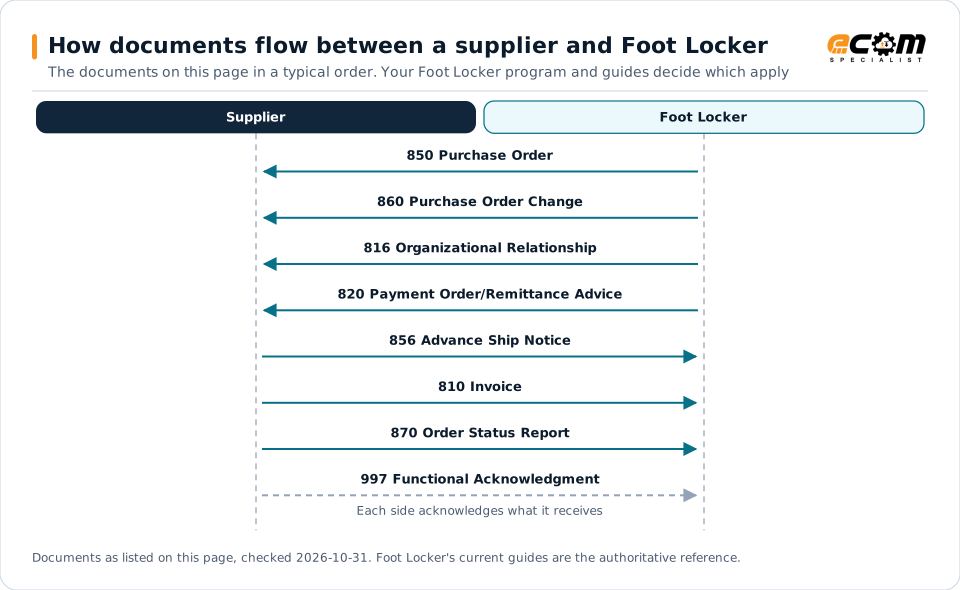
How documents flow between a supplier and Foot LockerSequence diagram of EDI documents between a supplier and Foot Locker: 850 Purchase Order from Foot Locker, 860 Purchase Order Change from Foot Locker, 816 Organizational Relationship from Foot Locker, 820 Payment Order/Remittance Advice from Foot Locker, 856 Advance Ship Notice to Foot Locker, 810 Invoice to Foot Locker, 870 Order Status Report to Foot Locker and 997 Functional Acknowledgment to Foot Locker.How documents flow between a supplier and Foot LockerThe documents on this page in a typical order. Your Foot Locker program and guides decide which applySupplierFoot Locker850 Purchase Order860 Purchase Order Change816 Organizational Relationship820 Payment Order/Remittance Advice856 Advance Ship Notice810 Invoice870 Order Status Report997 Functional AcknowledgmentEach side acknowledges what it receivesDocuments as listed on this page, checked 2026-10-31. Foot Locker's current guides are the authoritative reference.
How documents flow between a supplier and Foot LockerSequence diagram of EDI documents between a supplier and Foot Locker: 850 Purchase Order from Foot Locker, 860 Purchase Order Change from Foot Locker, 816 Organizational Relationship from Foot Locker, 820 Payment Order/Remittance Advice from Foot Locker, 856 Advance Ship Notice to Foot Locker, 810 Invoice to Foot Locker, 870 Order Status Report to Foot Locker and 997 Functional Acknowledgment to Foot Locker.How documents flow between asupplier and Foot LockerThe documents on this page in a typical order.Your Foot Locker program and guides decidewhich applySupplierFoot Locker850 Purchase Order860 Purchase OrderChange816 OrganizationalRelationship820 PaymentOrder/Remittance Advice856 Advance Ship Notice810 Invoice870 Order Status Report997 FunctionalAcknowledgmentEach side acknowledges whatit receivesDocuments as listed on this page, checked2026-10-31. Foot Locker's current guides are theauthoritative reference.

Read from top to bottom. Solid arrows are documents Foot Locker names in its own public documentation; the dashed arrow is the acknowledgment. The order is typical, not a Foot Locker rule: programs such as vendor direct to consumer use their own documents and timing.

Expand diagram Download SVG

Document by document

What each Foot Locker document needs

For each document: what it does for you as the supplier, what Foot Locker's own documents say about it (with the source and its date), and general EDI practice that helps, labelled as such. Your Foot Locker mapping guide for your version is the final word on fields and codes.

850

Purchase Order

You receive

An EDI PO is one of two valid order types. Verify it fully before you ship.

What Foot Locker states

How the 850 works in X12

856

Advance Ship Notice

You send

Required for every shipment. The deadline depends on whether the freight goes to a service center or a store.

What Foot Locker states

General EDI practice

  • Trigger the ASN from the trailer close or carrier pickup scan, so it leaves within the hour without manual steps.

How the 856 works in X12

810

Invoice

You send

EDI invoices are due by 8:00 PM Eastern the day after shipping and go through Foot Locker's edit checks.

What Foot Locker states

How the 810 works in X12

997

Functional Acknowledgment

You receive

Foot Locker returns a 997 for your ASNs and invoices. It confirms receipt, not accuracy.

What Foot Locker states

How the 997 works in X12

Deductions

What Foot Locker charges for EDI problems

Section 9 lists Foot Locker's violation codes and charges. These are the EDI, ASN and label items; the section also covers ticketing, packing, routing and late shipments.

ProblemCharge stated by Foot LockerSource
Missing ASN (code 607)$7.50 per carton (minimum $500)Source: Foot Locker, Vendor Standards Manual Section 9: Vendor Compliance Program, Chargebacks and Policies, Jul 2026, p. 9-5
Incorrect ASN (code 608)$7.50 per carton (minimum $500)Source: Foot Locker, Vendor Standards Manual Section 9: Vendor Compliance Program, Chargebacks and Policies, Jul 2026, p. 9-5
Late EDI ASN (code 609)$7.50 per carton (minimum $500)Source: Foot Locker, Vendor Standards Manual Section 9: Vendor Compliance Program, Chargebacks and Policies, Jul 2026, p. 9-5
Detention unloading a trailer because of a vendor ASN issue (code 705)$250 per hour, maximum $7,500 or 5% of cost, whichever is lessSource: Foot Locker, Vendor Standards Manual Section 9: Vendor Compliance Program, Chargebacks and Policies, Jul 2026, p. 9-5
Missing, incorrect or unscannable UCC 128 label (codes 401 to 404)$7.50 per carton plus $250Source: Foot Locker, Vendor Standards Manual Section 9: Vendor Compliance Program, Chargebacks and Policies, Jul 2026, p. 9-5
Late, failed or incorrect EDI invoice$100 or 30% per invoice, whichever is lessSource: Foot Locker, Vendor Standards Manual Section 8: Required Documentation, Apr 2026, p. 8-6
Late or rejected direct-to-store ASNThe lesser of $100 or 30% per ASNSource: Foot Locker, Vendor Standards Manual Section 11: Direct to Store Shipments, Oct 2025, p. 11-2

General practice for handling deductions

  • Review chargebacks as they arrive: Section 9 says Foot Locker will not research inquiries for receipts over six months old.

Onboarding

Getting set up with Foot Locker, step by step

Steps with a source come from Foot Locker's own onboarding material; the others are general practice that keeps the project on track.

  1. Contact the EDI coordinator

    To become an EDI trading partner, contact the EDI coordinator listed in the manual's contact list.

    Source: Foot Locker, Vendor Standards Manual Section 2: Purchase Orders, 2025
  2. Complete EDI testing

    Do not begin transmitting 810s until the testing process is complete and Foot Locker's EDI department notifies you.

    Source: Foot Locker, Vendor Standards Manual Section 8: Required Documentation, Apr 2026
  3. Stop paper invoices

    Once notified, stop mailing paper invoices or emailing PDF invoices and transmit electronic invoices only.

    Source: Foot Locker, Vendor Standards Manual Section 8: Required Documentation, Apr 2026
  4. Set up before store shipments

    Be set up on EDI, including the ASN, before shipping direct to any store.

    Source: Foot Locker, Vendor Standards Manual Section 11: Direct to Store Shipments, Oct 2025
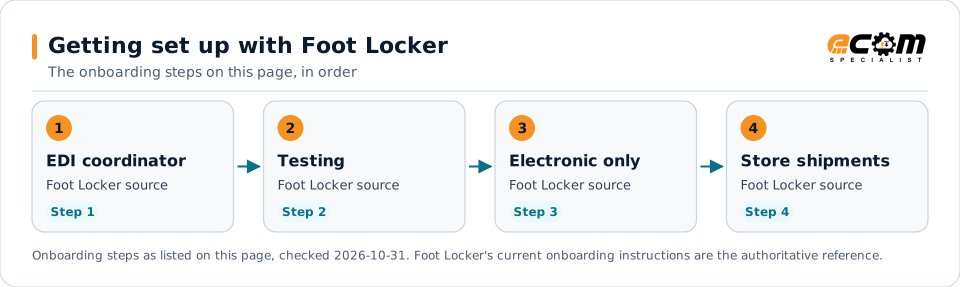
Getting set up with Foot LockerFlow diagram of 4 onboarding steps with Foot Locker: Contact the EDI coordinator, Complete EDI testing, Stop paper invoices and Set up before store shipments.Getting set up with Foot LockerThe onboarding steps on this page, in order1EDI coordinatorFoot Locker sourceStep 12TestingFoot Locker sourceStep 23Electronic onlyFoot Locker sourceStep 34Store shipmentsFoot Locker sourceStep 4Onboarding steps as listed on this page, checked 2026-10-31. Foot Locker's current onboarding instructions are the authoritative reference.
Getting set up with Foot LockerFlow diagram of 4 onboarding steps with Foot Locker: Contact the EDI coordinator, Complete EDI testing, Stop paper invoices and Set up before store shipments.Getting set up with Foot LockerThe onboarding steps on this page, in order1EDI coordinatorFoot Locker sourceStep 12TestingFoot Locker sourceStep 23Electronic onlyFoot Locker sourceStep 34Store shipmentsFoot Locker sourceStep 4Onboarding steps as listed on this page, checked2026-10-31. Foot Locker's current onboardinginstructions are the authoritative reference.

Read left to right, or top to bottom on a phone. 4 of the 4 steps come from Foot Locker's own published material and are marked "Foot Locker source"; the rest are general practice. Week numbers are given only where Foot Locker states them.

Expand diagram Download SVG

Verification

What we checked, and where

Each statement below shows its source and the date we checked it. Statements we could not confirm from an official Foot Locker source are labelled as such.

TopicStatementEvidenceChecked
StandardsFoot Locker sends the 816, 820, 850, 860 and 997 and receives the 810, 856, 870 and 997, following VICS guidelines.Confirmed on a public Foot Locker pageOct 31, 2026
Shipping and labelsService center ASNs should be sent within 1 hour after the shipment leaves and must be received while the shipment is in transit.Confirmed on a public Foot Locker pageOct 31, 2026
DocumentsEDI invoices are due by 8:00 PM Eastern the day after shipping; late or failed invoices are charged $100 or 30%, whichever is less.Confirmed on a public Foot Locker pageOct 31, 2026
Shipping and labelsAll direct-to-store shipments require EDI, and the vendor must be set up on EDI before shipping to stores.Confirmed on a public Foot Locker pageOct 31, 2026
PaymentsThe payment term on each PO is 15FM, the 15th of the following month, driven by the merchandise receipt date.Confirmed on a public Foot Locker pageOct 31, 2026
Recent changeSection 8 (Required Documentation) is published as a temporary 2026 edition with ASN detention added.Confirmed on a public Foot Locker pageOct 31, 2026

Available only after supplier login

Foot Locker keeps these behind its supplier portal. This guide does not reproduce them; use your own Foot Locker access or ask your Foot Locker contact.

  • Foot Locker's EDI mapping specifications and testing, which the manual handles through its EDI coordinator
  • The Routing Tool for direct-to-store routing requests

Not confirmed

We could not confirm these from an official public source, so we do not state them as Foot Locker requirements.

  • Foot Locker's X12 version and EDI mapping specifications, which the public manual does not include
  • Whether the temporary 2026 Section 8 will change before a final edition
  • How the 870 order status report is used

Checklist

Foot Locker EDI readiness checklist

  1. Contact Foot Locker's EDI coordinator to set up EDI before your first direct-to-store shipment.
  2. Do not ship until PO discrepancies are corrected by a new PO copy or an 860.
  3. Send the service center 856 within 1 hour after the shipment leaves, while it is in transit.
  4. Keep each 997 as proof that your ASN was received.
  5. For stores, send one 856 per carton with the store number, UPC, 13-digit SKU and tracking number.
  6. Send each 810 by 8:00 PM Eastern the day after shipping, without freight charges.
  7. Resend any corrected ASN or invoice within 24 hours.
  8. Place the GS1-128 label on the bottom right corner of the long side of the master carton.

Connectivity and contacts

How Foot Locker connects with suppliers

What Foot Locker's public documents say about networks and setup, and the department contacts it publishes for suppliers. Connection credentials and trading-partner IDs are exchanged with Foot Locker during setup and are never shown on this page.

What Foot Locker states about connecting

Department contacts Foot Locker publishes

Listed as Foot Locker published them. These are Foot Locker's contacts, not ECOM's; check the source for the current details.

Avoid these

Common mistakes with Foot Locker EDI

Sending the ASN after the truck arrives

The service center ASN must be in Foot Locker's system while the freight is in transit; ASN delays that hold up unloading are charged by the hour.

Source: Foot Locker, Vendor Standards Manual Section 8: Required Documentation, Apr 2026, p. 8-2

Several cartons on one store ASN

Direct-to-store shipments need one ASN per carton, with one tracking number per carton.

Source: Foot Locker, Vendor Standards Manual Section 11: Direct to Store Shipments, Oct 2025, p. 11-2

Freight charges on the invoice

Freight charges must not be included on invoices; invoices containing them are charged $100 or 30%.

Source: Foot Locker, Vendor Standards Manual Section 8: Required Documentation, Apr 2026, pp. 8-7, 8-9

Leaving old SSCC labels visible

Any other label with an SSCC-18 barcode on the carton must be covered or defaced so it cannot be scanned.

Source: Foot Locker, Vendor Standards Manual Section 6: Carton Packing, Packaging, Labeling, Shipping and Loading, Dec 2025, p. 6-4

Connectivity

Your options for connecting to Foot Locker

  • EDI coordinator and EDI support

    To become an EDI trading partner, Foot Locker directs vendors to its EDI coordinator, and its EDI team takes questions at its EDI support mailbox.

    From Foot Locker's published documents

  • Third-party EDI providers

    Vendors may use a third-party EDI provider, but remain responsible for successful transmission; Foot Locker is not responsible for a provider's errors.

    From Foot Locker's published documents

  • Routing Tool

    Direct-to-store shipments are routed through Foot Locker's internet-based Routing Tool, which gives an immediate routing status for each purchase order.

    From Foot Locker's published documents

Challenges

Common integration challenges

  • One-hour ASN window

    Service center ASNs are expected within one hour after the shipment leaves, and must be in Foot Locker's system while the freight is in transit.

  • Next-day invoice deadline

    EDI invoices are due by 8:00 PM Eastern the day after shipping, with earlier deadlines for Friday and Saturday shipments.

  • One ASN per carton for stores

    Direct-to-store ASNs need one ASN per carton and one carrier tracking number per carton, with the store number, UPC and 13-digit Foot Locker SKU.

Automation options for Foot Locker suppliers

Four ways to automate. One foundation.

Foot Locker's requirements on this page cover the 850, 860, 816, 820, 856, 810, 870 and 997. ECOM helps you automate them, meet Foot Locker's labeling and ship notice requirements, and see what needs action. Foot Locker sets its program's rules; ECOM confirms which options fit yours.

PRISM Supply Chain Automation Foundation

One platform beneath every option. Use one, or combine them for different partners and documents.

Compliance and actionable visibility

Connect order processing, shipping documentation, trading partner requirements, and performance monitoring through one coordinated workflow. These capabilities help teams improve shipment accuracy, reduce manual work, address compliance risks, and respond to exceptions before they affect customers.

Discuss Your Trading Partner Requirements

Connect Foot Locker documents to your ERP

ECOM integrates Foot Locker's VICS purchase orders, changes, store lists, ship notices and invoices with your ERP and warehouse systems, timed to the manual's ASN and invoice deadlines.

Next step

Get help with your Foot Locker program

Each request goes to an ECOM EDI specialist with Foot Locker's name attached, so the reply starts from your program.

  • Review Foot Locker's requirements

    Send us Foot Locker's guide or your program details; we explain the documents, rules and options for meeting them.

    Request a requirements review
  • Connect Foot Locker to your ERP

    Orders in, ship notices and invoices out, from the ERP and warehouse systems you already run.

    Discuss ERP integration
  • Testing and certification

    Build, test and certify each Foot Locker document, then go live with monitoring from the first file.

    Plan testing and certification
  • Shipping labels and ASNs

    Labels and ship notices that match Foot Locker's rules, to help avoid receiving problems and compliance deductions.

    Review shipping compliance

Foot Locker integration FAQs

Which EDI documents does Foot Locker trade?

Foot Locker's Vendor Standards Manual says it sends the 816, 820, 850, 860 and 997 and receives the 810, 856, 870 and 997, all following VICS guidelines.

When is the Foot Locker ASN due?

For service center shipments, within 1 hour after the shipment leaves your facility, and it must reach Foot Locker while in transit. Direct-to-store ASNs are due by 8:00 PM Eastern the day after shipping.

When must Foot Locker EDI invoices arrive?

By 8:00 PM Eastern the day after shipping, by noon Saturday for Friday shipments and by 4 PM Sunday for Saturday shipments. Late invoices are charged $100 or 30%, whichever is less.

Does Foot Locker require EDI for direct-to-store shipments?

Yes. The manual says all direct-to-store shipments require EDI, and the vendor must be set up on EDI before shipping to stores.

Is ECOM a Foot Locker-approved provider?

This page is an integration guide and does not indicate an approval or partnership with Foot Locker. ECOM builds integrations to the requirements Foot Locker publishes.

Sources and accuracy

This guide summarizes publicly available information as of October 2026. Foot Locker sets its own requirements and can change them at any time; your Foot Locker implementation guide, supplier portal or account contact is the authoritative source for your program.

Foot Locker documents cited on this page

Learn the general practice

Request Foot Locker integration assistance

Tell us about your Foot Locker program, documents and ERP. We will outline the connection, mapping and testing plan.