
X12 transaction guide · Education
EDI 138 Educational Testing and Prospect Request and Report
The X12 document institutions and employers use to request and receive testing program results and prospective student information.
- Sent by
- Testing service, prospect service, institution or employer
- Received by
- Institution, employer or testing service
- Standard
- ANSI ASC X12
What is an EDI 138?
The EDI 138 Educational Testing and Prospect Request and Report is the ANSI X12 transaction set educational institutions and employers can use to request and receive results of testing programs from testing services, and prospective student information from prospect services.
Admissions offices receive test scores for applicants, and recruitment offices receive lists of prospective students who match their criteria. Loading these directly into admissions systems avoids manual entry and speeds up decisions. Requests can specify the tests and score types needed, and reports can include several students at once.
How to read this diagram: the top row shows who sends the 138, to whom, and which documents usually come before and after it. The lower part shows what X12 release 008010 itself requires: the envelopes around the 138 and the segments and loops the standard marks as required, area by area. Optional loops are listed by the segment that starts them rather than drawn in full. This is the standard's minimum, not a trading partner's requirement: each partner's implementation guide usually makes some optional loops mandatory, restricts the codes and may use a different release.
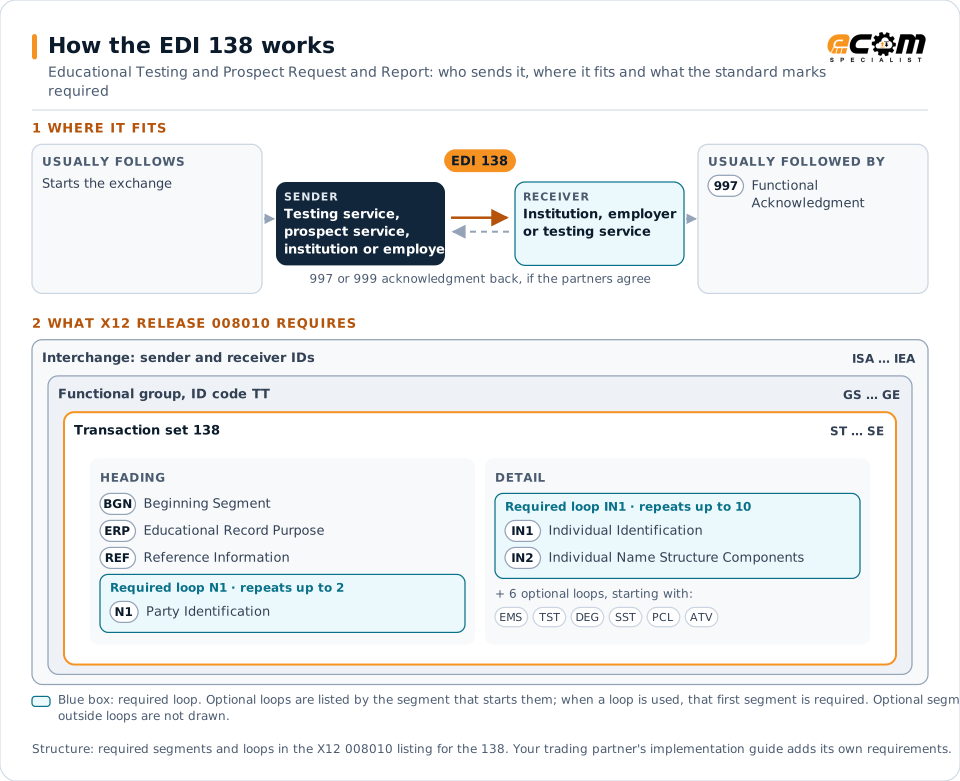
When it is used
- Receiving admissions test scores
- Requesting prospective student lists
- Receiving results of placement or certification tests
Where it fits in the document flow
Structure
Mandatory segments in the 138 (X12 release 008010)
The segments X12 release 008010 marks as mandatory at their level, in order. Segments inside optional loops are needed only when the loop is used. This is the standard's requirement, not your trading partner's: each partner's implementation guide names the release it uses, adds the optional segments it requires and restricts the values. The requirement status comes from one published X12 reference listing and has not been checked against a second source.
- ST
- BGN
- ERP
- REF
- N1
- IN1
- IN2
- EMS
- TST
- SBT
- RAP
- SCA
- DEG
- SST
- PCL
- ATV
- SE
Practical example
The 138 in practice
A college receives test scores for students who chose to send them. The testing service sends a 138 with each student's identification, test date and scores. The college's admissions system matches the scores to applications and updates each applicant's file.
Implementation
Implementation considerations for the 138
- Protect students' personal data and consent choices.
- Match test records to applicants reliably.
- Load prospect data only for permitted uses.
- Check which formats testing services currently offer.
How ECOM helps
Automate the 138 with ECOM
Solution
Enterprise Integration
Any-to-any integration across partners, systems, protocols, security requirements, formats and ERPs, in batch or real time.
Solution
EDI Integration
Exchange X12 and EDIFACT documents with partners and integrate them directly with your ERP.
Solution
B2B Integration
Connect every customer, supplier, carrier and bank across EDI, API, file and portal channels.
More general questions about EDI are answered in the EDI FAQ.
Related transactions
Related education documents
- 130Student Educational Record (Transcript)
- 131Student Educational Record (Transcript) Acknowledgment
- 133Educational Institution Record
- 146Request for Student Educational Record (Transcript)
- 147Response to Request for Student Educational Record (Transcript)
- 188Educational Course Inventory
- 189Application for Admission to Educational Institutions
Need help with the EDI 138?
ECOM maps, tests and monitors X12 documents for your trading partners and integrates them with your ERP.