
X12 transaction guide · Education
EDI 188 Educational Course Inventory
The X12 document schools and colleges use to request and send information about courses currently or previously offered.
- Sent by
- School, district or postsecondary institution
- Received by
- Another institution or education agency
- Standard
- ANSI ASC X12
What is an EDI 188?
The EDI 188 Educational Course Inventory is the ANSI X12 transaction set used by schools, school districts and postsecondary institutions to request and transmit information about educational courses currently or previously offered.
Course information, such as titles, descriptions, credits and levels, helps receiving institutions evaluate transcripts and award transfer credit. State agencies also use course inventories for reporting and to check that courses meet requirements. Inventories can cover current and historical courses, which matters because transcripts often list courses no longer offered, and institutions need their descriptions to evaluate them.
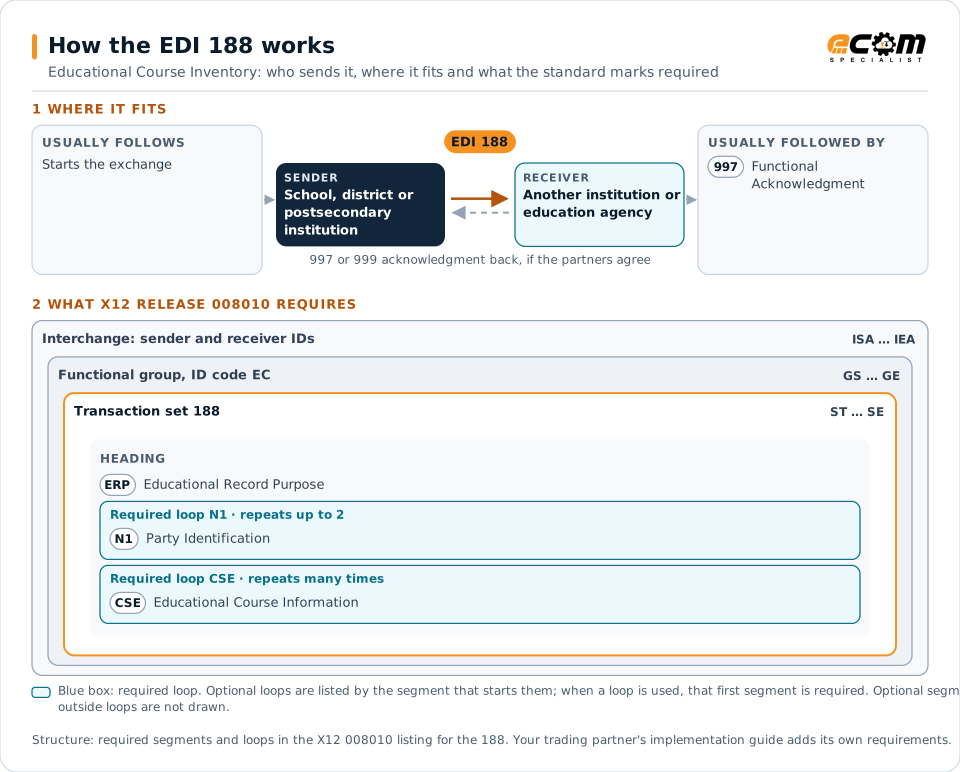
How to read this diagram: the top row shows who sends the 188, to whom, and which documents usually come before and after it. The lower part shows what X12 release 008010 itself requires: the envelopes around the 188 and the segments and loops the standard marks as required, area by area. Optional loops are listed by the segment that starts them rather than drawn in full. This is the standard's minimum, not a trading partner's requirement: each partner's implementation guide usually makes some optional loops mandatory, restricts the codes and may use a different release.
When it is used
- Sharing course catalogs for transfer credit evaluation
- Reporting courses offered to state agencies
- Requesting course information from another institution
Where it fits in the document flow
Structure
Mandatory segments in the 188 (X12 release 008010)
The segments X12 release 008010 marks as mandatory at their level, in order. Segments inside optional loops are needed only when the loop is used. This is the standard's requirement, not your trading partner's: each partner's implementation guide names the release it uses, adds the optional segments it requires and restricts the values. The requirement status comes from one published X12 reference listing and has not been checked against a second source.
- ST
- ERP
- N1
- CSE
- SE
Practical example
The 188 in practice
A university evaluates transfer credit for students from a community college. It requests the college's course inventory, and the college sends a 188 with each course's code, title, description, credits and level. The university maps the courses to its own equivalents.
Implementation
Implementation considerations for the 188
- Keep course codes stable over time where possible.
- Include historical courses that appear on transcripts.
- Update the inventory when courses change.
- Align course data with transcripts (130).
How ECOM helps
Automate the 188 with ECOM
Solution
Enterprise Integration
Any-to-any integration across partners, systems, protocols, security requirements, formats and ERPs, in batch or real time.
Solution
EDI Integration
Exchange X12 and EDIFACT documents with partners and integrate them directly with your ERP.
Solution
B2B Integration
Connect every customer, supplier, carrier and bank across EDI, API, file and portal channels.
More general questions about EDI are answered in the EDI FAQ.
Related transactions
Related education documents
- 130Student Educational Record (Transcript)
- 131Student Educational Record (Transcript) Acknowledgment
- 133Educational Institution Record
- 138Educational Testing and Prospect Request and Report
- 146Request for Student Educational Record (Transcript)
- 147Response to Request for Student Educational Record (Transcript)
- 189Application for Admission to Educational Institutions
Need help with the EDI 188?
ECOM maps, tests and monitors X12 documents for your trading partners and integrates them with your ERP.