
X12 transaction guide · Communications
EDI 143 Product Service Notification
The X12 document used to transmit a mandatory or voluntary product recall, usually to servicing organizations.
- Sent by
- Manufacturer
- Received by
- Servicing organization, dealer or consumer
- Standard
- ANSI ASC X12
What is an EDI 143?
The EDI 143 Product Service Notification is the ANSI X12 transaction set used to transmit a mandatory or voluntary recall. While it could be sent to a consumer, it is more likely to be sent to a servicing organization, giving notice of the recall and the products affected.
Dealers and service centers need to know which products are affected, what work is required and how it will be reimbursed. The notification lets them identify affected products in their records and schedule the work, which is later claimed with the 142.
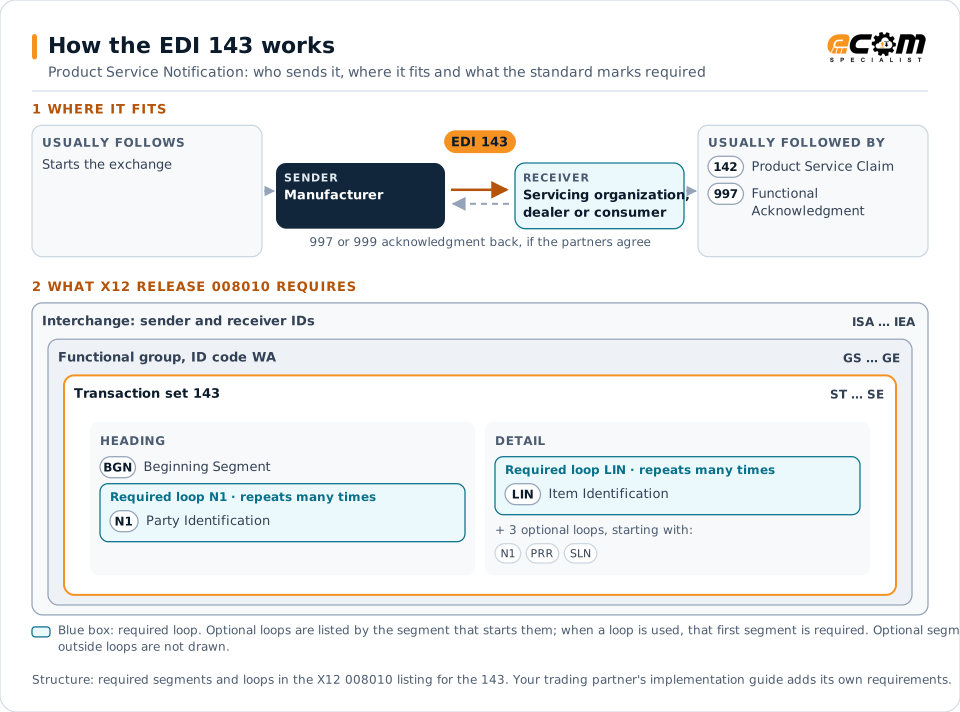
How to read this diagram: the top row shows who sends the 143, to whom, and which documents usually come before and after it. The lower part shows what X12 release 008010 itself requires: the envelopes around the 143 and the segments and loops the standard marks as required, area by area. Optional loops are listed by the segment that starts them rather than drawn in full. This is the standard's minimum, not a trading partner's requirement: each partner's implementation guide usually makes some optional loops mandatory, restricts the codes and may use a different release.
When it is used
- Notifying dealers of a safety recall
- Announcing voluntary service campaigns
- Listing affected serial numbers
Where it fits in the document flow
Structure
Mandatory segments in the 143 (X12 release 008010)
The segments X12 release 008010 marks as mandatory at their level, in order. Segments inside optional loops are needed only when the loop is used. This is the standard's requirement, not your trading partner's: each partner's implementation guide names the release it uses, adds the optional segments it requires and restricts the values. The requirement status comes from one published X12 reference listing and has not been checked against a second source.
- ST
- BGN
- N1
- LIN
- PRR
- N9
- REP
- PRT
- ITA
- SLN
- SE
Practical example
The 143 in practice
An equipment manufacturer discovers a defective hydraulic hose on a range of loaders. It sends its dealers a 143 describing the recall, the affected serial number range, the replacement procedure and the reimbursement terms. Dealers check their customers' machines and schedule the repairs.
Implementation
Implementation considerations for the 143
- Identify affected products precisely by serial range.
- State the required work and reimbursement terms.
- Follow regulatory requirements for mandatory recalls.
- Track completion of recall work for each product.
How ECOM helps
Automate the 143 with ECOM
Industry
Manufacturing
Customer schedules, supplier connectivity and shipping integrated with the ERP for manufacturers.
Industry
Automotive
Schedules, ship notices, labels, self-billing and multi-plant routing for automotive suppliers.
Solution
B2B Integration
Connect every customer, supplier, carrier and bank across EDI, API, file and portal channels.
More general questions about EDI are answered in the EDI FAQ.
Related transactions
Related communications documents
Need help with the EDI 143?
ECOM maps, tests and monitors X12 documents for your trading partners and integrates them with your ERP.