
X12 transaction guide · Communications
EDI 842 Nonconformance Report
The X12 document used to report products or processes that do not meet specifications and to request or record corrective action.
- Sent by
- Buyer, receiving plant or quality team
- Received by
- Supplier
- Standard
- ANSI ASC X12
What is an EDI 842?
The EDI 842 Nonconformance Report is the ANSI X12 transaction set for reporting products and processes that do not fulfill specifications or requirements. It can describe the nonconformance at whatever level of detail is needed, down to a specific component of an assembly, and can be used to report the problem, initiate or request actions, and carry related cost information.
In manufacturing supply chains the 842 replaces emailed defect reports. A plant that rejects material sends the supplier the part, lot, defect description, quantities affected and the disposition, and the supplier responds with containment and corrective action. Keeping this in EDI ties quality issues to the same part and shipment references used elsewhere.
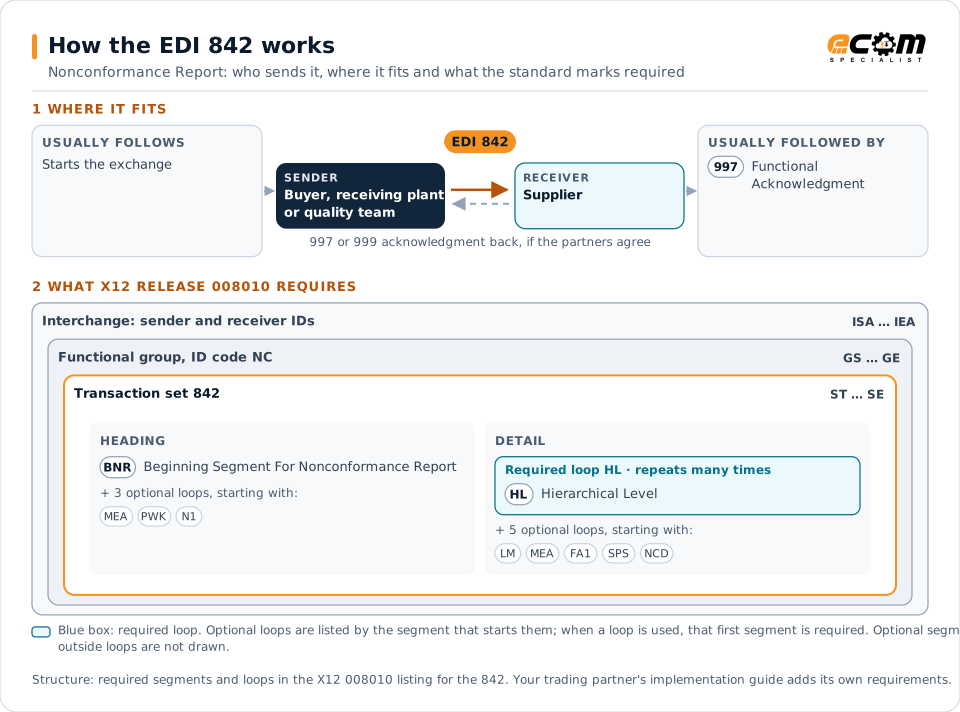
How to read this diagram: the top row shows who sends the 842, to whom, and which documents usually come before and after it. The lower part shows what X12 release 008010 itself requires: the envelopes around the 842 and the segments and loops the standard marks as required, area by area. Optional loops are listed by the segment that starts them rather than drawn in full. This is the standard's minimum, not a trading partner's requirement: each partner's implementation guide usually makes some optional loops mandatory, restricts the codes and may use a different release.
When it is used
- Reporting defective or out-of-specification material received from a supplier
- Requesting containment, sorting or corrective action
- Communicating the disposition of rejected parts
- Recording supplier responses to a quality issue
Where it fits in the document flow
Structure
Mandatory segments in the 842 (X12 release 008010)
The segments X12 release 008010 marks as mandatory at their level, in order. Segments inside optional loops are needed only when the loop is used. This is the standard's requirement, not your trading partner's: each partner's implementation guide names the release it uses, adds the optional segments it requires and restricts the values. The requirement status comes from one published X12 reference listing and has not been checked against a second source.
- ST
- BNR
- MEA
- PWK
- N1
- HL
- LM
- LQ
- FA1
- FA2
- SPS
- STA
- NCD
- EFI
- BIN
- NCA
- SE
Practical example
The 842 in practice
Incoming inspection at an appliance plant finds that a lot of 2,000 stamped brackets has holes out of tolerance. The quality system sends the supplier an 842 identifying the part, lot, ship notice, measured values against specification, quantity rejected and a request for an 8D corrective action. The supplier arranges sorting at the plant and returns its containment plan.
Implementation
Implementation considerations for the 842
- Reference the shipment, lot and part revision so the supplier can trace the material.
- Agree on defect and disposition codes, because free text alone is hard to report on.
- Link 842s to any material claim (847) or chargeback that follows from the issue.
- Route the report to the supplier's quality contact as well as its EDI system.
How ECOM helps
Automate the 842 with ECOM
Industry
Automotive
Schedules, ship notices, labels, self-billing and multi-plant routing for automotive suppliers.
Industry
Manufacturing
Customer schedules, supplier connectivity and shipping integrated with the ERP for manufacturers.
Solution
Supply Chain Visibility
Track orders, shipments and invoices across partners and catch exceptions early.
More general questions about EDI are answered in the EDI FAQ.
Related transactions
Related communications documents
Need help with the EDI 842?
ECOM maps, tests and monitors X12 documents for your trading partners and integrates them with your ERP.