
X12 transaction guide · Communications
EDI 863 Report of Test Results
The X12 document used to send the results of tests performed to meet product or process requirements, such as inspection or certification data.
- Sent by
- Supplier, laboratory or producer
- Received by
- Customer or quality team
- Standard
- ANSI ASC X12
What is an EDI 863?
The EDI 863 Report of Test Results is the ANSI X12 transaction set for transmitting the results of tests performed to satisfy a product or process requirement. It covers inspection data, certification data such as certificates of analysis, and statistical process control measurements.
Customers in chemicals, metals, food and automotive often require test results before or with each shipment. Receiving them as an 863 lets the customer's quality system compare the values with specifications automatically and release or hold material without manual data entry.
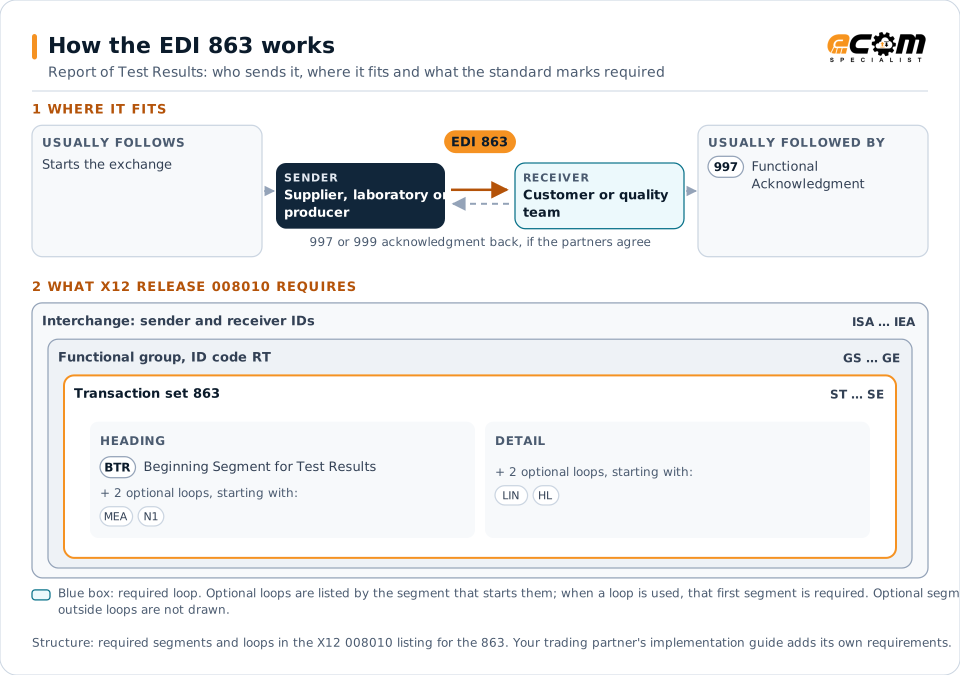
How to read this diagram: the top row shows who sends the 863, to whom, and which documents usually come before and after it. The lower part shows what X12 release 008010 itself requires: the envelopes around the 863 and the segments and loops the standard marks as required, area by area. Optional loops are listed by the segment that starts them rather than drawn in full. This is the standard's minimum, not a trading partner's requirement: each partner's implementation guide usually makes some optional loops mandatory, restricts the codes and may use a different release.
When it is used
- Sending a certificate of analysis with each lot shipped
- Reporting mill test results for metals
- Sharing statistical process control measurements
- Providing inspection data for first article approval
Where it fits in the document flow
Structure
Mandatory segments in the 863 (X12 release 008010)
The segments X12 release 008010 marks as mandatory at their level, in order. Segments inside optional loops are needed only when the loop is used. This is the standard's requirement, not your trading partner's: each partner's implementation guide names the release it uses, adds the optional segments it requires and restricts the values. The requirement status comes from one published X12 reference listing and has not been checked against a second source.
- ST
- BTR
- MEA
- LM
- LQ
- N1
- PER
- LIN
- CID
- STA
- TMD
- TSP
- HL
- NM1
- SE
Practical example
The 863 in practice
A resin producer ships railcars of polymer pellets to a film manufacturer. For each lot it sends an 863 with the lot number, the shipment reference and the measured melt index, density and moisture against the agreed specification limits. The customer's quality system checks the values on arrival and releases the lot to production.
Implementation
Implementation considerations for the 863
- Agree on test identifiers, units and specification limits so values can be compared automatically.
- Tie results to the lot and shipment, so they match what is received.
- Send results before the material arrives where the customer holds stock pending them.
- Keep a readable certificate for audits if partners require one.
How ECOM helps
Automate the 863 with ECOM
Industry
Manufacturing
Customer schedules, supplier connectivity and shipping integrated with the ERP for manufacturers.
Industry
Food and Beverage
Grocery and foodservice EDI for food and beverage manufacturers, with lot, date and inventory data.
Solution
B2B Integration
Connect every customer, supplier, carrier and bank across EDI, API, file and portal channels.
More general questions about EDI are answered in the EDI FAQ.
Related transactions
Related communications documents
Need help with the EDI 863?
ECOM maps, tests and monitors X12 documents for your trading partners and integrates them with your ERP.