
X12 transaction guide · Government and regulatory
EDI 149 Notice of Tax Adjustment or Assessment
The X12 document a taxing authority uses to notify a taxpayer of an adjustment to a prior filing, or of an assessment of taxes due.
- Sent by
- Taxing authority
- Received by
- Taxpayer or its representative
- Standard
- ANSI ASC X12
What is an EDI 149?
The EDI 149 Notice of Tax Adjustment or Assessment is the ANSI X12 transaction set a taxing authority can use to send a taxpayer either a notice of adjustment to a prior tax filing, or a notice of assessment of taxes due to the authority.
After processing a return, an authority may correct figures, disallow items or assess additional tax, penalties and interest. Electronic notices reach large taxpayers and their tax departments quickly, giving them time to review, pay or dispute within the deadlines stated.
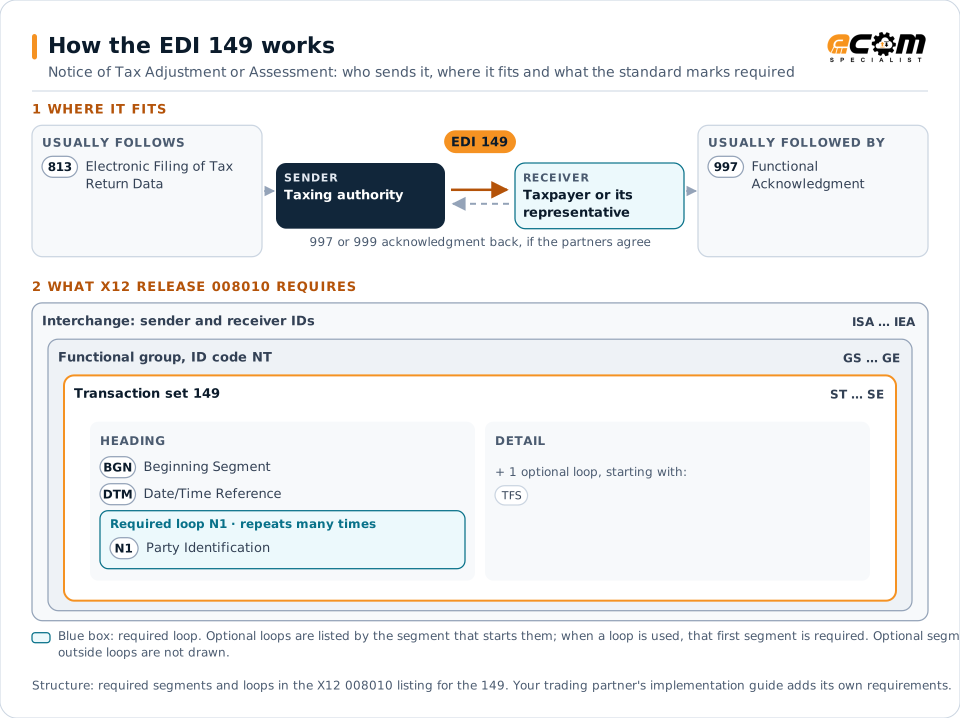
How to read this diagram: the top row shows who sends the 149, to whom, and which documents usually come before and after it. The lower part shows what X12 release 008010 itself requires: the envelopes around the 149 and the segments and loops the standard marks as required, area by area. Optional loops are listed by the segment that starts them rather than drawn in full. This is the standard's minimum, not a trading partner's requirement: each partner's implementation guide usually makes some optional loops mandatory, restricts the codes and may use a different release.
When it is used
- Notifying adjustments to filed returns
- Assessing additional tax, penalties or interest
- Informing taxpayers of amounts due
Where it fits in the document flow
Structure
Mandatory segments in the 149 (X12 release 008010)
The segments X12 release 008010 marks as mandatory at their level, in order. Segments inside optional loops are needed only when the loop is used. This is the standard's requirement, not your trading partner's: each partner's implementation guide names the release it uses, adds the optional segments it requires and restricts the values. The requirement status comes from one published X12 reference listing and has not been checked against a second source.
- ST
- BGN
- DTM
- N1
- TFS
- FGS
- AMT
- SE
Practical example
The 149 in practice
A state revenue department reviews a company's sales tax return and finds a calculation error. It sends the company a 149 explaining the adjustment, the additional tax and interest due and the payment deadline. The company's tax team checks the calculation and pays.
Implementation
Implementation considerations for the 149
- Route notices to the tax team as soon as they arrive.
- Note the deadlines for payment or appeal.
- Reconcile adjustments with the original return.
- Keep notices with the tax filing records.
How ECOM helps
Automate the 149 with ECOM
Solution
Financial Document Automation
Automate invoices, remittances, payment files and bank statements from capture to posting.
Industry
Financial Services
Secure file transfer and B2B integration for banks and financial institutions.
Solution
EDI Integration
Exchange X12 and EDIFACT documents with partners and integrate them directly with your ERP.
More general questions about EDI are answered in the EDI FAQ.
Related transactions
Related government and regulatory documents
- 153Unemployment Insurance Tax Claim or Charge Information
- 150Tax Rate Notification
- 103Abandoned Property Filings
- 105Business Entity Filings
- 154Secured Interest Filing
- 157Notice of Power of Attorney
- 175Court and Law Enforcement Notice
- 176Court Submission
- 521Income or Asset Offset
- 158Tax Jurisdiction Sourcing
- 283Tax or Fee Exemption Certification
Need help with the EDI 149?
ECOM maps, tests and monitors X12 documents for your trading partners and integrates them with your ERP.