
X12 transaction guide · Transportation
EDI 326 Consignment Summary List
The X12 document an ocean carrier or consolidator sends to list all consignments it has accepted, or expects to accept, for transport.
- Sent by
- Ocean carrier or consolidator
- Received by
- Shipper, forwarder, consignee, customs broker or other party
- Standard
- ANSI ASC X12
What is an EDI 326?
The EDI 326 Consignment Summary List is the ANSI X12 transaction set that gives a customer a list of all consignments for which an ocean carrier has accepted, or expects to accept, responsibility for transport. An ocean carrier or consolidator sends it to a shipper, freight forwarder, consignee, customs broker or other interested party.
Instead of tracking each bill of lading separately, the recipient sees all its consignments on a vessel or voyage at once. That helps importers and brokers plan clearance and delivery for everything arriving together.
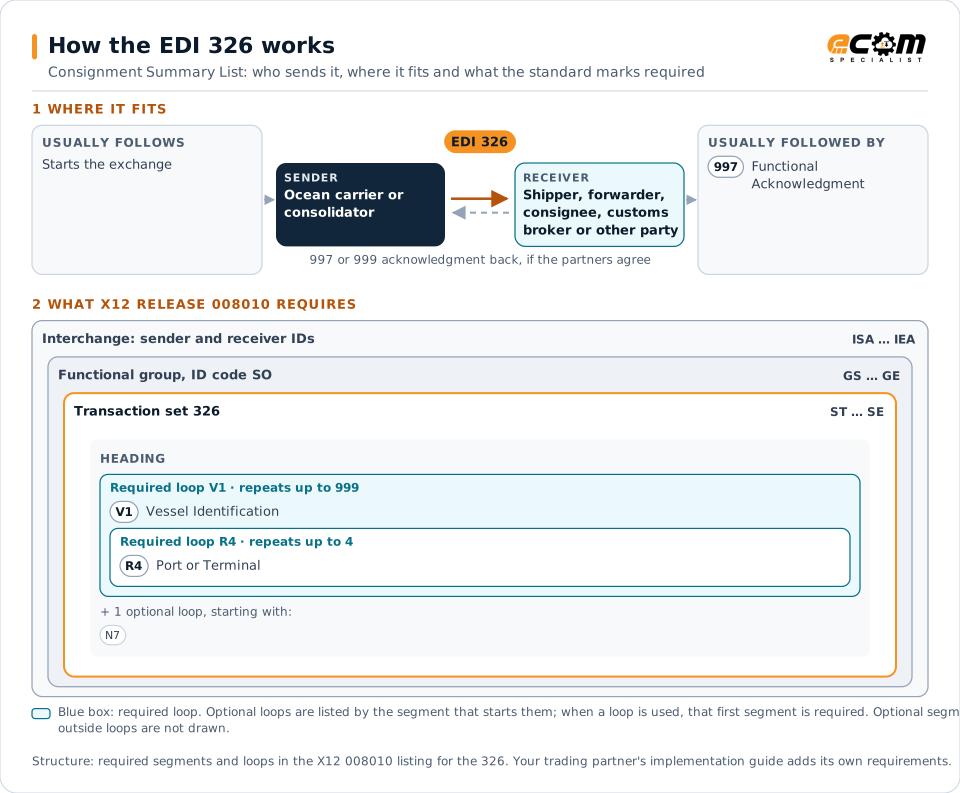
How to read this diagram: the top row shows who sends the 326, to whom, and which documents usually come before and after it. The lower part shows what X12 release 008010 itself requires: the envelopes around the 326 and the segments and loops the standard marks as required, area by area. Optional loops are listed by the segment that starts them rather than drawn in full. This is the standard's minimum, not a trading partner's requirement: each partner's implementation guide usually makes some optional loops mandatory, restricts the codes and may use a different release.
When it is used
- Summarizing a customer's consignments on a voyage
- Helping brokers plan clearance for arriving cargo
- Reconciling bookings against what the carrier accepted
Where it fits in the document flow
Structure
Mandatory segments in the 326 (X12 release 008010)
The segments X12 release 008010 marks as mandatory at their level, in order. Segments inside optional loops are needed only when the loop is used. This is the standard's requirement, not your trading partner's: each partner's implementation guide names the release it uses, adds the optional segments it requires and restricts the values. The requirement status comes from one published X12 reference listing and has not been checked against a second source.
- ST
- V1
- N7
- R4
- SE
Practical example
The 326 in practice
A retailer imports dozens of containers each week through one carrier. For each voyage the carrier sends the retailer and its broker a 326 listing every consignment on board for the retailer, with the bills of lading, containers and ports. The broker uses the list to prepare entries in one batch, and the retailer checks it against its expected purchase orders.
Implementation
Implementation considerations for the 326
- Reconcile the list with bookings and purchase orders to find missing cargo early.
- Share it with customs brokers as well as the consignee.
- Track updates, since consignments can roll to a later vessel.
- Use vessel and voyage identifiers consistent with schedules and status messages.
How ECOM helps
Automate the 326 with ECOM
Industry
Trucking and Transportation
Load tenders, responses, status and freight invoices for carriers, brokers and shippers, integrated with the TMS.
Industry
Retail
Retail and eCommerce EDI for suppliers and retailers, from purchase order to payment, with compliance built in.
Solution
Supply Chain Visibility
Track orders, shipments and invoices across partners and catch exceptions early.
More general questions about EDI are answered in the EDI FAQ.
Related transactions
Related transportation documents
- 163Transportation Appointment Schedule Information
- 213Motor Carrier Shipment Status Inquiry
- 312Arrival Notice (Ocean)
- 315Status Details (Ocean)
- 423Rail Industrial Switch List
- 104Air Shipment Information
- 106Motor Carrier Rate Proposal
- 107Request for Motor Carrier Rate Proposal
- 108Response to a Motor Carrier Rate Proposal
- 109Vessel Content Details
- 120Vehicle Shipping Order
- 121Vehicle Service
Need help with the EDI 326?
ECOM maps, tests and monitors X12 documents for your trading partners and integrates them with your ERP.