
EDIFACT message guide · Travel and tourism
AVLREQ Availability request
The UN/EDIFACT interactive message a customer or agent sends to ask a provider about availability of a travel, tourism or leisure service.
- Sent by
- Customer, travel agent or booking system
- Received by
- Travel service provider
- Standard
- UN/EDIFACT · Interactive (I-EDI) message
- X12 equivalent
- No direct equivalent
What is the EDIFACT AVLREQ message?
AVLREQ is the UN/EDIFACT interactive travel, tourism and leisure availability request. The directory defines it as a message sent by a customer or their agent to a service provider to request availability for a travel, tourism or leisure service. The provider answers with the interactive availability response (AVLRSP).
Availability checks come before booking: the traveler or agent asks what rooms, seats or services are free for given dates, and then books one with a reservation request. Because availability changes constantly, the check is done in real time.
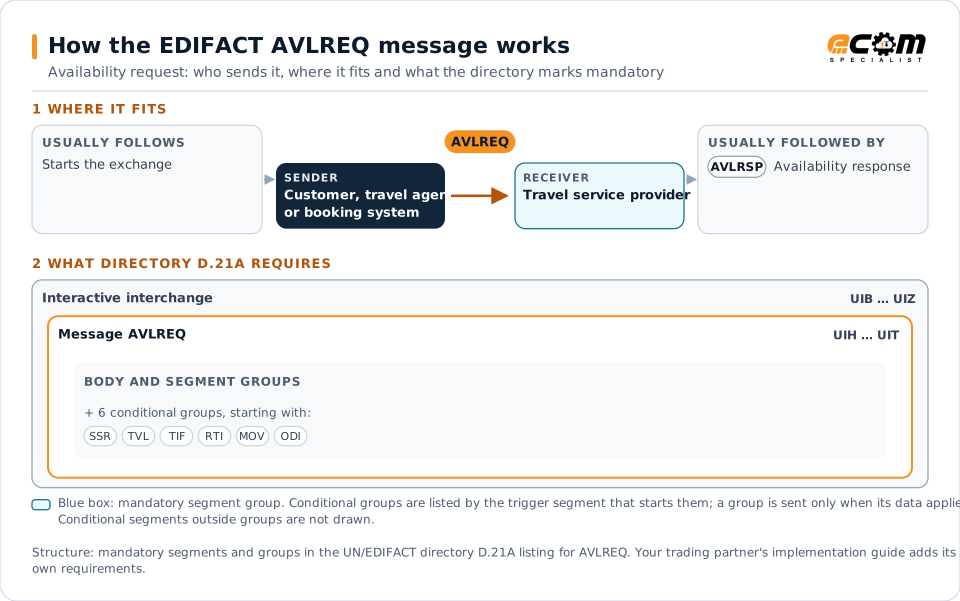
How to read this diagram: the top row shows who sends AVLREQ, to whom, and which messages usually come before and after it. The lower part shows what the directory D.21A itself requires: the envelopes around AVLREQ and the segments and segment groups it marks mandatory. Conditional groups are listed by their trigger segment rather than drawn in full. This is the directory's minimum, not a trading partner's requirement: a message implementation guide usually makes some conditional groups mandatory, restricts the codes and may use an older directory.
When it is used
- Checking hotel room availability for dates
- Checking seats on a journey
- Comparing options before booking
Where it fits in the message flow
Structure
Mandatory segments in AVLREQ (directory D.21A)
In UN/EDIFACT directory D.21A, the AVLREQ message has 54 segment positions arranged in 9 segment groups. These are the segments and segment groups marked mandatory at message level, in order; a mandatory group is shown with the segment that starts it. Segments inside conditional groups are needed only when the group is used. This is the directory’s requirement, not your trading partner’s: each partner’s message implementation guide names the directory it uses, often an older one such as D.96A or D.01B where the structure can differ, makes some conditional segments mandatory and restricts the codes. This structure comes from one published copy of the directory and has not been independently verified: confirm it before you build a map.
- UIH
- UIT
Practical example
AVLREQ in practice
A travel agent searches for a hotel in Vienna for three nights. The booking system sends several hotels an AVLREQ for the dates and room type. Each hotel answers with an AVLRSP listing available rooms and rates, and the agent books the best option with a RESREQ.
Implementation
Implementation considerations for AVLREQ
- Design for high request volumes compared with bookings.
- Cache cautiously, since availability changes quickly.
- Handle timeouts gracefully without blocking the user.
- Check which interactive standards each provider supports.
How ECOM helps
Automate AVLREQ with ECOM
Industry
Hospitality
Procurement, invoicing and supplier integration for hotels, restaurant groups and foodservice suppliers.
Solution
Batch and Real-Time Integration
Scheduled batch processing and real-time, API-driven integration on one platform.
Solution
API Integration
Connect partner and application APIs to your systems and bridge them with EDI processes.
Compare X12 and EDIFACT, or see answers to general questions in the EDI FAQ.
Related messages
Related travel and tourism messages
- AVLRSPAvailability response
- RESREQReservation request
- RESRSPReservation response
- SKDREQSchedule request
- TIQREQTravel, tourism and leisure information inquiry request
- TIQRSPTravel, tourism and leisure information inquiry response
- TSDUPDTimetable static data update
- PASREQTravel, tourism and leisure product application status request
- PASRSPTravel, tourism and leisure product application status response
- RESMSGReservation
- SKDUPDSchedule update
- STLRPTSettlement transaction reporting
Need help with AVLREQ?
ECOM maps, tests and monitors EDIFACT messages for your trading partners and integrates them with your ERP.