
EDIFACT message guide · Communications
INSREQ Inspection request
The UN/EDIFACT message a supplier sends to tell a customer that items are ready for inspection before despatch.
- Sent by
- Supplier
- Received by
- Customer or its inspection service
- Standard
- UN/EDIFACT · Batch message
- X12 equivalent
- No direct equivalent
What is the EDIFACT INSREQ message?
INSREQ is the UN/EDIFACT inspection request. The directory defines it as a message sent by a supplier to inform a customer that items are ready for inspection prior to despatch.
Many buyers, especially of manufactured goods made overseas, inspect goods before they ship. The request tells the buyer or its inspection agency what is ready, where and when, so an inspector can be scheduled. The results come back in an inspection report (INSRPT), and goods usually ship only after passing.
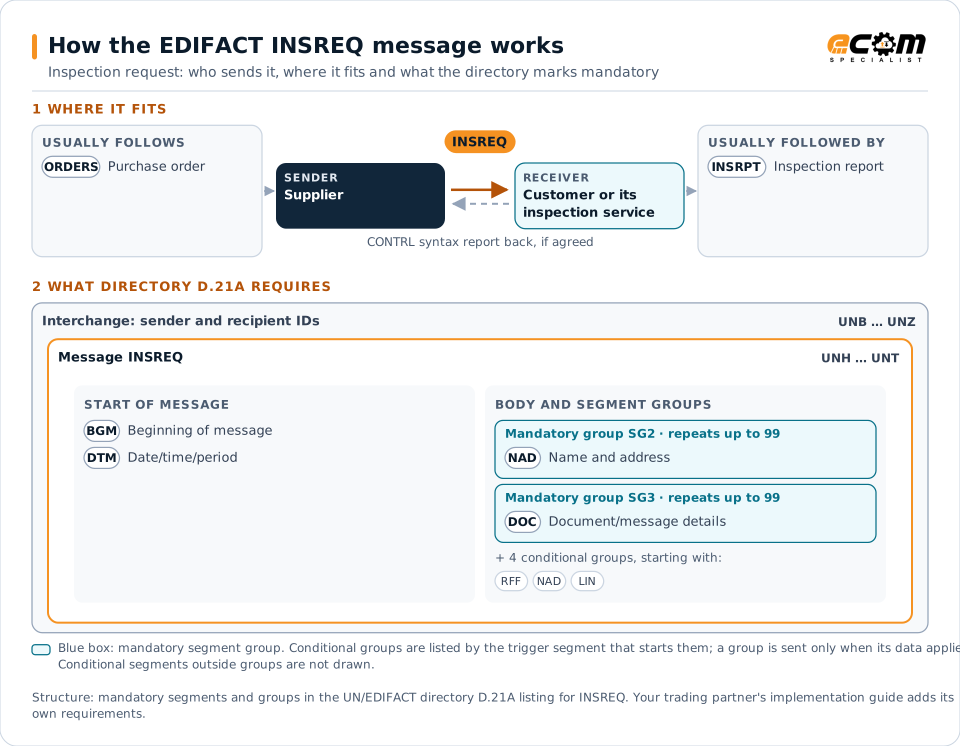
How to read this diagram: the top row shows who sends INSREQ, to whom, and which messages usually come before and after it. The lower part shows what the directory D.21A itself requires: the envelopes around INSREQ and the segments and segment groups it marks mandatory. Conditional groups are listed by their trigger segment rather than drawn in full. This is the directory's minimum, not a trading partner's requirement: a message implementation guide, such as an industry subset or a partner’s own guide, usually makes some conditional groups mandatory, restricts the codes and may use an older directory.
When it is used
- Requesting pre-shipment inspection of finished goods
- Scheduling inspections at a factory
- Requesting re-inspection after rework
Where it fits in the message flow
Structure
Mandatory segments in INSREQ (directory D.21A)
In UN/EDIFACT directory D.21A, the INSREQ message has 29 segment positions arranged in 9 segment groups. These are the segments and segment groups marked mandatory at message level, in order; a mandatory group is shown with the segment that starts it. Segments inside conditional groups are needed only when the group is used. This is the directory’s requirement, not your trading partner’s: each partner’s message implementation guide names the directory it uses, often an older one such as D.96A or D.01B where the structure can differ, makes some conditional segments mandatory and restricts the codes.
- UNH
- BGM
- DTM
- SG2 (NAD)
- SG3 (DOC)
- UNT
Practical example
INSREQ in practice
A garment factory finishes production of an order for a European retailer. It sends the retailer's inspection agency an INSREQ with the order, styles, quantities packed, the factory address and the dates the goods are available. The agency schedules an inspector, who checks a sample and reports the results.
Implementation
Implementation considerations for INSREQ
- Send requests early enough for inspectors to be scheduled.
- Reference the orders and items exactly as ordered.
- State quantities ready, especially for partial shipments.
- Hold goods until inspection results arrive.
How ECOM helps
Automate INSREQ with ECOM
Industry
Retail
Retail and eCommerce EDI for suppliers and retailers, from purchase order to payment, with compliance built in.
Industry
Consumer Goods
Retail, distributor, marketplace and direct-channel integration for consumer brands.
Solution
Supply Chain Visibility
Track orders, shipments and invoices across partners and catch exceptions early.
Compare X12 and EDIFACT, or see answers to general questions in the EDI FAQ.
Related messages
Related communications messages
Need help with INSREQ?
ECOM maps, tests and monitors EDIFACT messages for your trading partners and integrates them with your ERP.