
EDIFACT message guide · Insurance
LREACT Life reinsurance activity
The UN/EDIFACT message companies use to exchange insured and policy coverage detail for life reinsurance, ceded or assumed.
- Sent by
- Ceding life insurer or reinsurer
- Received by
- Reinsurer or ceding insurer
- Standard
- UN/EDIFACT · Batch message
- X12 equivalent
- No direct equivalent
What is the EDIFACT LREACT message?
LREACT is the UN/EDIFACT life reinsurance activity message. The directory defines it as a message companies use to exchange insured and policy coverage detail for reinsurance purposes, for both ceded and assumed reinsurance.
Life reinsurance is administered policy by policy: new business, changes, terminations and premiums for each insured life must be reported to the reinsurer. The activity message carries those events so both parties keep the same records of reinsured coverage. Activity is usually reported monthly or quarterly, depending on the treaty, and reconciled periodically with the reinsurer's records.
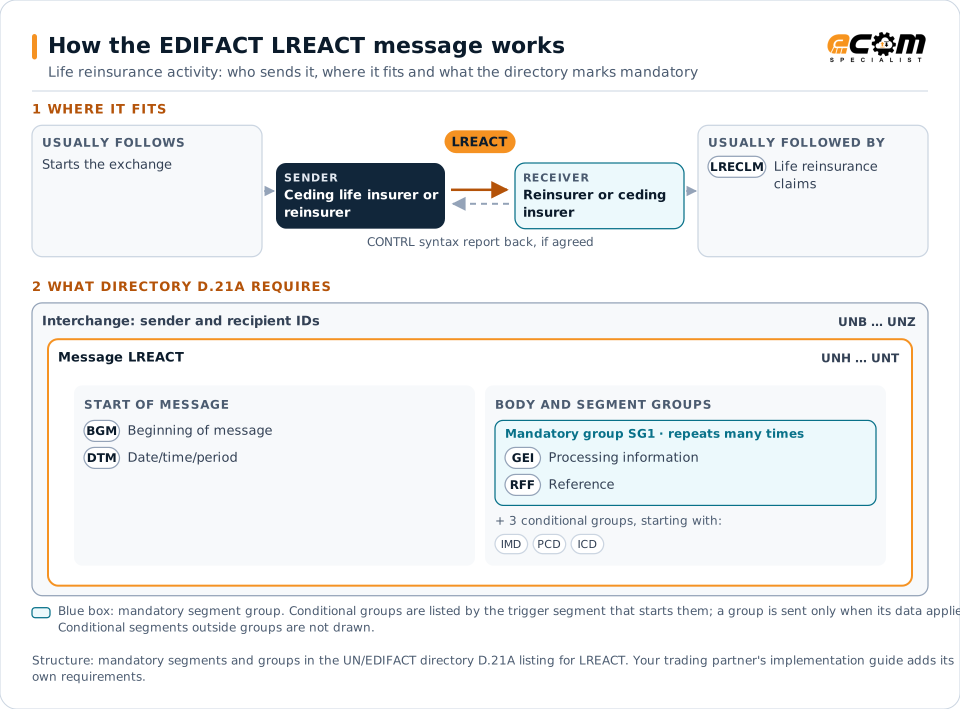
How to read this diagram: the top row shows who sends LREACT, to whom, and which messages usually come before and after it. The lower part shows what the directory D.21A itself requires: the envelopes around LREACT and the segments and segment groups it marks mandatory. Conditional groups are listed by their trigger segment rather than drawn in full. This is the directory's minimum, not a trading partner's requirement: a message implementation guide, such as an industry subset or a partner’s own guide, usually makes some conditional groups mandatory, restricts the codes and may use an older directory.
When it is used
- Reporting new life policies ceded to a reinsurer
- Reporting changes and terminations
- Reporting reinsurance premiums per policy
Where it fits in the message flow
Structure
Mandatory segments in LREACT (directory D.21A)
In UN/EDIFACT directory D.21A, the LREACT message has 37 segment positions arranged in 9 segment groups. These are the segments and segment groups marked mandatory at message level, in order; a mandatory group is shown with the segment that starts it. Segments inside conditional groups are needed only when the group is used. This is the directory’s requirement, not your trading partner’s: each partner’s message implementation guide names the directory it uses, often an older one such as D.96A or D.01B where the structure can differ, makes some conditional segments mandatory and restricts the codes.
- UNH
- BGM
- DTM
- SG1 (GEI)
- UNT
Practical example
LREACT in practice
A life insurer cedes the excess over its retention on large policies. Each month it sends the reinsurer an LREACT with new policies above retention, increases and terminations, with the insured amounts and reinsurance premiums. The reinsurer updates its records and checks premiums against the treaty.
Implementation
Implementation considerations for LREACT
- Protect personal and health data under applicable law.
- Report each event promptly, with the date it takes effect.
- Reconcile reinsured amounts periodically.
- Use policy identifiers both parties keep.
How ECOM helps
Automate LREACT with ECOM
Industry
Financial Services
Secure file transfer and B2B integration for banks and financial institutions.
Industry
Healthcare
Secure B2B integration and file transfer for providers, suppliers, distributors and healthcare partners.
Solution
B2B Integration
Connect every customer, supplier, carrier and bank across EDI, API, file and portal channels.
Compare X12 and EDIFACT, or see answers to general questions in the EDI FAQ.
Related messages
Related insurance messages
- LRECLMLife reinsurance claims
- REBORDReinsurance bordereau
- RECALCReinsurance calculation
- RECLAMReinsurance claims
- RECORDReinsurance core data
- REPREMReinsurance premium
- RESETTReinsurance settlement
- RETACCReinsurance technical account
- ICASRPInsurance claim assessment and reporting
- ICSOLIInsurance claim solicitor's instruction
- IFTICLCargo insurance claims
- INSPREInsurance premium
Need help with LREACT?
ECOM maps, tests and monitors EDIFACT messages for your trading partners and integrates them with your ERP.