
B2B communication protocols
RosettaNet RNIF: messaging for PIP exchanges
The RosettaNet Implementation Framework (RNIF) defines how RosettaNet business messages, called PIPs, are packaged, secured, sent and acknowledged. High-tech, electronics and semiconductor companies use it, as do partners following the chemical industry's Chem eStandards. ECOM sets up RNIF connections and maps the PIPs to your ERP.
- Versions
- RNIF 2.0 (and older 1.1)
- Transport
- HTTP or HTTPS
- Security
- S/MIME signing and encryption, TLS
- Reliability
- Receipt acknowledgments, retries, time limits
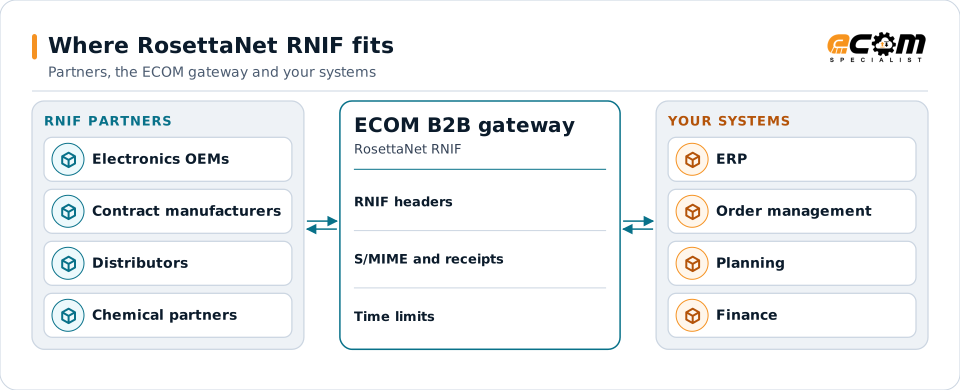
Partners exchange PIPs over RNIF; the gateway handles the messaging rules and maps the content.
Overview
What RosettaNet RNIF is
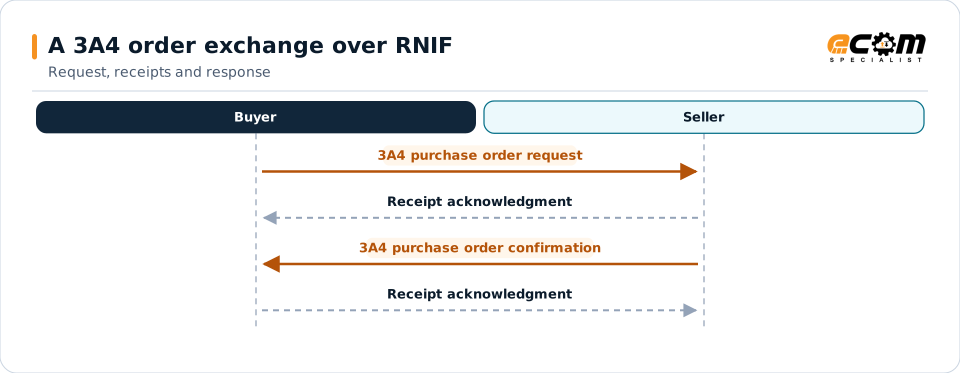
RosettaNet defines Partner Interface Processes (PIPs): standard business conversations such as 3A4 for a purchase order request and confirmation. RNIF is the messaging layer underneath. It wraps each PIP message with headers that identify the partners and the process, protects it with S/MIME, and requires a receipt acknowledgment.
RNIF also sets time limits. If a receipt does not arrive within the agreed time, the sender retries; if a business response does not arrive in time, the process fails and both sides are notified.
Where businesses use it
High-tech and electronics
Orders, forecasts, ship notices and invoices between manufacturers, contract manufacturers and distributors.
Semiconductors
Order and inventory processes between chip companies and their partners.
Chemicals
Chem eStandards transactions carried in RNIF messages.
How it works
How an RNIF message is built and exchanged
An RNIF 2.0 message is a MIME package with a preamble header, a delivery header naming sender and receiver, a service header identifying the PIP, its role and the process instance, then the service content (the PIP's XML) and any attachments. The package can be signed and encrypted with S/MIME and is posted over HTTPS.
The receiver validates the message and returns a signed receipt acknowledgment. A business response, such as a purchase order confirmation, comes later as its own message with its own receipt.
Every business message gets its own receipt. If a receipt or response is late, the sender retries or the process is reported as failed.
In depth
RNIF in practice
Headers
Preamble, delivery and service headers identify the partners, the PIP, the role and the process instance.
S/MIME security
Messages can be signed and encrypted; current algorithms are used where partners support them.
Receipts and retries
Receipt acknowledgments must arrive in time; retries are automatic.
Time to perform
Business responses must arrive within the PIP's agreed time, or the process fails with a notification.
PIP versions
Partners agree the PIP versions they use; maps validate against them.
Partner agreements
Endpoints, certificates and process settings are agreed with each partner.
In practice
Example: a contract manufacturer receiving orders by RNIF
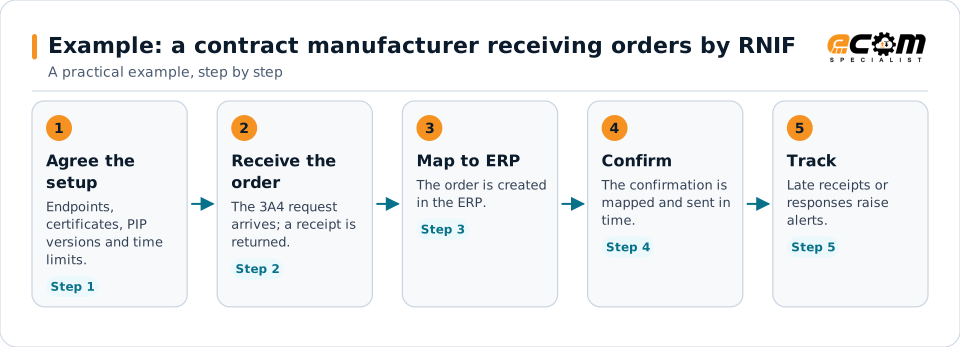
A contract manufacturer receives 3A4 orders and returns confirmations within the agreed time.
The time limits are part of the agreement, so tracking them is part of the work.
Connections
How RosettaNet RNIF connects your business
High-tech partners
Manufacturers, distributors and contract manufacturers.
PIP content
The PIP XML is mapped to your ERP.
ERP
Orders, forecasts and shipments update your systems.
Monitoring
Receipts, retries and time limits are tracked.
ECOM
How ECOM supports RosettaNet RNIF
ECOM supports RosettaNet RNIF with dedicated implementation, mapping, communication and support teams, and with specialists who know the industries your partners work in.
Implementation team
Plans the RosettaNet RNIF setup with you, configures it on the gateway and runs the tests with your partners and systems.
Mapping team
Builds and maintains the maps, code conversions and validation rules between partner data and your applications.
Communication team
Sets up and monitors partner connections, certificates, keys and credentials, and coordinates changes with each partner.
Support team
Watches the flows, investigates failed or missing documents, and works the issue through with you and your partner.
For RosettaNet RNIF in particular
- RNIF endpoints, certificates, receipts, retries and time-limit tracking.
- Maps for the PIPs your partners use.
- Partner onboarding for RNIF: exchanging connection details, testing in both directions and confirming the go-live date with each partner.
- Monitoring of every connection, with alerts for failed, missing or unacknowledged transfers.
Frequently asked questions
What is the difference between RosettaNet and RNIF?
RosettaNet defines the business processes and messages (PIPs). RNIF defines how those messages are packaged, secured, sent and acknowledged.
Which RNIF version is used?
Most partners use RNIF 2.0; some older connections use 1.1. Partners agree the version.
What happens if a receipt does not arrive?
The sender retries within the agreed limits. If the process still does not complete in time, both sides are notified.
Can PIPs be mapped to X12?
Yes. PIP content can be mapped to your ERP format or to X12 for other partners.
Talk to an EDI/API Expert
Tell us which partners, systems and RosettaNet RNIF requirements you are working with. An ECOM specialist will review them with you and outline the setup, the maps and the tests.