
EDI and B2B standards
CIDX Chem eStandards for the chemical industry
The Chem eStandards, developed by CIDX (Chemical Industry Data Exchange), define XML transactions for buying, selling and shipping chemicals. Chemical producers, distributors and logistics partners still use them. ECOM maps Chem eStandards transactions and the RNIF messaging around them.
- Developed by
- CIDX, the chemical industry's e-business group
- Industry
- Chemicals and plastics
- Format
- XML transactions
- Messaging
- RosettaNet Implementation Framework (RNIF)
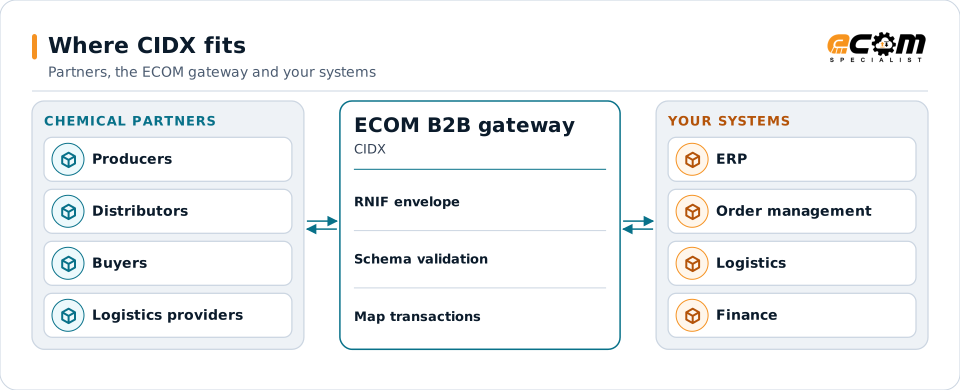
Chemical partners exchange Chem eStandards inside RNIF; the gateway opens, checks and maps them for your systems.
Overview
What CIDX is
CIDX was formed by chemical companies to agree on electronic business standards. Its Chem eStandards are XML transactions for orders, order responses, ship notices, invoices, inventory and logistics, written for the specifics of chemicals: bulk quantities, hazardous materials and transport by rail, truck and vessel.
CIDX no longer operates as a stand-alone organization, but the Chem eStandards remain in use between established trading partners. They are commonly sent inside the RosettaNet Implementation Framework (RNIF), which adds headers, signing, encryption and receipt acknowledgments.
Where businesses use it
Order to invoice
Chemical buyers and sellers exchange orders, order responses, ship notices and invoices.
Logistics
Load tenders, shipment status and freight details for bulk and packaged chemicals.
Inventory and consignment
Inventory reports and consumption data for vendor-managed and consigned stock.
Structure
How a Chem eStandards transaction is structured
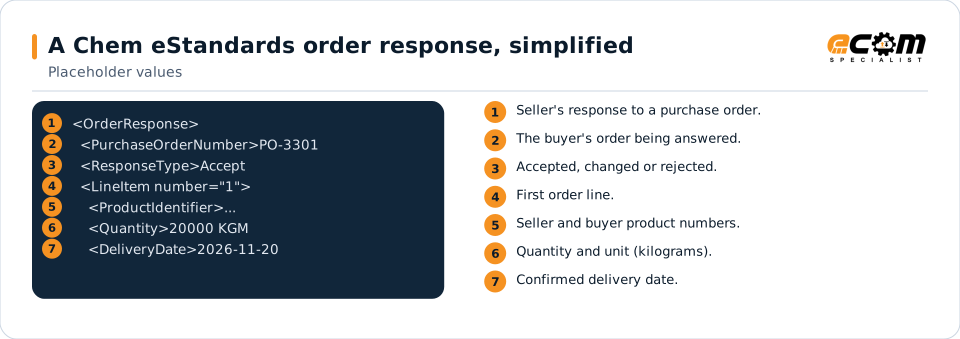
Each transaction is an XML document defined by a schema: a header with document identifiers, dates and parties, followed by line items with product, quantity, unit and delivery details. Chemical-specific details, such as packaging type or hazardous material information, have their own elements.
For transport, the XML is placed in an RNIF message with preamble, delivery and service headers. The message can be signed and encrypted, and the receiver returns a receipt acknowledgment.
The response references the buyer's order, states whether it is accepted, and confirms each line's product, quantity and delivery date.
In depth
What Chem eStandards connections involve
Transaction set
Orders, order responses, ship notices, invoices, inventory and logistics transactions, each defined by its schema.
RNIF envelope
Headers identify the partners and process; S/MIME signing and encryption protect the content; receipts confirm delivery.
Units and quantities
Bulk quantities in weight or volume units are converted between partner and ERP units.
Hazardous materials
Hazard information travels with shipment data where partners require it.
Partner agreements
Partners agree which transactions and versions they use; maps follow the agreement.
Coexistence with X12
Some chemical partners use X12 for the same documents; both run on the same gateway.
Mapping
How a mapper reads and writes CIDX
CIDX as input
The RNIF envelope is opened and verified, then the XML is validated against its schema and mapped to orders, shipments or invoices in your ERP.
CIDX as output
Data from your ERP is written as the Chem eStandards XML, validated, wrapped in RNIF, signed and encrypted if agreed, and sent.
What the mapping handles
Fields
Order numbers, dates, parties and products are mapped.
Loops
Line items and schedule lines become ERP lines.
Validation
Schema validation plus partner requirements.
Code conversions
Units and product numbers are converted.
Business rules
Accept, change or reject logic is driven by ERP confirmation status.
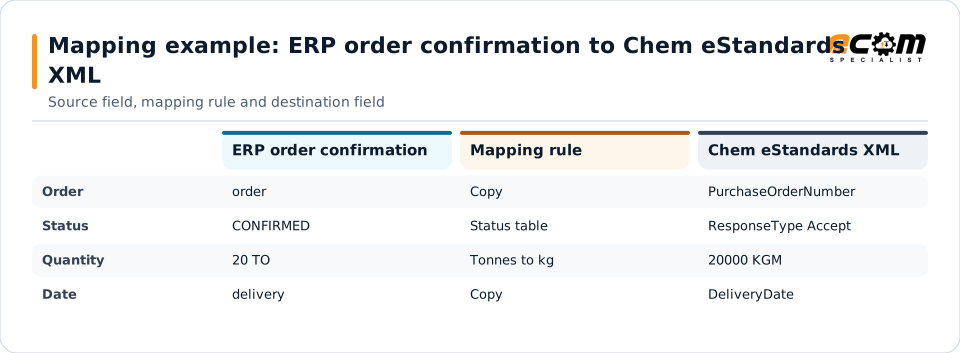
Example: source, mapping, destination
order=PO-3301 status=CONFIRMED
line=1 material=RESIN-44 qty=20 uom=TO
delivery=2026-11-20<OrderResponse>
<PurchaseOrderNumber>PO-3301</PurchaseOrderNumber>
<ResponseType>Accept</ResponseType>
<LineItem number="1">
<Quantity unit="KGM">20000</Quantity>
</LineItem>
</OrderResponse>An ERP confirmation becomes the order response the buyer expects. Units are converted to the ones agreed with the partner.
Connections
How CIDX connects your business
Chemical partners
Producers, distributors and buyers exchange transactions over RNIF.
Logistics providers
Carriers and terminals receive shipment data for bulk and packaged moves.
ERP
Orders, deliveries and invoices are created and updated in your ERP.
Compliance
Hazardous material data stays with the shipment.
ECOM
How ECOM supports CIDX
ECOM supports CIDX with dedicated implementation, mapping, communication and support teams, and with specialists who know the industries your partners work in.
Implementation team
Plans the CIDX setup with you, configures it on the gateway and runs the tests with your partners and systems.
Mapping team
Builds and maintains the maps, code conversions and validation rules between partner data and your applications.
Communication team
Sets up and monitors partner connections, certificates, keys and credentials, and coordinates changes with each partner.
Support team
Watches the flows, investigates failed or missing documents, and works the issue through with you and your partner.
For CIDX in particular
- Maps for Chem eStandards transactions to and from your ERP.
- RNIF messaging, certificates, signing, encryption and receipts.
- Unit, product and hazard data conversions.
Frequently asked questions
Are the Chem eStandards still used?
Yes, between established chemical trading partners, even though CIDX no longer operates on its own. New connections may use the Chem eStandards, X12 or other formats, depending on what partners agree.
How are Chem eStandards messages sent?
Usually inside the RosettaNet Implementation Framework (RNIF), which adds headers, optional signing and encryption, and receipt acknowledgments, over HTTPS.
Can ECOM convert Chem eStandards to X12 or our ERP format?
Yes. Transactions are mapped to your ERP format, and the same data can be produced as X12 for partners who prefer it.
What do we need to provide?
The partner's transaction list and version, sample messages, and its RNIF connection details and certificates.
Talk to an EDI/API Expert
Tell us which partners, systems and CIDX requirements you are working with. An ECOM specialist will review them with you and outline the setup, the maps and the tests.