
B2B communication protocols
WebDAV file exchange over HTTPS
WebDAV extends HTTP so files and folders can be managed on a web server: uploaded, downloaded, listed, moved and locked. Some document platforms and partners exchange files this way. ECOM connects to WebDAV servers over HTTPS and brings their files into your integration flows.
- Specification
- IETF RFC 4918
- Transport
- HTTP, normally HTTPS
- Operations
- PUT, GET, PROPFIND, MKCOL, MOVE, LOCK
- Used by
- Document platforms, file services, partners
The gateway reaches WebDAV folders securely and brings their files into your flows.
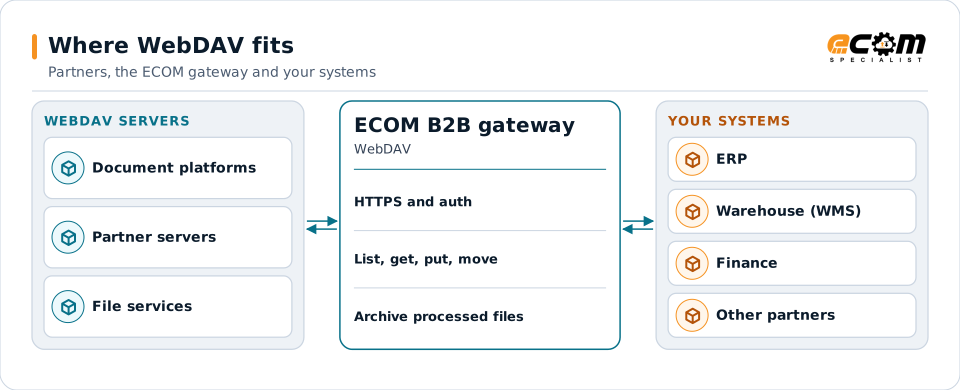
Overview
What WebDAV is
WebDAV (Web Distributed Authoring and Versioning) adds methods to HTTP for working with files and folders on a server. A client can list a folder's contents with PROPFIND, upload with PUT, create a folder with MKCOL, and lock a file while editing it.
Because it runs over HTTPS, it passes through most firewalls and uses the same TLS and authentication as other web traffic.
Where businesses use it
Document platforms
Content and collaboration platforms that offer WebDAV access.
Partner file exchange
Partners that publish files on a WebDAV server.
Shared folders over the web
Exchanging files where SFTP is not available.
How it works
How WebDAV exchange works
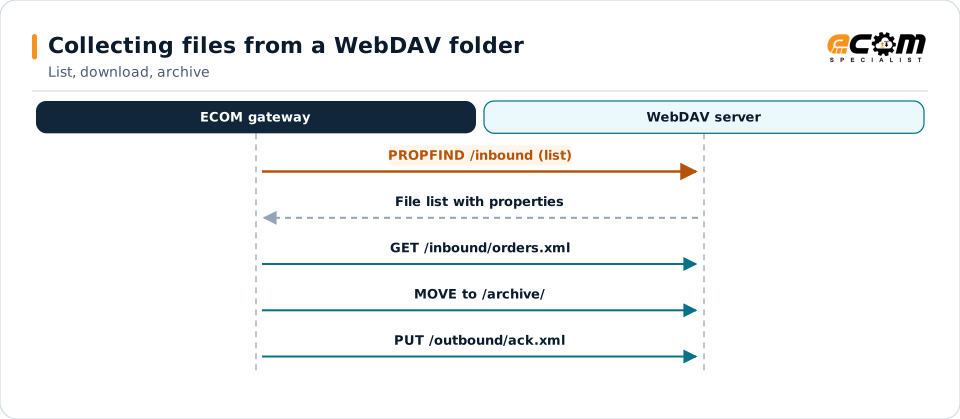
The client authenticates over HTTPS, uses PROPFIND to list new files, GET to download them and MOVE or DELETE to archive them. To send, it uses PUT, often to a temporary name followed by MOVE, so the receiver never sees a partial file.
Locks prevent two clients from changing the same file at once; properties carry metadata such as size and modification date.
Listing, downloading and archiving are separate HTTP requests over the same secure connection.
In depth
WebDAV in practice
HTTPS only
WebDAV is used over HTTPS so credentials and files are encrypted in transit.
Authentication
Basic over TLS, tokens or client certificates, as the server requires.
New-file detection
Folder listings and modification dates identify new files; processed files are moved to an archive.
Locking
Locks prevent conflicts when several systems use the same folder.
Large files
Timeouts and chunked transfer are set for large files.
Server differences
Servers implement WebDAV slightly differently; each connection is tested against the real server.
In practice
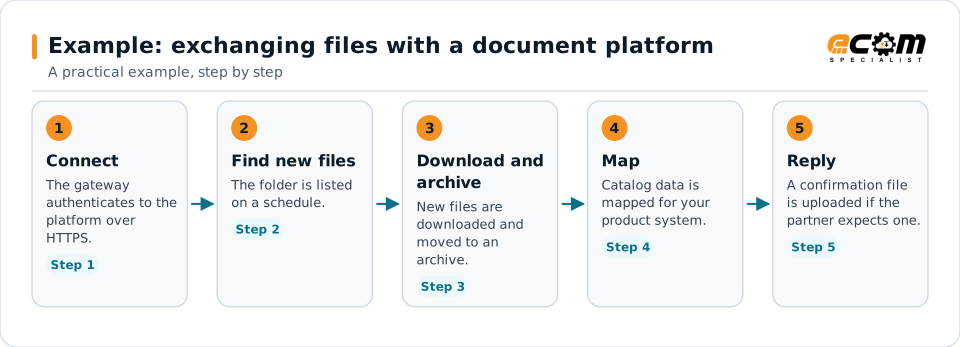
Example: exchanging files with a document platform
A partner places catalog files on a document platform that offers WebDAV.
WebDAV works like a shared folder, reached securely over the web.
Connections
How WebDAV connects your business
Partners and platforms
Files on WebDAV servers reach your flows.
Translation
Files are translated and mapped like any others.
ERP and product systems
Data reaches your applications.
Monitoring
Failed connections and missing files raise alerts.
ECOM
How ECOM supports WebDAV
ECOM supports WebDAV with dedicated implementation, mapping, communication and support teams, and with specialists who know the industries your partners work in.
Implementation team
Plans the WebDAV setup with you, configures it on the gateway and runs the tests with your partners and systems.
Mapping team
Builds and maintains the maps, code conversions and validation rules between partner data and your applications.
Communication team
Sets up and monitors partner connections, certificates, keys and credentials, and coordinates changes with each partner.
Support team
Watches the flows, investigates failed or missing documents, and works the issue through with you and your partner.
For WebDAV in particular
- WebDAV client connections over HTTPS, with folder, naming and archive rules.
- Partner onboarding for WebDAV: exchanging connection details, testing in both directions and confirming the go-live date with each partner.
- Monitoring of every connection, with alerts for failed, missing or unacknowledged transfers.
Frequently asked questions
Is WebDAV secure?
When used over HTTPS, yes: the connection and credentials are encrypted with TLS. WebDAV over plain HTTP should be avoided.
How is WebDAV different from SFTP?
Both exchange files with a server. WebDAV runs over HTTPS and passes easily through web firewalls; SFTP runs over SSH. The partner's server usually decides.
Can the gateway detect new files on a WebDAV server?
Yes, by listing the folder and comparing names and dates, then moving processed files to an archive.
Does every server behave the same?
Not exactly. Each connection is tested against the actual server.
Talk to an EDI/API Expert
Tell us which partners, systems and WebDAV requirements you are working with. An ECOM specialist will review them with you and outline the setup, the maps and the tests.