
B2B communication protocols
Zengin TCP/IP for banking in Japan
Zengin TCP/IP is a communication procedure published by the Japanese Bankers Association for exchanging files between companies and banks in Japan: transfer requests, account statements and collection data. ECOM connects your systems to banks using it and maps Zengin-format files to your ERP.
- Published by
- Japanese Bankers Association (Zenginkyo)
- Used for
- Company-to-bank file exchange in Japan
- Network
- TCP/IP
- File formats
- Zengin fixed-length record formats
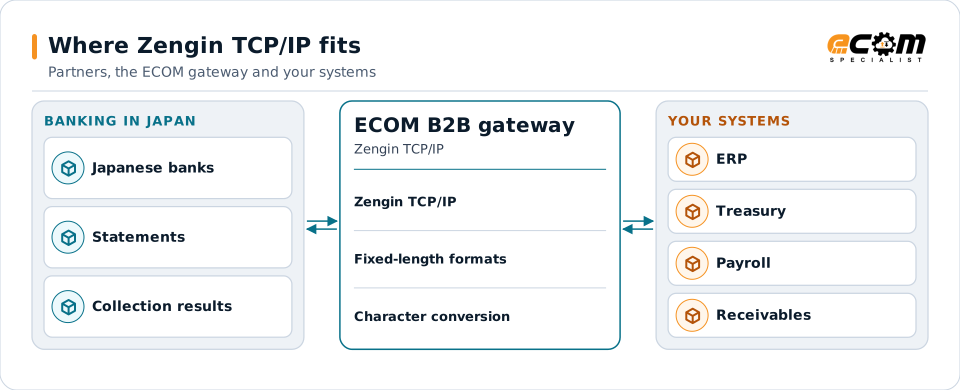
The gateway connects your systems to Japanese banks and converts Zengin files both ways.
Overview
What Zengin TCP/IP is
Zengin is short for Zenkoku Ginko Kyokai, the Japanese Bankers Association. It publishes standard communication procedures and file formats that Japanese banks and companies use for corporate banking. The TCP/IP procedure defines how a company's system connects to a bank and transfers files over TCP/IP networks.
The files themselves follow Zengin formats: fixed-length records with header, data, trailer and end records for transfers, salary payments, collections and account statements. Banks publish the details they require for each service.
Where businesses use it
Payments in Japan
Bulk transfer and salary payment requests to Japanese banks.
Collections
Account transfer (direct debit) requests and results.
Statements
Deposit and account statements for reconciliation.
How it works
How a Zengin exchange works
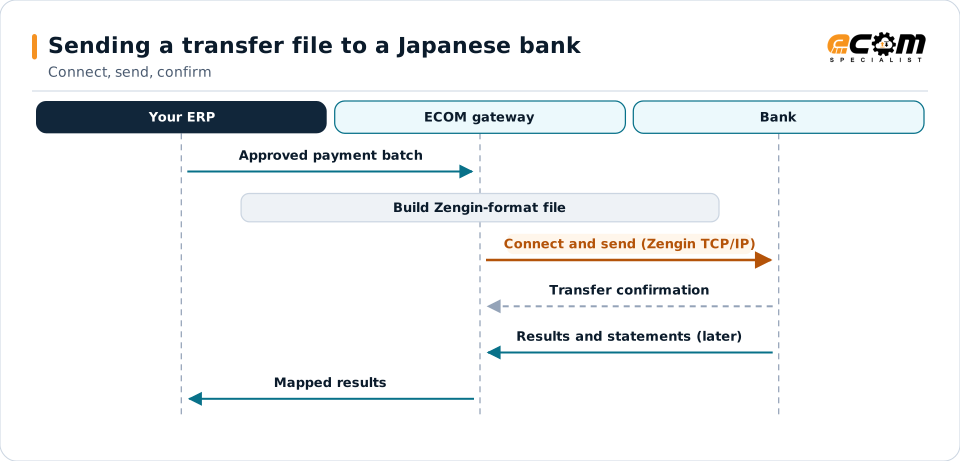
The company's system connects to the bank over the agreed network, authenticates with the identifiers and credentials the bank issues, and sends or receives files according to the procedure. The bank confirms each transfer.
Each file is a set of fixed-length records: a header with the company and bank details, data records for each transfer or statement line, a trailer with counts and totals, and an end record.
The gateway builds the Zengin file and handles the bank connection; confirmations and results come back to the ERP.
In depth
Zengin in practice
Bank specifications
Each bank publishes its connection details and the Zengin formats and options it uses; setup follows them.
Fixed-length records
Header, data, trailer and end records with exact field positions.
Character encoding
Zengin files use Japanese character sets such as half-width katakana for names; the gateway converts them.
Totals and counts
Trailer counts and amounts are calculated and checked.
Network connection
Network and security settings are agreed with the bank.
Results
Transfer and collection results are mapped back to your ERP.
Mapping
How a mapper reads and writes Zengin TCP/IP
Zengin TCP/IP as input
Statement and result files are cut into records by position, decoded from the bank's character set, and mapped to your accounts and open items.
Zengin TCP/IP as output
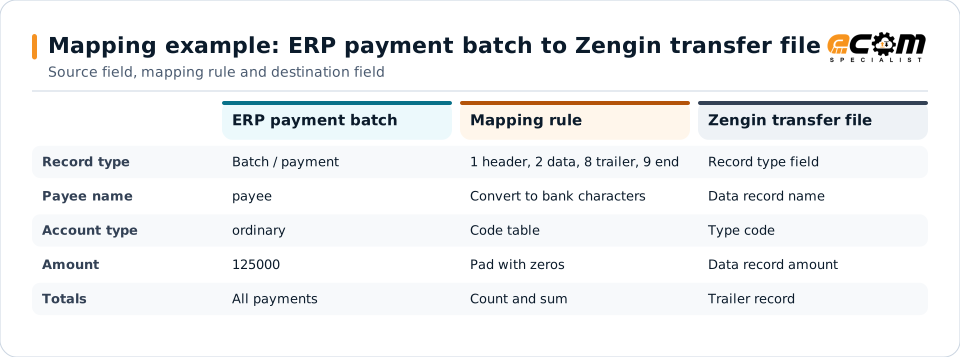
Payment batches from your ERP become header, data, trailer and end records in the bank's Zengin format, with names converted to the required characters and totals calculated.
What the mapping handles
Fields
Bank codes, branch codes, account types, numbers, names and amounts are placed at fixed positions.
Loops
One data record per payment or statement line.
Validation
Lengths, numeric fields and totals are checked.
Code conversions
Account types and names are converted to the bank's codes and characters.
Business rules
Transfer dates and fees follow your agreement with the bank.
Example: source, mapping, destination
{ "valueDate": "2026-11-25",
  "payments": [{ "payee": "Yamada Shoji",
    "bank": "XXXX", "branch": "XXX",
"type": "ordinary", "amount": 125000 }] }1 ... header (company, date) ...
2 XXXX XXX 1 ... YAMADA SHOJI 125000
8 ... count 1, total 125000 ...
9A payment batch becomes the bank's fixed-length Zengin records. Bank and account numbers are placeholders.
Connections
How Zengin TCP/IP connects your business
Japanese banks
Connections set up to each bank's specification.
ERP and treasury
Payments go out and results come back.
Payroll
Salary transfer files from payroll systems.
Receivables
Statements and collection results update open items.
ECOM
How ECOM supports Zengin TCP/IP
ECOM supports Zengin TCP/IP with dedicated implementation, mapping, communication and support teams, and with specialists who know the industries your partners work in.
Implementation team
Plans the Zengin TCP/IP setup with you, configures it on the gateway and runs the tests with your partners and systems.
Mapping team
Builds and maintains the maps, code conversions and validation rules between partner data and your applications.
Communication team
Sets up and monitors partner connections, certificates, keys and credentials, and coordinates changes with each partner.
Support team
Watches the flows, investigates failed or missing documents, and works the issue through with you and your partner.
For Zengin TCP/IP in particular
- Bank connections set up to each bank's Zengin specification.
- Zengin file formats mapped to and from your ERP, with character conversion.
- Partner onboarding for Zengin TCP/IP: exchanging connection details, testing in both directions and confirming the go-live date with each partner.
- Monitoring of every connection, with alerts for failed, missing or unacknowledged transfers.
Frequently asked questions
What is Zengin?
Zengin refers to the Japanese Bankers Association (Zenkoku Ginko Kyokai), which publishes communication procedures and file formats for corporate banking in Japan.
What do Zengin files look like?
They are fixed-length record files with header, data, trailer and end records. Banks publish the exact formats and options they use.
Can names in Japanese characters be handled?
Yes. Names are converted to the character set the bank requires, such as half-width katakana.
What do we need to start?
Your bank's specification for the service, its connection details and the identifiers it issues, plus sample files.
Talk to an EDI/API Expert
Tell us which partners, systems and Zengin TCP/IP requirements you are working with. An ECOM specialist will review them with you and outline the setup, the maps and the tests.