
EDI and B2B standards
NACHA ACH files for payments and remittance
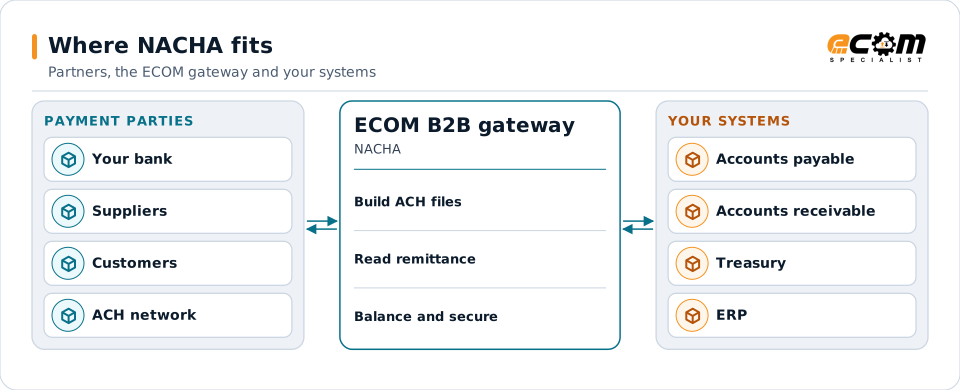
Businesses pay suppliers and collect from customers through the US Automated Clearing House (ACH) network, using files in the format Nacha publishes. ECOM builds ACH files from your ERP, reads the remittance that comes with incoming payments, and connects them with EDI.
- Rules published by
- Nacha
- Record length
- 94 characters, fixed width
- Common business codes
- CCD, CCD+, CTX
- Remittance
- Addenda records, including X12 820 in CTX
Payment files go to your bank; remittance comes back. The gateway builds, checks and maps them for your finance systems.
Overview
What NACHA is
An ACH file is a plain text file of fixed-width records, each 94 characters long. It contains one or more batches of payments, and each payment is an entry with the receiver's bank routing number, account number and amount. Banks send these files into the ACH network on behalf of their customers.
For business payments, the Standard Entry Class (SEC) code says what kind of payment it is. CCD is a corporate credit or debit; CCD+ adds one addenda record with remittance text; CTX can carry up to 9,999 addenda records, which hold a full X12 820 remittance advice describing which invoices are being paid.
Where businesses use it
Supplier payments
Accounts payable runs produce ACH credits to suppliers, often with remittance detail.
Customer collections
Incoming ACH payments carry remittance that cash application uses to close invoices.
Payroll and refunds
Payroll and consumer payments use other SEC codes such as PPD.
Structure
How an ACH file is structured
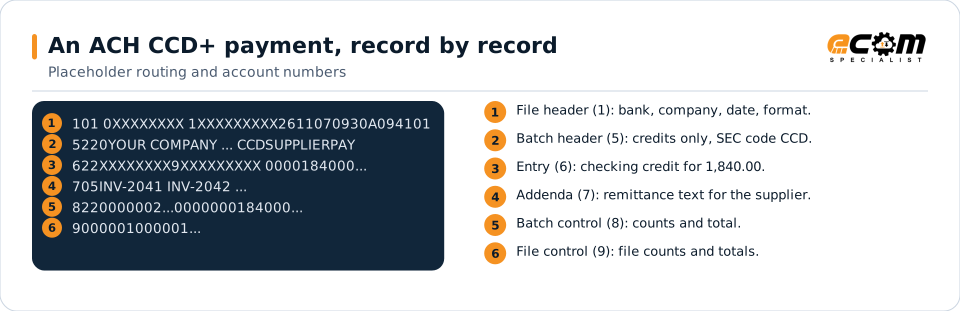
A file starts with a file header (record type 1). Each batch has a batch header (5), entry detail records (6), optional addenda records (7) and a batch control (8). The file ends with a file control (9) holding counts, totals and a hash of routing numbers so the bank can check nothing was lost.
Fields sit at fixed positions: the amount is in cents without a decimal point, names are padded with spaces, and numbers with zeros. The file is padded to a multiple of ten records with lines of nines.
Each line is one 94-character record (shortened here). The first digit is the record type; the batch holds one payment with one remittance addenda.
In depth
ACH formats, remittance and controls
SEC codes
CCD, CCD+ and CTX for business payments; PPD for consumer accounts; others for specific uses. The bank and the receiver's needs decide which is used.
CTX and the 820
CTX addenda carry an X12 820 split into 80-character pieces, so the receiver gets invoice-level detail with the payment.
Bank requirements
Banks add their own rules: company identifiers, cut-off times, file naming and transmission, often over SFTP with PGP encryption.
Controls and balancing
Entry counts, totals and hash totals are calculated by the map; offsetting entries are added where the bank requires them.
Returns and notifications
Returns and notifications of change come back from the bank and update vendor records.
Protecting account data
Account numbers are sensitive. Files are encrypted in transit and at rest, and access is restricted.
Mapping
How a mapper reads and writes NACHA
NACHA as input
Incoming ACH or bank reports are read by record type: payments from type 6 records and remittance from type 7, rebuilding the 820 from CTX addenda before matching it to open invoices.
NACHA as output
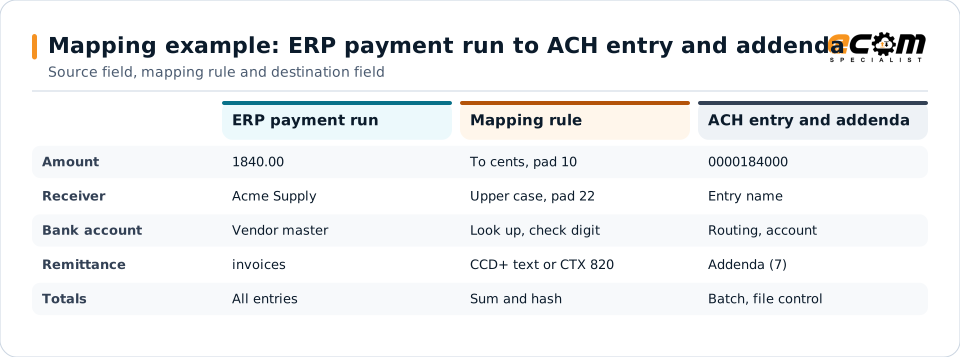
An approved payment run from your ERP becomes batches and entries with remittance addenda, and the map calculates every count and total the bank checks.
What the mapping handles
Fields
Amounts, dates, names and references go to fixed positions with the right padding.
Loops
Each payment is an entry; each remittance line becomes an addenda or an 820 segment.
Validation
Routing number check digits, lengths and totals are checked before the file leaves.
Code conversions
Payment methods map to SEC and transaction codes.
Business rules
Remittance is placed in CCD+ or CTX depending on the receiver.
Example: source, mapping, destination
{ "vendor": "Acme Supply",
  "amount": 1840.00,
  "invoices": ["INV-2041","INV-2042"],
"date": "2026-11-09" }622...ACME SUPPLY 0000184000...
705INV-2041 INV-2042...A payment from your ERP becomes fixed-width ACH records. The map does the formatting, lookups and totals the bank checks.
Connections
How NACHA connects your business
Banks
Files are delivered to your bank over its required channel, usually SFTP with encryption.
ERP and treasury
Payment runs come from accounts payable; returns and remittance update treasury and receivables.
EDI partners
The same remittance can go to partners as an X12 820.
Cash application
Incoming remittance is matched to invoices.
ECOM
How ECOM supports NACHA
ECOM supports NACHA with dedicated implementation, mapping, communication and support teams, and with specialists who know the industries your partners work in.
Implementation team
Plans the NACHA setup with you, configures it on the gateway and runs the tests with your partners and systems.
Mapping team
Builds and maintains the maps, code conversions and validation rules between partner data and your applications.
Communication team
Sets up and monitors partner connections, certificates, keys and credentials, and coordinates changes with each partner.
Support team
Watches the flows, investigates failed or missing documents, and works the issue through with you and your partner.
For NACHA in particular
- ACH file generation from your ERP payment runs, to your bank's specification.
- CTX and CCD+ remittance, including X12 820 in addenda.
- Incoming remittance parsing for cash application.
- Secure delivery to your bank, with file encryption where required.
Frequently asked questions
What is the difference between CCD and CTX?
Both are business ACH payments. CCD carries no addenda, or one with CCD+, for short remittance text. CTX can carry up to 9,999 addenda records, which hold a complete X12 820 remittance advice.
Can ECOM send ACH files directly to the ACH network?
Businesses send ACH files to their bank, which originates them into the network. ECOM builds the files to your bank's specification and delivers them over the channel the bank requires.
How is account data protected?
Files are transmitted over encrypted channels, usually SFTP, and often encrypted with PGP as the bank requires. Access to payment data is restricted.
Can we receive remittance from customers' ACH payments?
Yes. Remittance from your bank's reports or CTX addenda is parsed and mapped for cash application.
Talk to an EDI/API Expert
Tell us which partners, systems and NACHA requirements you are working with. An ECOM specialist will review them with you and outline the setup, the maps and the tests.