
Data formats
Fixed-width file integration
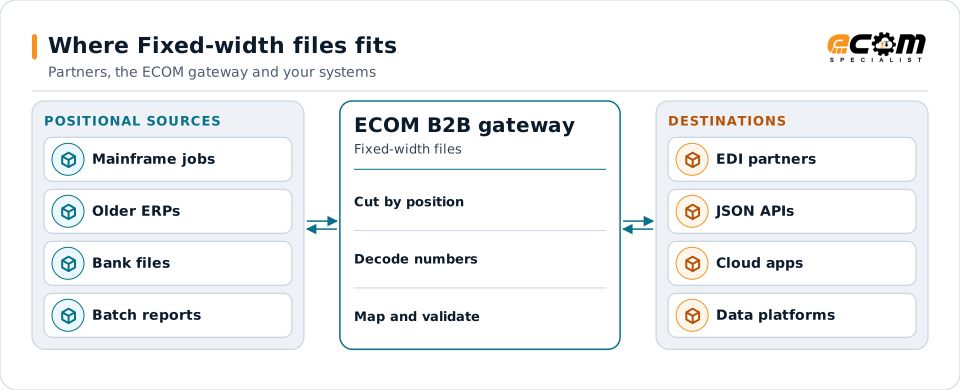
Fixed-width files place every field at an exact position and length. Mainframes, older ERPs, banks and payment formats rely on them. ECOM reads and writes positional layouts precisely and maps them to EDI, XML, JSON and your applications.
- Also called
- Positional or fixed-length files
- Field rule
- Start position plus length
- Common in
- Mainframes, banking, older ERPs
- Watch for
- Padding, implied decimals, encoding
Positional records are cut, decoded and mapped to the formats newer systems and partners use.
Overview
What Fixed-width files is
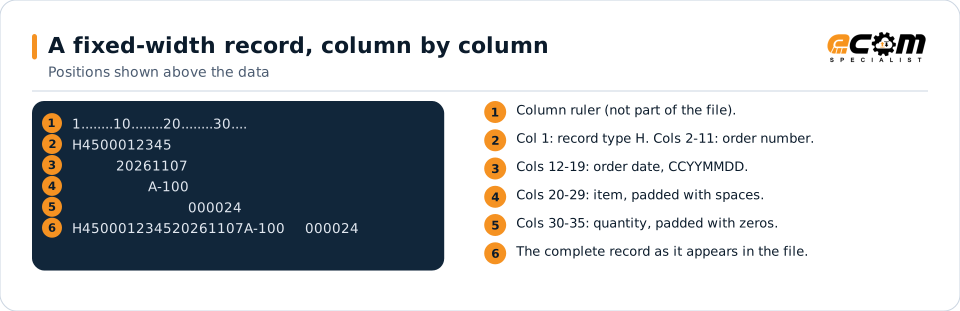
In a fixed-width file, there are no separators. A layout says, for example, that the order number is in columns 2 to 11 and the quantity in columns 30 to 37. Shorter values are padded, usually text with spaces on the right and numbers with zeros on the left.
The format is compact and fast for batch systems to process, which is why it remains common for mainframe interfaces, bank files such as ACH, and ERP batch imports. The catch is precision: a field shifted by one column changes its meaning.
Where businesses use it
Mainframe interfaces
COBOL programs read and write fixed-length records, often described by copybooks.
Banking and payments
ACH and many bank formats use fixed-width records.
ERP batch imports
Older ERP interfaces import orders and invoices from positional files.
Structure
How a fixed-width record is laid out
Each record type has a layout listing every field's start position, length, data type and padding. Numbers often have implied decimals: 000001840 with two implied decimals means 18.40. Signs may be written as a trailing character or, on mainframes, combined into the last digit.
Files may have a fixed record length with no line breaks, or one record per line. Mainframe files are often in EBCDIC rather than ASCII and may use packed decimal fields, which store two digits per byte.
The ruler shows column positions. Each field always starts at the same column; the item is padded with spaces and the quantity with zeros.
In depth
What matters with fixed-width files
Exact positions
Every field is defined by start and length. Layouts are tested against real samples, field by field.
Padding and alignment
Text is usually left-aligned with spaces; numbers right-aligned with zeros. Each layout states its own rule.
Implied decimals and signs
Amounts without a decimal point are scaled; trailing or embedded signs are decoded and written correctly.
EBCDIC and packed decimal
Mainframe files are converted from EBCDIC and packed or zoned numbers are unpacked.
Copybooks
COBOL copybooks can serve as the layout definition for mainframe records.
Truncation rules
Values longer than their field are flagged or shortened by explicit rule, never silently cut.
Mapping
How a mapper reads and writes Fixed-width files
Fixed-width files as input
The mapper cuts each record at the defined positions, trims padding, applies implied decimals and signs, converts encoding and validates each value.
Fixed-width files as output
Outbound, each value is formatted, padded and placed at its exact position, numbers are scaled for implied decimals, and the record is checked for the correct total length.
What the mapping handles
Fields
Each position range maps to a named field.
Loops
Detail record types repeat under their header.
Validation
Record length, numeric fields and dates are checked.
Code conversions
Application codes become partner codes.
Business rules
Implied decimals, signs and defaults are applied.
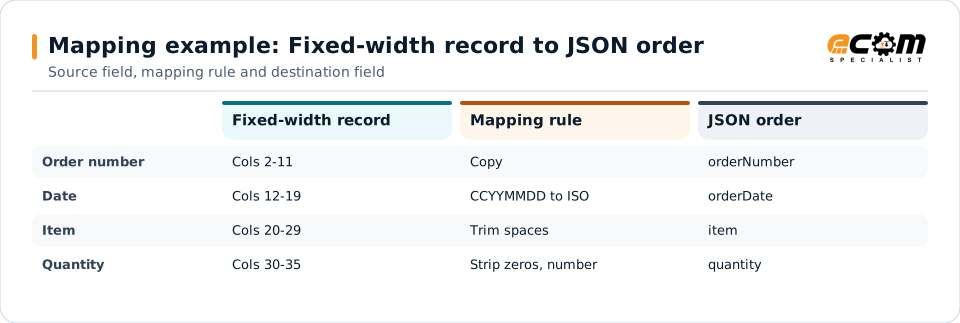
Example: source, mapping, destination
H450001234520261107A-100 000024{
"orderNumber": "4500012345",
"orderDate": "2026-11-07",
"item": "A-100",
"quantity": 24
}Position ranges on the left become named JSON fields on the right, with padding removed.
Connections
How Fixed-width files connects your business
Mainframes
Mainframe batch output reaches partners and APIs without changing COBOL programs.
Banks
Payment and statement files in positional formats.
Trading partners
Positional files are mapped to each partner's EDI format.
Modern applications
Data from positional files becomes JSON or XML for cloud systems.
ECOM
How ECOM supports Fixed-width files
ECOM supports Fixed-width files with dedicated implementation, mapping, communication and support teams, and with specialists who know the industries your partners work in.
Implementation team
Plans the Fixed-width files setup with you, configures it on the gateway and runs the tests with your partners and systems.
Mapping team
Builds and maintains the maps, code conversions and validation rules between partner data and your applications.
Communication team
Sets up and monitors partner connections, certificates, keys and credentials, and coordinates changes with each partner.
Support team
Watches the flows, investigates failed or missing documents, and works the issue through with you and your partner.
For Fixed-width files in particular
- Maps between fixed-width and X12, EDIFACT, XML, JSON, flat files, databases or your ERP's own formats, in either direction.
- Validation rules for fixed-width data before it reaches a partner or your ERP, with clear error reports.
- Cross-reference tables for items, units, locations and partners, maintained with you.
- Testing with sample files from your systems and partners before go-live.
Frequently asked questions
What is the difference between fixed-width and delimited files?
In a fixed-width file each field is at a fixed position and length, with padding. In a delimited file fields are separated by a character such as a comma or pipe, and lengths vary.
Can you read COBOL copybooks?
Yes. A copybook can define the layout of mainframe records, including packed and zoned decimal fields.
What are implied decimals?
An amount stored without a decimal point, where the layout says how many digits are decimals. For example, 001840 with two implied decimals is 18.40.
How do you test a positional layout?
Against real sample files, field by field, so every position, padding rule and number format is confirmed before go-live.
Talk to an EDI/API Expert
Tell us which partners, systems and Fixed-width files requirements you are working with. An ECOM specialist will review them with you and outline the setup, the maps and the tests.