
Data formats
Delimited file integration
Delimited files separate fields with a chosen character: a pipe, a tab, a semicolon or a comma. Applications use them for orders, inventory, prices and reports. ECOM reads and writes any delimited layout and maps it to EDI, APIs and your ERP.
- Separators
- Pipe, tab, semicolon, comma or custom
- Field length
- Variable
- Layouts
- Single or multiple record types
- Watch for
- Separators inside data, escaping
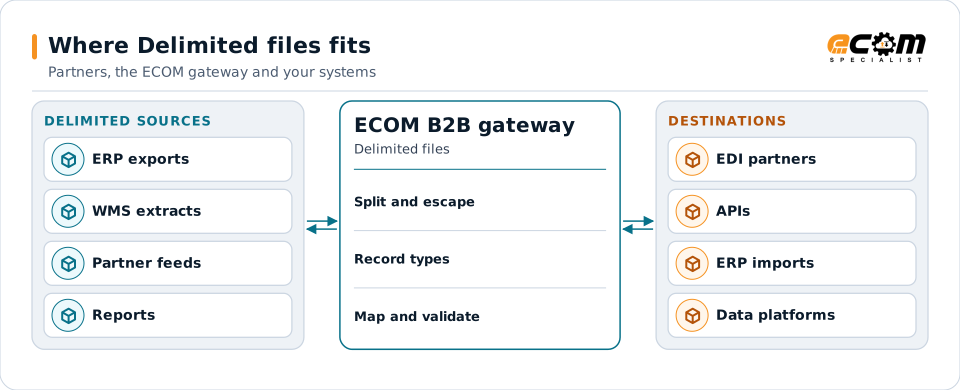
Delimited files are split, checked and mapped to each destination's format.
Overview
What Delimited files is
A delimited file is text where a separator character marks the end of each field and a line break marks the end of each record. Fields can be any length. CSV is the best-known example, but many systems prefer pipes or tabs because those characters rarely appear inside business data.
Delimited files can carry several record types, each with its own field list, identified by the first field. That lets one file hold headers and lines, or several document types.
Where businesses use it
ERP and WMS interfaces
Pipe or tab-delimited imports and exports for orders, receipts and inventory.
Partner data feeds
Inventory, price and sales data shared by partners without EDI.
Data platform loads
Extracts loaded into data warehouses and analytics tools.
Structure
How a delimited file is structured
The layout defines the separator, the order of fields in each record type, whether there is a header line, and how a separator inside a value is handled: by quoting the value or by an escape character.
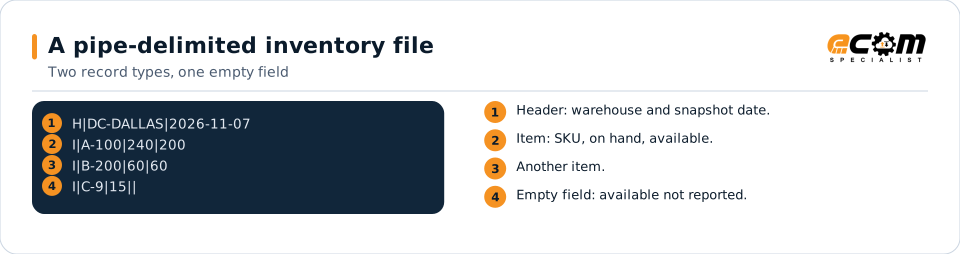
Empty fields are written as two separators side by side. The number of fields in a record tells the reader whether a record is complete, which is a useful check on input.
The first field is the record type. Two pipes together mark an empty field, here an unknown available quantity.
In depth
What matters with delimited files
Choice of separator
Pipe, tab, semicolon, comma or any other character, set per layout.
Escaping and quoting
Quotes or an escape character protect separators inside data; the rule is set per layout.
Multiple record types
The first field identifies the record type and its field list.
Empty versus missing
An empty field and a missing field are treated by explicit rule, so defaults are deliberate.
Field counts
Records with too many or too few fields are flagged with their line number.
Encoding
UTF-8 and other encodings, with or without a byte order mark.
Mapping
How a mapper reads and writes Delimited files
Delimited files as input
The mapper splits each line on the separator, honoring quoting or escapes, identifies the record type, checks the field count and maps each field by its position in the record.
Delimited files as output
Outbound, values are joined with the separator, separators inside values are escaped or quoted, and record types are written in the order the receiver expects.
What the mapping handles
Fields
Field positions within each record type are mapped.
Loops
Item records under a header become lines.
Validation
Field counts, types and required values are checked.
Code conversions
Warehouse and item codes are converted.
Business rules
Empty values get explicit defaults or are skipped.
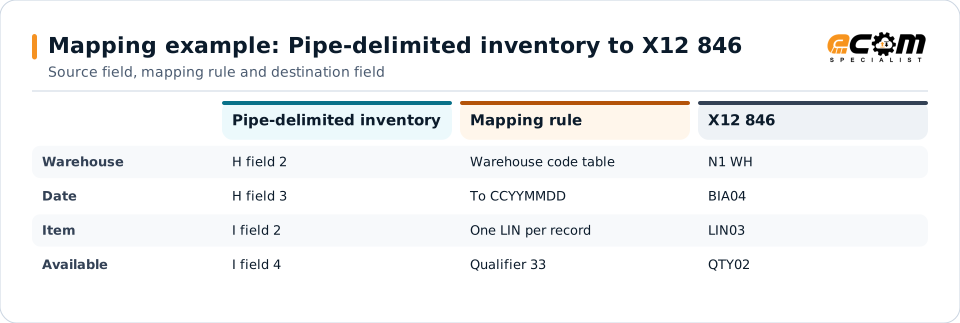
Example: source, mapping, destination
H|DC-DALLAS|2026-11-07
I|A-100|240|200
I|B-200|60|60BIA*00*DD*INV1107*20261107~
N1*WH**92*DALLAS~
LIN*1*VN*A-100~
QTY*33*200*EA~
LIN*2*VN*B-200~
QTY*33*60*EA~Each item record becomes one LIN loop in the inventory advice; the header supplies the warehouse and date.
Connections
How Delimited files connects your business
Trading partners
Delimited exports become each partner's EDI or API format.
ERP and WMS
Partner data becomes delimited imports for your applications.
File transfer
Files move over SFTP, FTPS or managed file transfer.
Analytics
Clean delimited extracts feed reporting and data platforms.
ECOM
How ECOM supports Delimited files
ECOM supports Delimited files with dedicated implementation, mapping, communication and support teams, and with specialists who know the industries your partners work in.
Implementation team
Plans the Delimited files setup with you, configures it on the gateway and runs the tests with your partners and systems.
Mapping team
Builds and maintains the maps, code conversions and validation rules between partner data and your applications.
Communication team
Sets up and monitors partner connections, certificates, keys and credentials, and coordinates changes with each partner.
Support team
Watches the flows, investigates failed or missing documents, and works the issue through with you and your partner.
For Delimited files in particular
- Maps between delimited and X12, EDIFACT, XML, JSON, flat files, databases or your ERP's own formats, in either direction.
- Validation rules for delimited data before it reaches a partner or your ERP, with clear error reports.
- Cross-reference tables for items, units, locations and partners, maintained with you.
- Testing with sample files from your systems and partners before go-live.
Frequently asked questions
Is CSV a delimited file?
Yes. CSV is a delimited file that uses commas. Delimited files can use any separator, such as pipes or tabs.
What if a value contains the separator?
The layout defines how it is protected, by quoting the value or using an escape character, and the gateway reads and writes it accordingly.
Can one file contain different record types?
Yes. The first field identifies each record's type and field list.
Can you convert delimited files to EDI?
Yes, and EDI to delimited files, with validation in both directions.
Talk to an EDI/API Expert
Tell us which partners, systems and Delimited files requirements you are working with. An ECOM specialist will review them with you and outline the setup, the maps and the tests.