
Data formats
Flat file integration for ERP and legacy systems
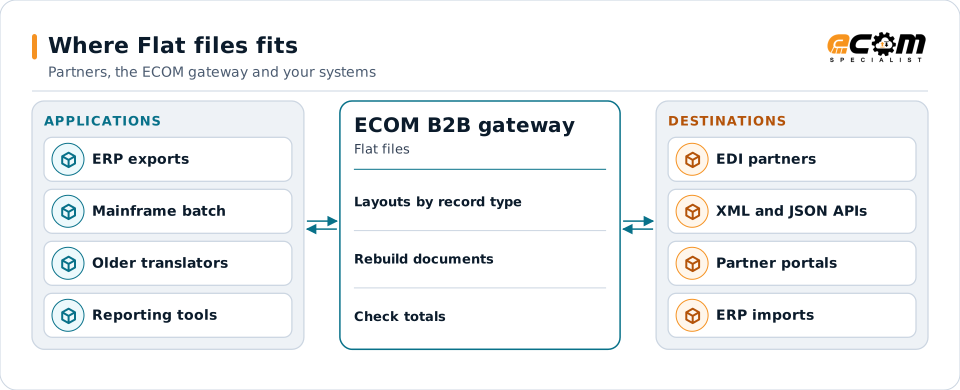
Many ERP and mainframe systems exchange data as flat files: plain text records in a layout the application defines. ECOM reads and writes flat files of any layout, fixed-width or delimited, and maps them to EDI, XML, JSON and partner formats.
- What it is
- Plain text records, one per line
- Layouts
- Fixed-width or delimited, by record type
- Common in
- ERP interfaces, mainframes, older systems
- Defined by
- The application's file specification
Flat files from your applications are read by record type and mapped to the formats partners and APIs need.
Overview
What Flat files is
A flat file is a text file with one record per line and no nested structure in the syntax itself. The application that writes it publishes a layout: which fields each record holds, in what order, and how they are separated or positioned.
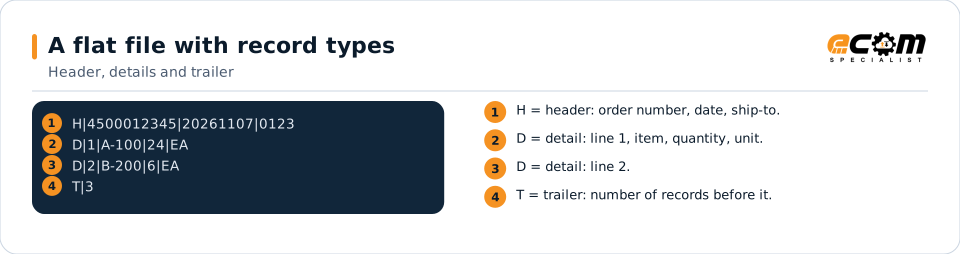
Most business flat files use record types. A header record holds order-level data, detail records hold lines, and a trailer holds counts and totals. A code at the start of each record says which type it is, so a single file can carry many documents.
Where businesses use it
ERP interfaces
Many ERPs import and export orders, invoices and shipments as flat files.
Mainframe systems
Batch jobs read and write fixed-width record files.
EDI translator output
Older translators deliver EDI data to applications as flat files.
Structure
How a flat file is structured
Each record type has its own layout. In a fixed-width file each field starts at a set position and has a set length; in a delimited file fields are separated by a character such as a pipe. The record type code is usually the first field.
Record order carries meaning: a header is followed by its details, then the next header. Trailers carry record counts and totals so the receiver can check the file is complete.
The first character of each record says what it is. Detail records belong to the header above them; the trailer counts records.
In depth
What matters when integrating flat files
Layout specification
Every field's position or order, length, type and meaning comes from the application's specification, set up once on the gateway.
Record types and hierarchy
Headers, details, sub-details and trailers are read in order to rebuild each document.
Fixed-width or delimited
Both kinds are supported; see the dedicated pages for each.
Control totals
Trailer counts and totals are checked on input and calculated on output.
Encodings
ASCII, UTF-8 and mainframe EBCDIC files, with packed numbers where a layout uses them.
Layout changes
When the application changes its layout, the definition is versioned so old and new files can coexist during a cutover.
Mapping
How a mapper reads and writes Flat files
Flat files as input
The mapper reads each line, uses the record type code to choose its layout, extracts the fields, and nests details under their header to rebuild documents.
Flat files as output
Outbound, each document is written as a header, its details and a trailer, with every field in its position or order, padded or delimited as the layout says.
What the mapping handles
Fields
Fields are mapped by position or by order within each record type.
Loops
Detail records under a header become document lines.
Validation
Record order, required fields and trailer totals are checked.
Code conversions
Application codes are translated to partner codes.
Business rules
Documents are split or combined as the destination requires.
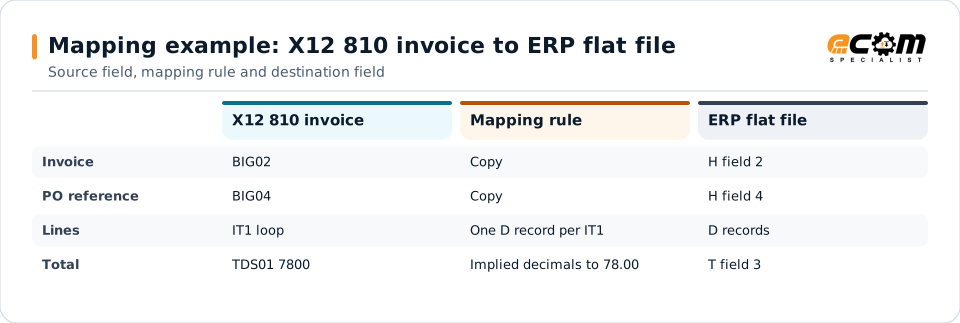
Example: source, mapping, destination
BIG*20261108*INV-2041**4500012345~
IT1*1*24*EA*3.25**VN*A-100~
TDS*7800~H|INV-2041|20261108|4500012345
D|1|A-100|24|3.25
T|2|78.00The EDI invoice becomes the header, detail and trailer records the ERP imports. TDS amounts have two implied decimals.
Connections
How Flat files connects your business
Trading partners
Flat files from your ERP become each partner's EDI or XML format.
ERP and mainframe
Partner documents become the files your applications import.
File transfer
Files are exchanged over SFTP, shared folders or managed file transfer.
APIs
Flat file data can also be posted to APIs.
ECOM
How ECOM supports Flat files
ECOM supports Flat files with dedicated implementation, mapping, communication and support teams, and with specialists who know the industries your partners work in.
Implementation team
Plans the Flat files setup with you, configures it on the gateway and runs the tests with your partners and systems.
Mapping team
Builds and maintains the maps, code conversions and validation rules between partner data and your applications.
Communication team
Sets up and monitors partner connections, certificates, keys and credentials, and coordinates changes with each partner.
Support team
Watches the flows, investigates failed or missing documents, and works the issue through with you and your partner.
For Flat files in particular
- Maps between flat file and X12, EDIFACT, XML, JSON, flat files, databases or your ERP's own formats, in either direction.
- Validation rules for flat file data before it reaches a partner or your ERP, with clear error reports.
- Cross-reference tables for items, units, locations and partners, maintained with you.
- Testing with sample files from your systems and partners before go-live.
Frequently asked questions
What is the difference between a flat file and EDI?
EDI follows a published standard such as X12. A flat file follows a layout defined by one application. The gateway maps between them, so your ERP can keep its own file format.
Can you work with mainframe files?
Yes, including EBCDIC encoding and packed decimal fields where the layout uses them.
What do you need to set up a flat file?
The application's layout specification and sample files. ECOM sets up the layout and validates it against the samples.
Are fixed-width and delimited files both supported?
Yes. Both have their own pages with examples.
Talk to an EDI/API Expert
Tell us which partners, systems and Flat files requirements you are working with. An ECOM specialist will review them with you and outline the setup, the maps and the tests.