
Data formats
Custom application file integration
Some applications have a file format of their own: a positional layout, a delimited export, an XML or JSON structure, or a home-grown EDI-like syntax. ECOM defines the format on the gateway from its specification and samples, then maps it to any partner or system.
- Defined from
- Your specification and sample files
- Layout kinds
- Positional, delimited, XML, JSON, EDI-like
- Result
- A reusable format definition with validation
- Maintained by
- You, ECOM or both, as agreed
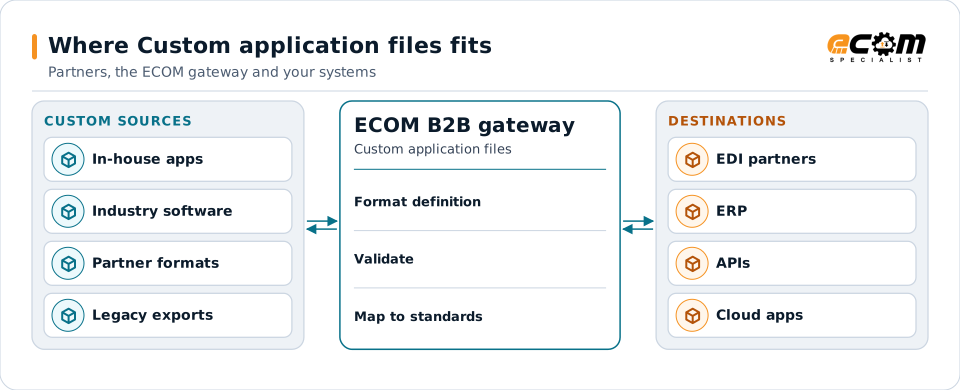
A custom format is defined once on the gateway, then validated and mapped to every destination.
Overview
What Custom application files is
A custom application file is any format that belongs to one application rather than a published standard. It may be documented in a specification, or only exist as the files the application produces.
The gateway turns that format into a definition: record types, fields, positions or paths, data types and rules. Once defined, the format can be validated and mapped like any standard, so the application never needs to change.
Where businesses use it
Home-grown systems
Applications built in-house with their own import and export files.
Industry software
Specialist software with a vendor-defined file layout.
Partner-specific files
A partner that sends its own format instead of a standard.
Structure
How a custom format is defined
ECOM starts with the specification, if there is one, and a set of real sample files covering normal and unusual cases. The format is described record by record or element by element, with types, lengths, required fields and repeat rules.
The definition is tested against every sample. Differences between the specification and the real files are resolved with you before mapping begins, so the definition matches what the application actually produces.
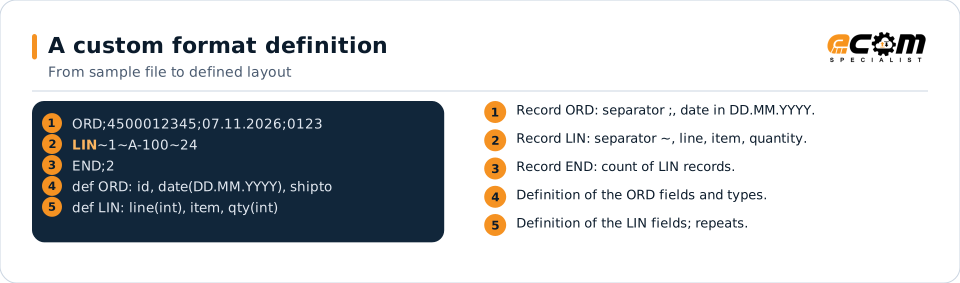
Each line of the sample is described by the definition: the record tag, the separator and the meaning and type of every field.
In depth
What custom format work involves
Discovery
Specification review and sample analysis, including edge cases such as empty documents and very long values.
Definition
Records, fields, separators, positions or paths, types, lengths and repeats are defined on the gateway.
Validation rules
Required fields, value lists, counts and totals become automatic checks.
Versioning
When the application changes its format, the definition is versioned so old and new files can coexist.
Documentation
The definition becomes the reference for both your team and ECOM.
Reuse
One definition serves every map that reads or writes the format.
Mapping
How a mapper reads and writes Custom application files
Custom application files as input
The gateway parses the file with its definition, checks it, and the map reads the defined fields like those of any standard.
Custom application files as output
Outbound, the map fills the defined records, and the definition takes care of separators, positions, formats and counts.
What the mapping handles
Fields
Defined fields map to targets.
Loops
Repeating records or elements become lines.
Validation
Definition rules check every file.
Code conversions
Application codes become partner codes.
Business rules
Partner-specific logic is applied in the map.
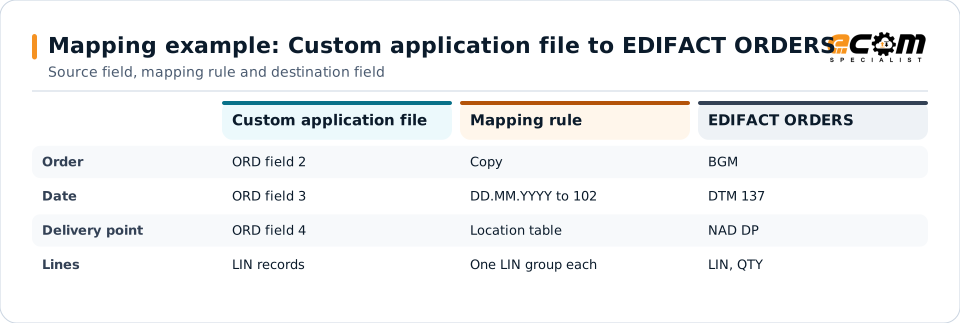
Example: source, mapping, destination
ORD;4500012345;07.11.2026;0123
LIN~1~A-100~24
END;1BGM+220+4500012345+9'
DTM+137:20261107:102'
NAD+DP+0123::92'
LIN+1++A-100:SA'
QTY+21:24'Once the custom format is defined, it maps to a standard like any other format.
Connections
How Custom application files connects your business
Trading partners
Your application's files reach partners in their standard formats.
Other applications
Data moves between your application and ERP, WMS or cloud systems.
APIs
Custom file data can be posted to APIs or published as events.
File transfer
Files are picked up from and delivered to folders or servers.
ECOM
How ECOM supports Custom application files
ECOM supports Custom application files with dedicated implementation, mapping, communication and support teams, and with specialists who know the industries your partners work in.
Implementation team
Plans the Custom application files setup with you, configures it on the gateway and runs the tests with your partners and systems.
Mapping team
Builds and maintains the maps, code conversions and validation rules between partner data and your applications.
Communication team
Sets up and monitors partner connections, certificates, keys and credentials, and coordinates changes with each partner.
Support team
Watches the flows, investigates failed or missing documents, and works the issue through with you and your partner.
For Custom application files in particular
- Format discovery from your specification and sample files.
- A tested definition with validation rules, versioned as the application changes.
- Maps from the custom format to EDI, XML, JSON, databases and APIs.
- Documentation your team can use for future changes.
Frequently asked questions
What if our format has no specification?
ECOM can define it from a representative set of sample files and confirm the meaning of each field with your team.
Do we have to change our application?
No. The gateway adapts to the application's format, so the application keeps producing and reading the files it already uses.
What kinds of custom formats are supported?
Positional, delimited, XML, JSON and EDI-like syntaxes, including mixtures such as different separators per record type.
What happens when the format changes?
The definition is versioned. Old and new files can run side by side during a change, and maps are updated and retested.
Talk to an EDI/API Expert
Tell us which partners, systems and Custom application files requirements you are working with. An ECOM specialist will review them with you and outline the setup, the maps and the tests.