
Data formats
CSV file integration and mapping
CSV is the simplest way to move rows of data between systems: spreadsheets, reporting tools and many older applications export and import it. ECOM reads and writes CSV and maps it to EDI documents, APIs and your ERP.
- Stands for
- Comma-separated values
- Common in
- Spreadsheets, exports, small systems
- Structure
- Rows and columns, optional header
- Reference
- RFC 4180 describes common practice
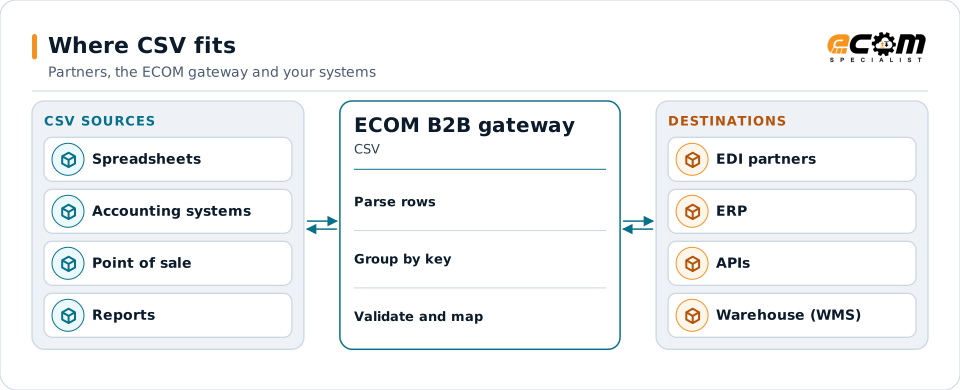
CSV files are parsed, grouped into documents and mapped to each destination.
Overview
What CSV is
A CSV file is plain text where each line is a row and commas separate the columns. The first line often holds column names. It is a common denominator: almost every system can produce a CSV, so it is often the fastest way to connect an application that has no API or EDI support.
CSV looks simple, but details vary: some systems quote every value, some use semicolons in place of commas, line endings differ, and spreadsheets may change numbers and dates when a file is opened and saved. Good mapping settles each of those details explicitly.
Where businesses use it
Spreadsheet-based processes
Orders, price lists and forecasts prepared in spreadsheets and exported for upload.
Older and smaller systems
Accounting, warehouse and point-of-sale systems that export and import CSV.
Reports and catalogs
Inventory, sales and product catalog extracts shared with partners.
Structure
How a CSV file is structured
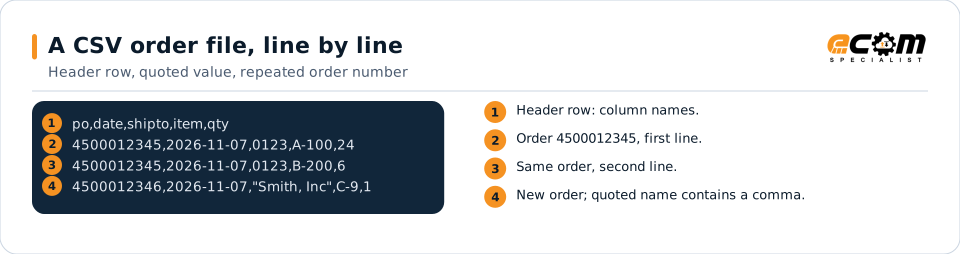
Each line is one record. Values are separated by commas. A value that contains a comma, a quote or a line break is wrapped in double quotes, and a quote inside such a value is written twice. A header line, if present, names the columns.
One business document often spans several rows: an order with three lines becomes three rows that repeat the order number. The map groups those rows back into one order with lines.
Rows with the same order number belong to one order. Quotes protect a value that contains a comma.
In depth
What matters when integrating CSV
Delimiters and quoting
Comma, semicolon or tab separators and the quoting rules are set per file, so values with commas or quotes are read correctly.
Headers and column order
Columns are mapped by header name or by position. Name-based mapping survives a column being added.
Grouping rows
Rows that share a key, such as an order number, are grouped into one document with lines.
Numbers and dates
Leading zeros, decimal separators and date formats are defined explicitly, avoiding spreadsheet surprises such as lost zeros in UPCs.
Encoding and line endings
UTF-8 or other encodings, a byte order mark and Windows or Unix line endings are all handled.
Validation and rejects
Rows with missing or invalid values are reported, with the line number, rather than silently dropped.
Mapping
How a mapper reads and writes CSV
CSV as input
The mapper splits each line into columns using the file's delimiter and quoting rules, matches columns by header name or position, groups rows by key and validates each value.
CSV as output
Outbound, each record is flattened into one or more rows, values with commas or quotes are quoted, and a header row is written if the receiver expects one.
What the mapping handles
Fields
Each column is mapped to a target field.
Loops
Rows with the same key become lines of one document.
Validation
Required columns, types and lengths are checked per row.
Code conversions
Store codes, units and items are converted with tables.
Business rules
Totals are calculated and defaults are applied.
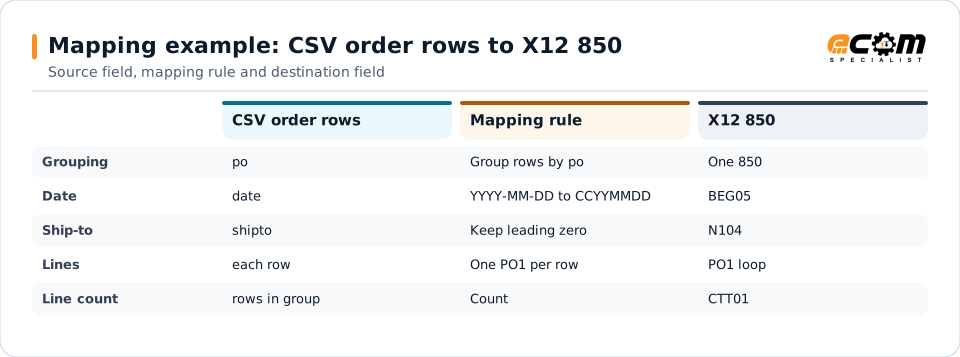
Example: source, mapping, destination
po,date,shipto,item,qty
4500012345,2026-11-07,0123,A-100,24
4500012345,2026-11-07,0123,B-200,6BEG*00*SA*4500012345**20261107~
N1*ST**92*0123~
PO1*1*24*EA***VN*A-100~
PO1*2*6*EA***VN*B-200~
CTT*2~Two rows with the same PO number become one purchase order with two lines.
Connections
How CSV connects your business
Trading partners
CSV from small systems becomes the EDI documents partners require.
ERP imports
Partner EDI becomes CSV for ERPs and accounting systems that import files.
File transfer
Files are picked up and delivered over SFTP, FTPS or shared folders.
Business workflows
Spreadsheet-driven processes connect to automated partner exchanges.
ECOM
How ECOM supports CSV
ECOM supports CSV with dedicated implementation, mapping, communication and support teams, and with specialists who know the industries your partners work in.
Implementation team
Plans the CSV setup with you, configures it on the gateway and runs the tests with your partners and systems.
Mapping team
Builds and maintains the maps, code conversions and validation rules between partner data and your applications.
Communication team
Sets up and monitors partner connections, certificates, keys and credentials, and coordinates changes with each partner.
Support team
Watches the flows, investigates failed or missing documents, and works the issue through with you and your partner.
For CSV in particular
- Maps between CSV and X12, EDIFACT, XML, JSON, flat files, databases or your ERP's own formats, in either direction.
- Validation rules for CSV data before it reaches a partner or your ERP, with clear error reports.
- Cross-reference tables for items, units, locations and partners, maintained with you.
- Testing with sample files from your systems and partners before go-live.
Frequently asked questions
Can a CSV file be turned into EDI?
Yes. Rows are grouped into documents, such as one order per PO number, and each row becomes a line in the EDI document.
What if our CSV uses semicolons or tabs?
The delimiter, quoting and encoding are set per file, so semicolon, tab or other delimited files are handled the same way.
How do you avoid losing leading zeros?
Columns such as UPCs and store numbers are read as text, never as numbers, so leading zeros are kept.
What happens to bad rows?
They are reported with the file name, line number and reason, so they can be corrected and resent.
Talk to an EDI/API Expert
Tell us which partners, systems and CSV requirements you are working with. An ECOM specialist will review them with you and outline the setup, the maps and the tests.