
EDI and B2B standards
Fedwire wire payment data, connected to your ERP
The Fedwire Funds Service, operated by the Federal Reserve Banks, settles high-value US dollar wire transfers between banks. Businesses take part through their bank. ECOM builds the wire instructions your bank accepts and maps the wire details your bank reports back.
- Operated by
- The Federal Reserve Banks
- Settlement
- Real-time, final, in US dollars
- Message standard
- ISO 20022 (pacs messages)
- Business access
- Through your bank
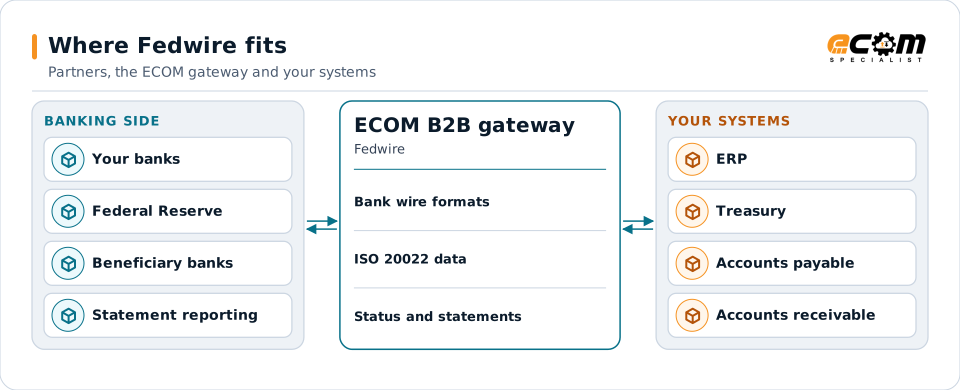
The gateway connects your finance systems to your banks. The banks exchange the Fedwire messages.
Overview
What Fedwire is
Fedwire is the Federal Reserve's system for moving funds between banks in real time. Each transfer settles immediately and is final. Companies use wires for urgent, high-value or time-critical payments such as real estate closings, treasury moves and large supplier payments.
Banks exchange Fedwire messages with the Federal Reserve. The service has moved from its long-standing proprietary tag format to ISO 20022 messages, which carry richer, structured information about the parties and the purpose of a payment. A business does not connect to Fedwire itself: it sends payment instructions to its bank and receives reports about incoming and outgoing wires.
Where businesses use it
Urgent supplier payments
High-value or time-critical payments that must settle the same day.
Treasury transfers
Moving funds between your own accounts at different banks.
Incoming wires
Customer payments by wire, identified and applied in receivables.
Structure
How a business wire flows
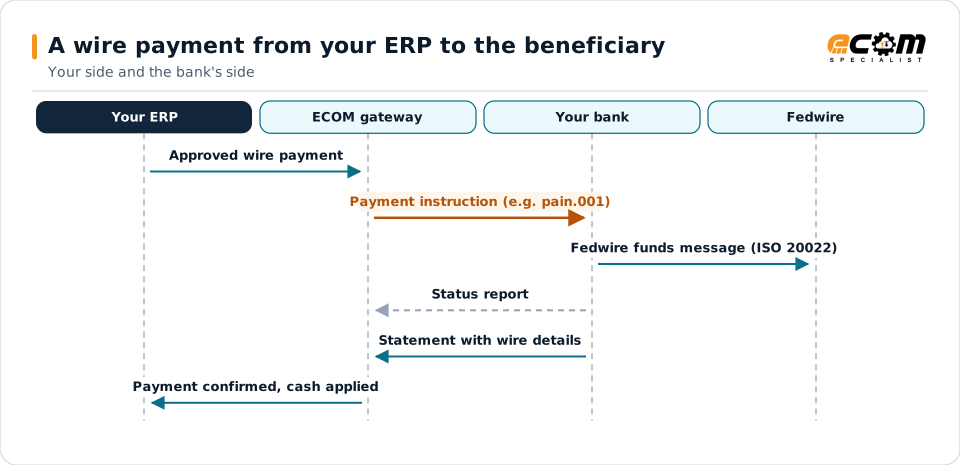
Your ERP or treasury system approves a payment. It is turned into the payment instruction format your bank accepts, often an ISO 20022 pain.001 credit transfer or a bank-specific file, and delivered over the bank's secure channel. The bank checks it and sends the wire through Fedwire.
The bank then reports the result and any incoming wires, often as ISO 20022 camt statements or BAI2 files, which include the wire details such as the sender, references and remittance information.
ECOM works on your side of the bank: payment instructions out, status and statements back. The bank exchanges the Fedwire messages.
In depth
What connecting wire data involves
Bank formats
Each bank publishes the formats it accepts for wire instructions: ISO 20022 pain.001, its own file layout or a host-to-host format. Maps follow the bank's specification.
Structured party data
ISO 20022 carries structured names and addresses for the parties. Vendor master data is mapped to those fields.
Remittance information
Wires can carry remittance references that receivables uses to apply cash.
Approvals and controls
Payments are released only after your approval workflow; files are encrypted and signed where the bank requires.
Status and returns
Bank status reports and returns update the payment record in your ERP.
Reporting
Incoming and outgoing wires in camt or BAI2 statements are mapped for reconciliation.
In practice
Example: a same-day supplier wire
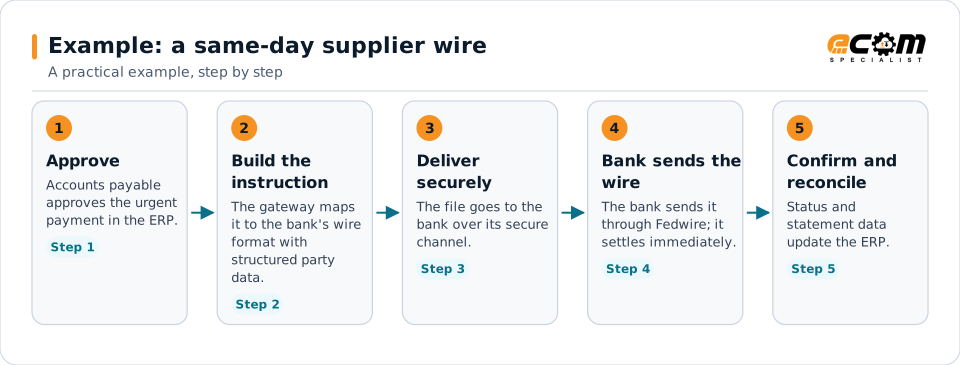
A supplier needs funds the same day. The payment is approved in the ERP and reaches the bank as a wire instruction in minutes.
Each step is visible in your systems, from approval to reconciliation.
Connections
How Fedwire connects your business
Banks
Each bank's wire formats and channels are set up on the gateway.
ERP and treasury
Payments come from your approval process; confirmations come back.
Receivables
Incoming wire details help apply cash to the right invoices.
Other payment types
ACH and other formats run on the same gateway.
ECOM
How ECOM supports Fedwire
ECOM supports Fedwire with dedicated implementation, mapping, communication and support teams, and with specialists who know the industries your partners work in.
Implementation team
Plans the Fedwire setup with you, configures it on the gateway and runs the tests with your partners and systems.
Mapping team
Builds and maintains the maps, code conversions and validation rules between partner data and your applications.
Communication team
Sets up and monitors partner connections, certificates, keys and credentials, and coordinates changes with each partner.
Support team
Watches the flows, investigates failed or missing documents, and works the issue through with you and your partner.
For Fedwire in particular
- Wire payment instructions in your bank's format, including ISO 20022 pain.001.
- Status, return and statement mapping (camt and BAI2) back to your ERP.
- Secure bank connections with encryption and signing where required.
Frequently asked questions
Can ECOM connect us directly to Fedwire?
No. Only banks connect to Fedwire. ECOM connects your systems to your bank, building the wire instructions your bank accepts and mapping the reports it sends back.
What is ISO 20022?
It is an international standard for financial messages. Fedwire now uses ISO 20022 messages between banks, and many banks accept ISO 20022 payment instructions, such as pain.001, from their business customers.
Can incoming wires be matched to invoices?
Yes, when the remittance reference is present. Wire details from bank statements are mapped to receivables for cash application.
Do you support several banks?
Yes. Each bank's formats and channels are set up separately on the same gateway.
Talk to an EDI/API Expert
Tell us which partners, systems and Fedwire requirements you are working with. An ECOM specialist will review them with you and outline the setup, the maps and the tests.