
Data formats
Database integration for EDI and APIs
Some applications exchange data through their database rather than files or APIs. ECOM reads from and writes to relational databases, using staging tables and safe change detection, and maps the records to EDI, files and APIs.
- Data model
- Tables, rows, columns, keys
- Access
- SQL through standard database drivers
- Common pattern
- Staging (interface) tables
- Confirmed in scoping
- Database product and access method
The gateway reads new rows from staging tables, maps them for partners and records the outcome back in the database.
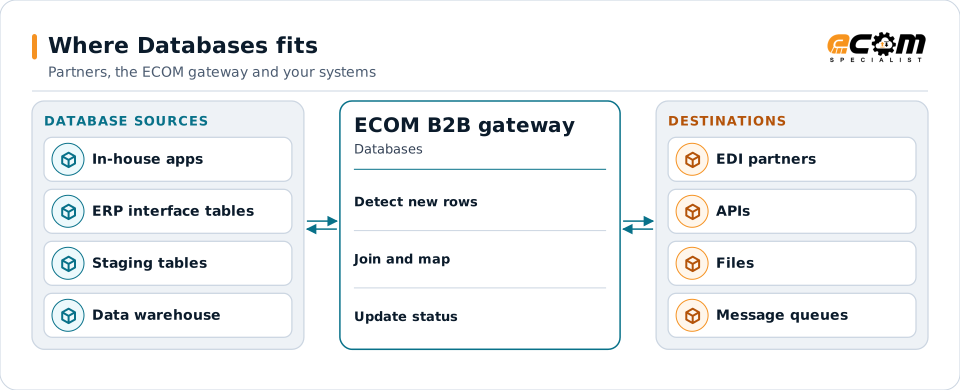
Overview
What Databases is
A relational database stores data in tables of rows and columns. Related tables are linked by keys: an order header table and an order line table share the order number. SQL is the language used to read and change the data.
Integrating through a database usually means staging tables: the application writes records it wants sent into an interface table, and reads records it receives from another. The gateway picks up new rows, maps them and marks them processed, so neither side touches the other's core tables.
Where businesses use it
Custom and in-house applications
Systems built around a database, with no API or file interface.
ERP interface tables
ERPs that provide open interface tables for importing orders, invoices and receipts.
Reporting and data platforms
Loading partner data into a database for analysis and dashboards.
Structure
How database exchange is structured
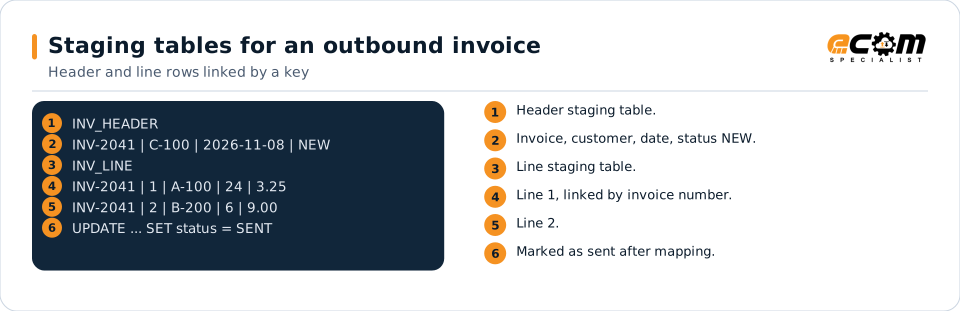
Outbound, the application writes header and line rows into staging tables with a status such as NEW. The gateway selects new rows, maps them to the partner's format and updates their status to SENT, inside a transaction so nothing is sent twice or lost.
Inbound, the gateway inserts mapped rows into receiving tables with a status such as READY, and the application imports them. Errors are written back with a reason so they can be fixed.
The header and line tables share the invoice number. The status column tells the gateway which rows to pick up and records what happened.
In depth
What matters when integrating through a database
Staging over core tables
Writing to interface or staging tables protects the application's own data and business rules.
Change detection
New rows are found by status flags, timestamps or the database's change tracking features, chosen per system.
Transactions
Reading, mapping and status updates happen in transactions, so a failure does not send a document twice or lose it.
Keys and relationships
Header and line tables are joined by key to rebuild documents.
Data types
Decimal, date, time and text columns are converted to the formats partners use.
Access and security
A dedicated account with the minimum rights needed, and encrypted connections where the database supports them.
Mapping
How a mapper reads and writes Databases
Databases as input
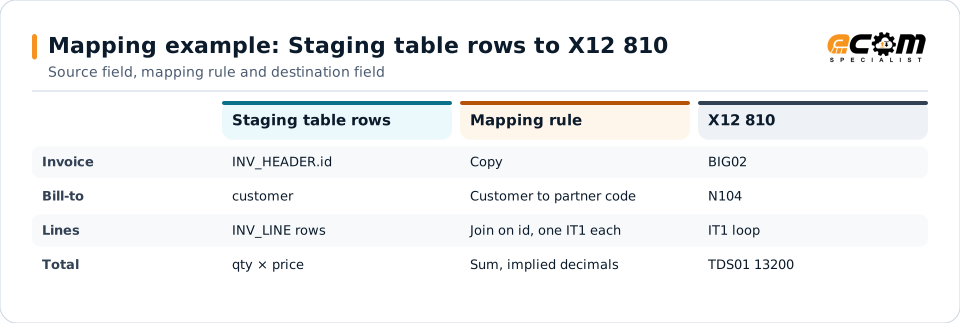
The mapper selects new header rows, joins their lines by key, maps columns to the target format and, after a successful send, updates the status in the same unit of work.
Databases as output
For inbound documents, the mapper inserts header and line rows with the right keys and data types, then sets them to ready for the application to import.
What the mapping handles
Fields
Columns map to target fields.
Loops
Line rows joined by key become document lines.
Validation
Required columns and types are checked before sending.
Code conversions
Customer and item codes become partner codes.
Business rules
Status updates, totals and error rows are handled.
Example: source, mapping, destination
INV_HEADER: INV-2041, C-100, 2026-11-08
INV_LINE:   INV-2041, 1, A-100, 24, 3.25
INV_LINE: INV-2041, 2, B-200, 6, 9.00BIG*20261108*INV-2041~
N1*BT**92*C-100~
IT1*1*24*EA*3.25**VN*A-100~
IT1*2*6*EA*9**VN*B-200~
TDS*13200~Header and line rows become one EDI invoice. The total is calculated from the lines: 78.00 plus 54.00 is 132.00, written as 13200.
Connections
How Databases connects your business
Trading partners
Database records become each partner's EDI, XML or file format.
Applications
Your application keeps using its database; the gateway handles the partner side.
APIs
The same records can be posted to APIs or published to message queues.
Reporting
Partner documents are loaded into tables for analysis.
ECOM
How ECOM supports Databases
ECOM supports Databases with dedicated implementation, mapping, communication and support teams, and with specialists who know the industries your partners work in.
Implementation team
Plans the Databases setup with you, configures it on the gateway and runs the tests with your partners and systems.
Mapping team
Builds and maintains the maps, code conversions and validation rules between partner data and your applications.
Communication team
Sets up and monitors partner connections, certificates, keys and credentials, and coordinates changes with each partner.
Support team
Watches the flows, investigates failed or missing documents, and works the issue through with you and your partner.
For Databases in particular
- Maps between database and X12, EDIFACT, XML, JSON, flat files, databases or your ERP's own formats, in either direction.
- Validation rules for database data before it reaches a partner or your ERP, with clear error reports.
- Cross-reference tables for items, units, locations and partners, maintained with you.
- Testing with sample files from your systems and partners before go-live.
Frequently asked questions
Which databases can the gateway connect to?
Common relational databases accessed through standard drivers. ECOM confirms your database product, version and access method during scoping.
Will you write into our application's tables?
The usual approach is staging or interface tables, so your application imports the data with its own rules. Writing directly to core tables is avoided.
How do you avoid sending a record twice?
Status updates and mapping run in a transaction, and each document carries a unique key that is checked before sending.
Is this secure?
The gateway uses a dedicated account with only the rights it needs and an encrypted connection where the database supports one.
Talk to an EDI/API Expert
Tell us which partners, systems and Databases requirements you are working with. An ECOM specialist will review them with you and outline the setup, the maps and the tests.