
Messaging and events
Oracle AQ and Transactional Event Queues integration
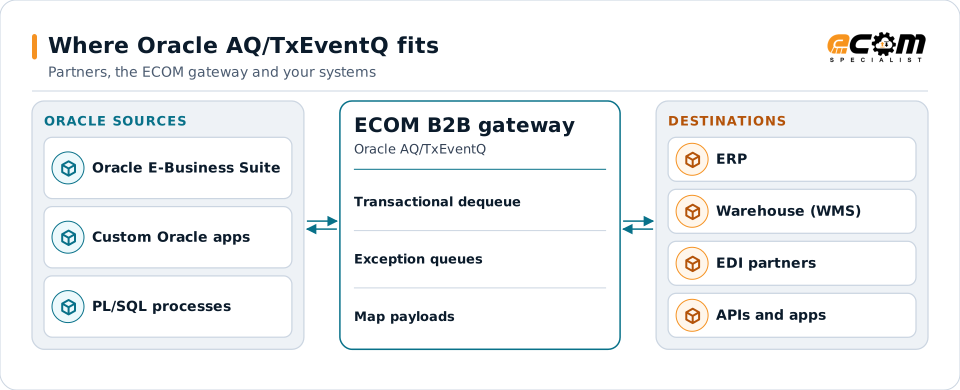
Oracle Advanced Queuing (AQ) and its successor, Transactional Event Queues (TxEventQ), are message queues built into Oracle Database. Applications enqueue messages in the same transaction as their business data. ECOM dequeues and enqueues these messages to connect Oracle-based applications with partners and APIs.
- Vendor
- Oracle
- Where it runs
- Inside Oracle Database
- Interfaces
- PL/SQL (DBMS_AQ), JMS, client libraries
- Key benefit
- Messages committed with business data
Messages committed in Oracle Database reach partners and other systems through the gateway.
Overview
What Oracle AQ/TxEventQ is
With AQ, a queue is stored in the database. An application can update an order and enqueue an "order shipped" message in one transaction, so the message exists only if the update commits. Consumers dequeue messages, also within transactions.
TxEventQ is Oracle's newer, partitioned implementation for high-throughput event streaming, with JMS support and, in recent releases, compatibility with Kafka client APIs. Oracle E-Business Suite and other Oracle-based applications use database queues for business events.
Where businesses use it
Oracle E-Business Suite events
Business events raised by Oracle applications and delivered through database queues.
Custom Oracle applications
In-house systems that publish events from PL/SQL.
Reliable outbound integration
Messages that must exist only if the business transaction committed.
How it works
How database queuing works
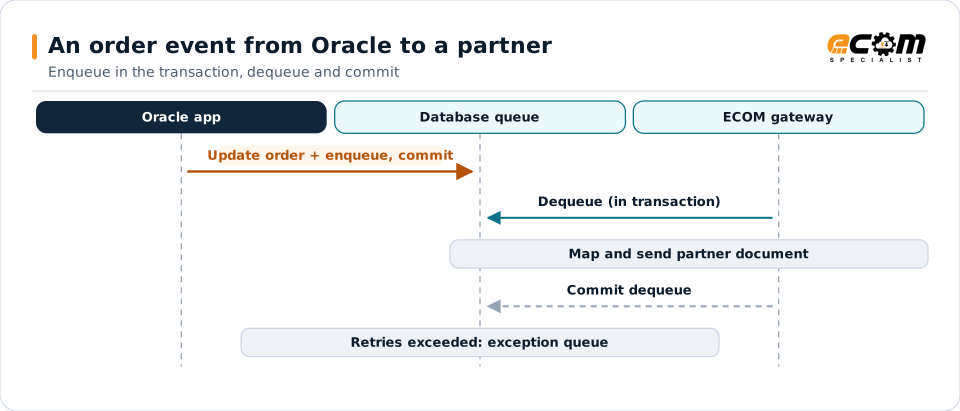
A producer calls the enqueue procedure inside its transaction, with a message payload (often an object type, XML or JSON) and properties such as priority and correlation. When the transaction commits, the message becomes available.
A consumer dequeues, optionally by correlation or condition, processes the message and commits. If processing fails and the transaction rolls back, the message stays; after a set number of retries it moves to an exception queue.
The message exists only if the business update committed. The gateway commits its dequeue only after sending.
In depth
Oracle queue integration in practice
Transactional enqueue
Messages and business data commit together, so there are no orphan or missing events.
Payload types
Object types, RAW, XML or JSON payloads are mapped to partner formats.
Exception queues
Messages that exceed retries move to an exception queue for review.
AQ or TxEventQ
The queue type and database version decide the interfaces available.
Database access
A dedicated database user with only enqueue and dequeue privileges on the queues used.
Ordering and priority
Sort order, priority and correlation IDs control which messages are dequeued first.
In practice
Example: Oracle E-Business Suite shipments to retailers
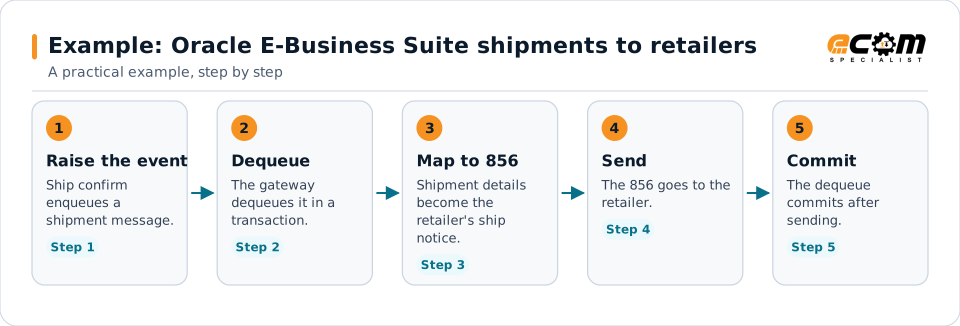
Shipments confirmed in Oracle E-Business Suite need to reach retailers as ship notices.
Using the database queue means every confirmed shipment produces exactly one message.
Connections
How Oracle AQ/TxEventQ connects your business
Trading partners
EDI documents from partners become Oracle queue messages for internal systems, and events become partner documents.
ERP and business systems
Orders, shipments, inventory and invoices move between applications as events, without point-to-point links.
APIs and files
The same data can be published to APIs or written to files for systems that do not read the platform.
Business workflows
Order-to-cash and fulfillment steps react to events as they happen.
ECOM
How ECOM supports Oracle AQ/TxEventQ
ECOM supports Oracle AQ/TxEventQ with dedicated implementation, mapping, communication and support teams, and with specialists who know the industries your partners work in.
Implementation team
Plans the Oracle AQ/TxEventQ setup with you, configures it on the gateway and runs the tests with your partners and systems.
Mapping team
Builds and maintains the maps, code conversions and validation rules between partner data and your applications.
Communication team
Sets up and monitors partner connections, certificates, keys and credentials, and coordinates changes with each partner.
Support team
Watches the flows, investigates failed or missing documents, and works the issue through with you and your partner.
For Oracle AQ/TxEventQ in particular
- Dequeue and enqueue connections to AQ and TxEventQ with a least-privilege database user.
- Mapping between Oracle queue messages and EDI, XML, JSON, files and your ERP, with validation.
- Monitoring of queues, subscriptions and failed messages, with alerts and a clear path to reprocess.
Frequently asked questions
Why use a database queue instead of a separate broker?
Because the message is committed in the same transaction as the business data. If the update rolls back, no message is sent.
What is TxEventQ?
Transactional Event Queues are Oracle's newer, partitioned queue implementation in Oracle Database, designed for high-throughput event streaming.
Can ECOM read Oracle E-Business Suite business events?
Yes, where they are delivered through database queues. The specific events and queues are confirmed during scoping.
How are failed messages handled?
If processing fails, the dequeue rolls back. After the retry limit, the message moves to an exception queue for review.
Talk to an EDI/API Expert
Tell us which partners, systems and Oracle AQ/TxEventQ requirements you are working with. An ECOM specialist will review them with you and outline the setup, the maps and the tests.