
EDI and B2B standards
PIDX for oil and gas supply chains
PIDX (Petroleum Industry Data Exchange) publishes e-business standards for the oil and natural gas industry: XML schemas for orders, field tickets and invoices, product classification codes and implementation guidance. ECOM maps PIDX documents between operators, suppliers and service companies and their ERPs.
- Publisher
- PIDX International
- Industry
- Oil and natural gas, upstream to downstream
- Main format
- XML schemas (PIDX XML)
- Common documents
- Invoice, order, field ticket
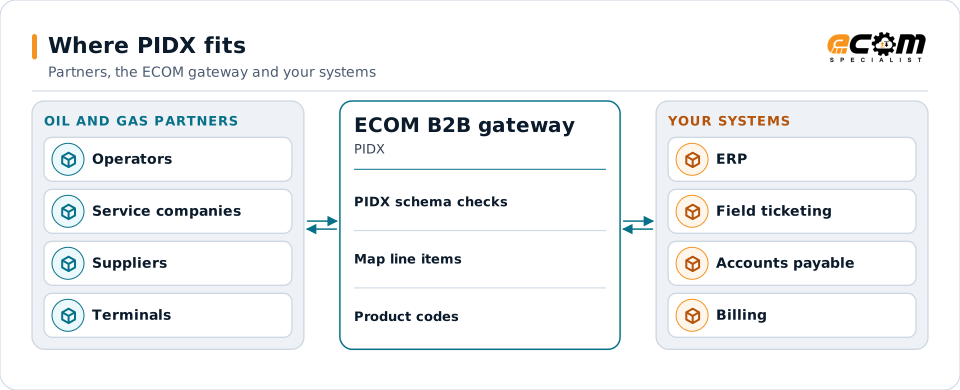
Oil and gas partners exchange PIDX documents; the gateway validates and maps them to your systems.
Overview
What PIDX is
PIDX is the oil and gas industry's standards organization for electronic business. Its XML schemas describe the documents service companies, suppliers and operators exchange, and its product codes give everyone the same names for materials and services.
Operators often receive invoices for well services and materials electronically, matched to field tickets and approved against contracts. PIDX makes those documents consistent across many suppliers, and many companies also use X12 for downstream fuel and product movements.
Where businesses use it
Upstream services
Service companies send field tickets and invoices for work performed at a well site.
Materials and equipment
Suppliers receive orders and send invoices for pipe, chemicals and equipment.
Downstream and fuels
Terminals, carriers and marketers exchange movement and invoice data, often in X12 alongside PIDX.
Structure
How a PIDX document is structured
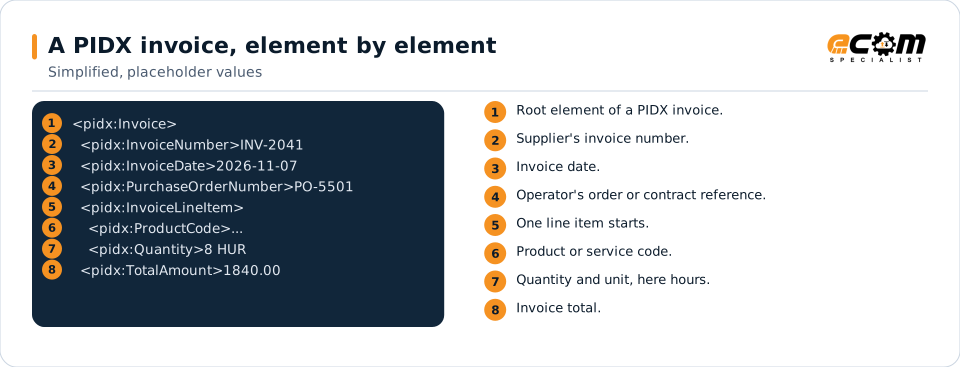
A PIDX XML document has a header with the document number, dates, parties and references such as the purchase order, the well or the AFE, followed by line items with product codes, quantities, prices and taxes, and a summary with totals.
Each element is defined in the PIDX schema, so a document can be validated before it is sent. Operators usually add their own requirements, such as mandatory cost coding or approver references.
The header identifies the invoice and references the order; each line item carries a product code, quantity and price; the summary carries the total.
In depth
PIDX in practice
Schemas and versions
PIDX publishes schema versions over time; operators state which one they accept. Maps validate against that schema.
Field tickets
Field tickets record work and materials at the well site and are matched to the invoice that follows.
Cost coding
Operators often require AFE numbers, well identifiers or cost codes on each line; maps carry them from your system.
Product codes
PIDX product classification codes are converted to and from your item and service numbers.
Transport
PIDX documents commonly travel over AS2 or through operator networks and portals, depending on the operator.
X12 alongside
Downstream partners may use X12 for the same business; both are handled on one gateway.
Mapping
How a mapper reads and writes PIDX
PIDX as input
The map validates the XML against the PIDX schema, reads header references and each line item, and creates a payable invoice with cost codes in your ERP.
PIDX as output
From your billing system, the map builds the PIDX invoice with the operator's references and product codes, validates it, and sends it.
What the mapping handles
Fields
Invoice number, dates, order and well references are mapped.
Loops
Each InvoiceLineItem becomes an invoice line.
Validation
Schema validation plus the operator's required fields.
Code conversions
Product codes and units are converted to your items.
Business rules
Totals and taxes are recalculated and checked.
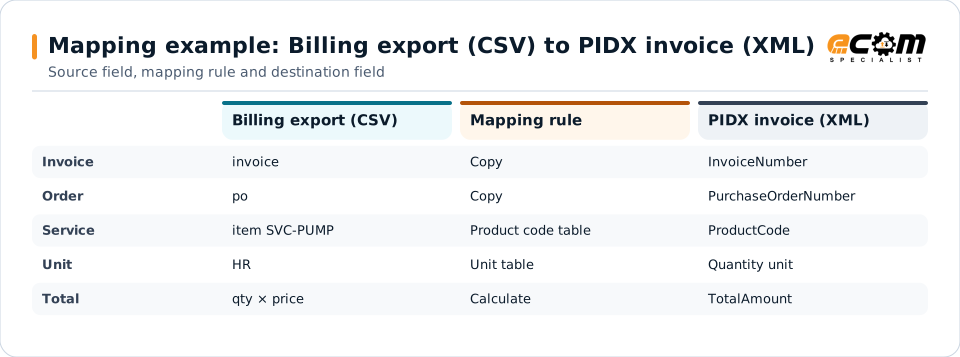
Example: source, mapping, destination
invoice,date,po,item,qty,unit,price
INV-2041,2026-11-07,PO-5501,SVC-PUMP,8,HR,230.00<pidx:Invoice>
<pidx:InvoiceNumber>INV-2041</pidx:InvoiceNumber>
<pidx:PurchaseOrderNumber>PO-5501</pidx:PurchaseOrderNumber>
<pidx:InvoiceLineItem>
<pidx:Quantity>8</pidx:Quantity>
</pidx:InvoiceLineItem>
</pidx:Invoice>A billing export becomes a PIDX invoice the operator can validate and approve automatically.
Connections
How PIDX connects your business
Operators
Invoices and field tickets reach operators over AS2 or their chosen networks.
Suppliers and service companies
Orders flow to suppliers; invoices come back in PIDX.
ERP and accounts payable
Approved invoices post with cost codes to your ERP.
Field systems
Field ticket data feeds billing and matching.
ECOM
How ECOM supports PIDX
ECOM supports PIDX with dedicated implementation, mapping, communication and support teams, and with specialists who know the industries your partners work in.
Implementation team
Plans the PIDX setup with you, configures it on the gateway and runs the tests with your partners and systems.
Mapping team
Builds and maintains the maps, code conversions and validation rules between partner data and your applications.
Communication team
Sets up and monitors partner connections, certificates, keys and credentials, and coordinates changes with each partner.
Support team
Watches the flows, investigates failed or missing documents, and works the issue through with you and your partner.
For PIDX in particular
- Maps for PIDX XML invoices, orders and field tickets in the schema version your partner uses.
- Product code and cost code cross-references.
- Operator onboarding and testing.
Frequently asked questions
What is PIDX?
PIDX is the oil and gas industry's e-business standards organization. It publishes XML schemas for documents such as invoices, orders and field tickets, and product codes so companies describe materials and services the same way.
Does PIDX replace X12?
Not entirely. PIDX XML is common for upstream services and materials, while many downstream fuel and product movements use X12. ECOM handles both on one gateway.
Can ECOM send PIDX invoices from our billing system?
Yes. Your billing export is mapped to the operator's PIDX invoice requirements, validated and sent.
Which PIDX version do operators require?
Each operator states its schema version and requirements. ECOM maps to what the operator specifies.
Talk to an EDI/API Expert
Tell us which partners, systems and PIDX requirements you are working with. An ECOM specialist will review them with you and outline the setup, the maps and the tests.