
Messaging and events
Azure Service Bus integration
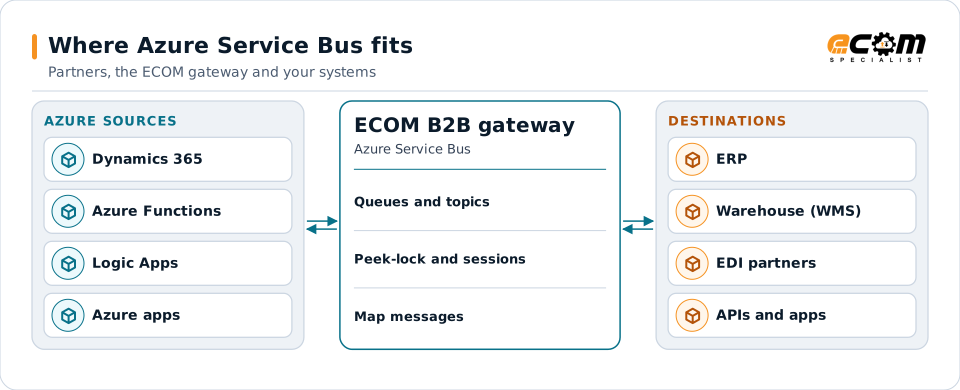
Azure Service Bus is Microsoft's managed enterprise message broker. Applications on Azure, and Dynamics 365 integrations, often use it to exchange orders and events. ECOM connects Service Bus queues and topics to EDI partners, files and APIs.
- Provider
- Microsoft Azure
- Entities
- Queues, topics and subscriptions
- Ordering
- Sessions (first in, first out per session)
- Authentication
- Microsoft Entra ID or SAS
Azure applications publish and consume through Service Bus; the gateway connects them to partners.
Overview
What Azure Service Bus is
Service Bus offers queues for one-to-one messaging and topics with subscriptions for publish and subscribe. Each subscription can have filter rules, so it receives only the messages it needs.
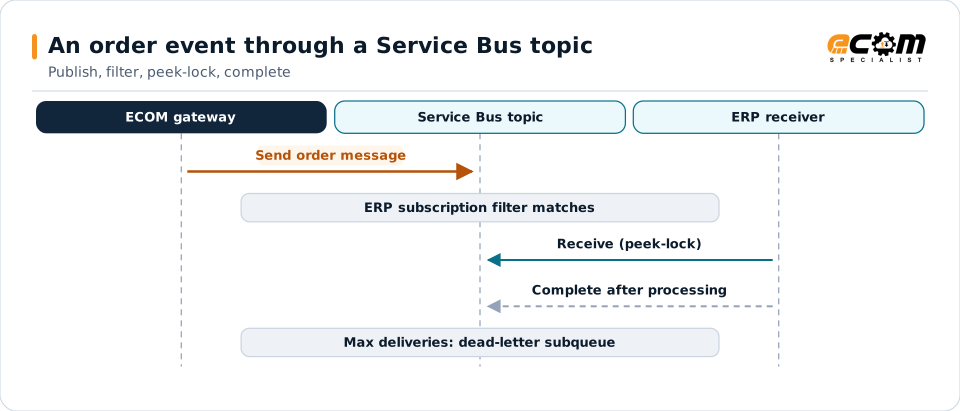
Consumers usually receive in peek-lock mode: the message is locked, processed, then completed. If it is abandoned or the lock expires, it is delivered again; after too many attempts it moves to the dead-letter subqueue. Sessions keep related messages in order, and duplicate detection drops repeats within a time window.
Where businesses use it
Azure applications
Services and functions on Azure that exchange orders and events.
Dynamics 365 integration
Exchanging business events between Dynamics 365 and other systems.
Hybrid integration
Connecting on-premises systems to Azure services.
How it works
How Service Bus messaging works
A sender sends a message with properties to a queue or topic. For topics, each subscription's rules decide whether it gets a copy. A receiver takes a lock on a message, processes it and completes it, which removes it.
Session-enabled entities deliver all messages with the same session ID, such as an order number, to one receiver in order. Scheduled messages are delivered at a set time.
Subscriptions filter what they receive. Peek-lock and complete make processing safe; failures end up in the dead-letter subqueue.
In depth
Service Bus integration in practice
Queues or topics
Queues for point-to-point work; topics with filtered subscriptions for events many systems need.
Peek-lock
Messages are completed only after successful processing; lock duration is set to fit processing time.
Sessions
Session IDs keep related messages in order, such as all updates to one order.
Dead-lettering
Messages that exceed delivery attempts or expire move to the dead-letter subqueue.
Duplicate detection
Message IDs are used to drop repeats within the configured window.
Security
Microsoft Entra ID roles or shared access signatures, with least privilege.
In practice
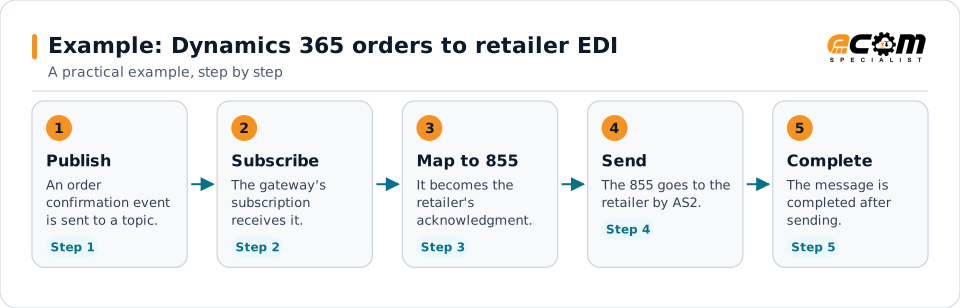
Example: Dynamics 365 orders to retailer EDI
Order confirmations from Dynamics 365 are published to Service Bus. Retailers need X12 855s.
The topic lets other systems subscribe to the same confirmations without changing the ERP.
Connections
How Azure Service Bus connects your business
Trading partners
EDI documents from partners become Service Bus messages for internal systems, and events become partner documents.
ERP and business systems
Orders, shipments, inventory and invoices move between applications as events, without point-to-point links.
APIs and files
The same data can be published to APIs or written to files for systems that do not read the platform.
Business workflows
Order-to-cash and fulfillment steps react to events as they happen.
ECOM
How ECOM supports Azure Service Bus
ECOM supports Azure Service Bus with dedicated implementation, mapping, communication and support teams, and with specialists who know the industries your partners work in.
Implementation team
Plans the Azure Service Bus setup with you, configures it on the gateway and runs the tests with your partners and systems.
Mapping team
Builds and maintains the maps, code conversions and validation rules between partner data and your applications.
Communication team
Sets up and monitors partner connections, certificates, keys and credentials, and coordinates changes with each partner.
Support team
Watches the flows, investigates failed or missing documents, and works the issue through with you and your partner.
For Azure Service Bus in particular
- Service Bus senders and receivers with Entra ID or SAS, sessions, filters and dead-letter handling.
- Mapping between Service Bus messages and EDI, XML, JSON, files and your ERP, with validation.
- Monitoring of queues, subscriptions and failed messages, with alerts and a clear path to reprocess.
Frequently asked questions
What is peek-lock?
A receive mode where the message is locked rather than removed. The receiver completes it after processing; if it fails, the message becomes available again.
How is ordering guaranteed?
With sessions: all messages sharing a session ID are delivered in order to one receiver.
Can Service Bus connect to EDI partners?
Yes. Messages are mapped to partner EDI documents, and partner documents are published as messages.
How are failed messages handled?
After the maximum delivery count they move to the dead-letter subqueue, where they can be inspected and resubmitted.
Talk to an EDI/API Expert
Tell us which partners, systems and Azure Service Bus requirements you are working with. An ECOM specialist will review them with you and outline the setup, the maps and the tests.