
Messaging and events
Google Cloud Pub/Sub integration
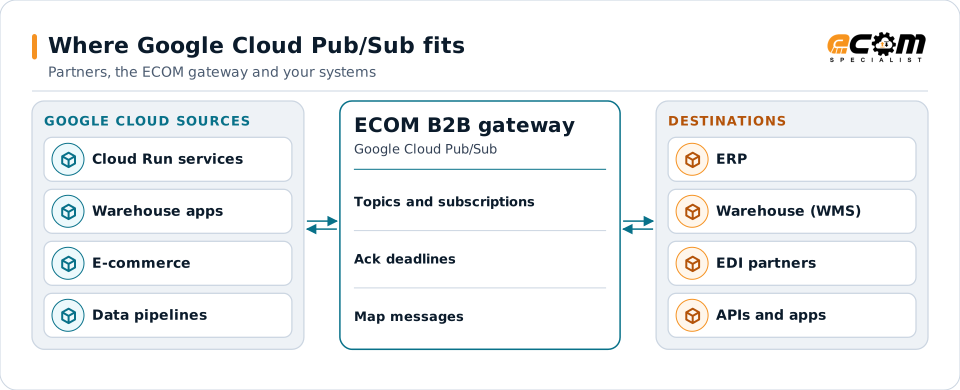
Google Cloud Pub/Sub is a managed messaging service for publishing events to many subscribers. Applications on Google Cloud use it for orders, inventory and analytics events. ECOM connects Pub/Sub topics and subscriptions to EDI partners, files and APIs.
- Provider
- Google Cloud
- Model
- Topics and subscriptions
- Delivery
- Pull or push subscriptions
- Access control
- IAM service accounts
Events published on Google Cloud reach partners through the gateway, and partner documents come back as events.
Overview
What Google Cloud Pub/Sub is
Publishers send messages to a topic. Each subscription attached to the topic receives a copy. Subscribers either pull messages or have Pub/Sub push them to an HTTPS endpoint. Each message must be acknowledged within the acknowledgment deadline, or it is redelivered.
Ordering keys keep messages with the same key in order. Dead-letter topics collect messages that fail too many times. Exactly-once delivery is available for pull subscriptions in a region; otherwise delivery is at least once.
Where businesses use it
Google Cloud applications
Services on Google Cloud exchanging business events.
Analytics pipelines
Streaming events into BigQuery and data processing.
Event fan-out
One event delivered to every service that needs it.
How it works
How Pub/Sub messaging works
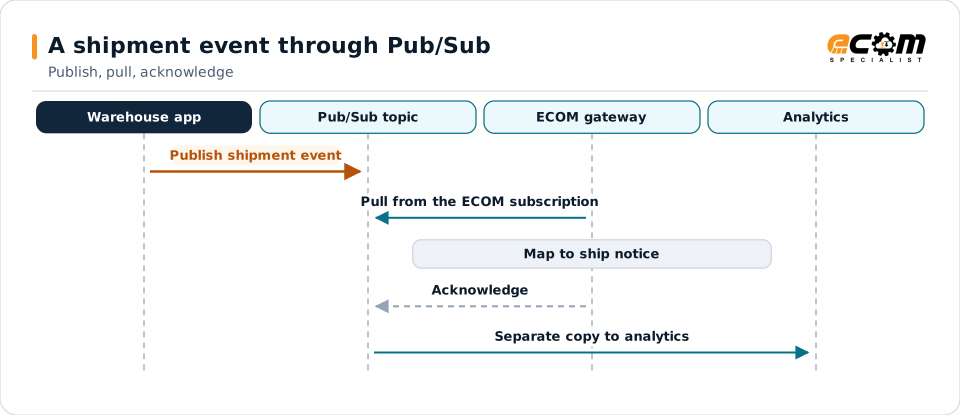
A publisher sends a message with data and attributes, and optionally an ordering key, to a topic. Pub/Sub stores it and delivers it to each subscription. A pull subscriber receives messages, processes them and acknowledges them; a push subscription posts them to an endpoint that answers with success.
Unacknowledged messages are redelivered after the deadline. After the maximum delivery attempts, they go to the dead-letter topic if one is configured.
Each subscription gets its own copy. An acknowledgment within the deadline ends delivery for that subscription.
In depth
Pub/Sub integration in practice
Pull or push
Pull for controlled processing; push to an HTTPS endpoint for simple event delivery.
Acknowledgment deadline
Set to fit processing time, or extended while work continues.
Ordering keys
Keep related events, such as updates to one order, in order.
Dead-letter topics
Messages that fail too often are moved aside for review.
Duplicates
Consumers are idempotent, or exactly-once delivery is used where available.
IAM
Service accounts with publisher or subscriber roles only.
In practice
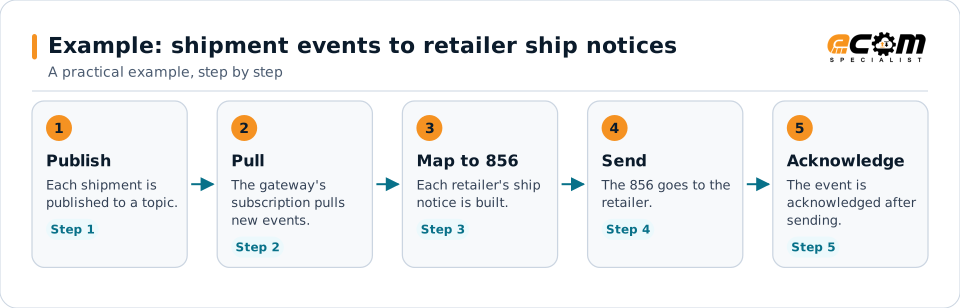
Example: shipment events to retailer ship notices
A warehouse application on Google Cloud publishes shipment events. Retailers need X12 856s.
Acknowledging after the send means an interrupted send is retried, not lost.
Connections
How Google Cloud Pub/Sub connects your business
Trading partners
EDI documents from partners become Pub/Sub messages for internal systems, and events become partner documents.
ERP and business systems
Orders, shipments, inventory and invoices move between applications as events, without point-to-point links.
APIs and files
The same data can be published to APIs or written to files for systems that do not read the platform.
Business workflows
Order-to-cash and fulfillment steps react to events as they happen.
ECOM
How ECOM supports Google Cloud Pub/Sub
ECOM supports Google Cloud Pub/Sub with dedicated implementation, mapping, communication and support teams, and with specialists who know the industries your partners work in.
Implementation team
Plans the Google Cloud Pub/Sub setup with you, configures it on the gateway and runs the tests with your partners and systems.
Mapping team
Builds and maintains the maps, code conversions and validation rules between partner data and your applications.
Communication team
Sets up and monitors partner connections, certificates, keys and credentials, and coordinates changes with each partner.
Support team
Watches the flows, investigates failed or missing documents, and works the issue through with you and your partner.
For Google Cloud Pub/Sub in particular
- Pub/Sub publishers and pull or push subscriptions with service accounts, ordering keys and dead-letter topics.
- Mapping between Pub/Sub messages and EDI, XML, JSON, files and your ERP, with validation.
- Monitoring of queues, subscriptions and failed messages, with alerts and a clear path to reprocess.
Frequently asked questions
What is the difference between pull and push subscriptions?
With pull, the subscriber requests messages. With push, Pub/Sub posts each message to an HTTPS endpoint, which acknowledges by answering with success.
Does Pub/Sub keep messages in order?
Messages with the same ordering key are delivered in order when ordering is enabled on the subscription.
What happens if a message is not acknowledged?
It is redelivered after the deadline. After the maximum attempts it goes to the dead-letter topic, if one is set.
Can Pub/Sub events become EDI documents?
Yes. Events are mapped to partner EDI documents, and partner documents can be published as events.
Talk to an EDI/API Expert
Tell us which partners, systems and Google Cloud Pub/Sub requirements you are working with. An ECOM specialist will review them with you and outline the setup, the maps and the tests.