
Messaging and events
Amazon SQS integration
Amazon Simple Queue Service (SQS) is a fully managed message queue in AWS. Applications built on AWS use it to pass work between services. ECOM sends partner documents to SQS queues and turns queued messages into EDI and API calls.
- Provider
- Amazon Web Services
- Queue types
- Standard and FIFO
- Access control
- AWS IAM policies
- Failure handling
- Visibility timeout, dead-letter queues
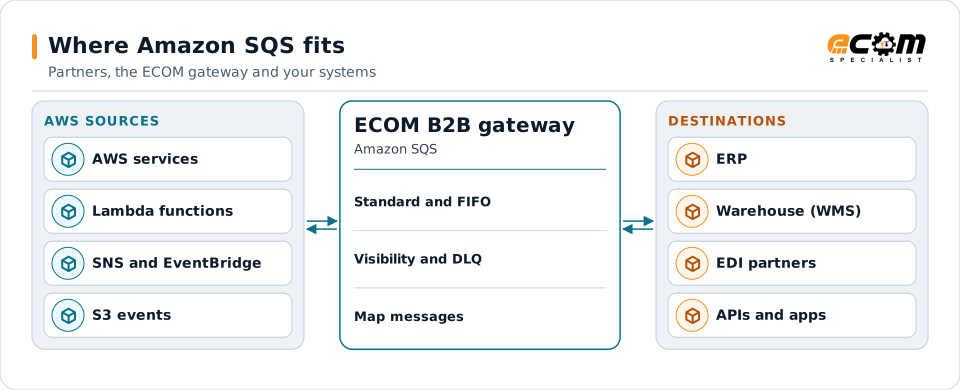
Messages from AWS services pass through SQS; the gateway turns them into partner documents and back.
Overview
What Amazon SQS is
SQS stores messages until a consumer receives and deletes them. Standard queues offer at-least-once delivery with best-effort ordering, so a message can occasionally arrive twice or out of order. FIFO queues keep order within a message group and remove duplicates within a deduplication window.
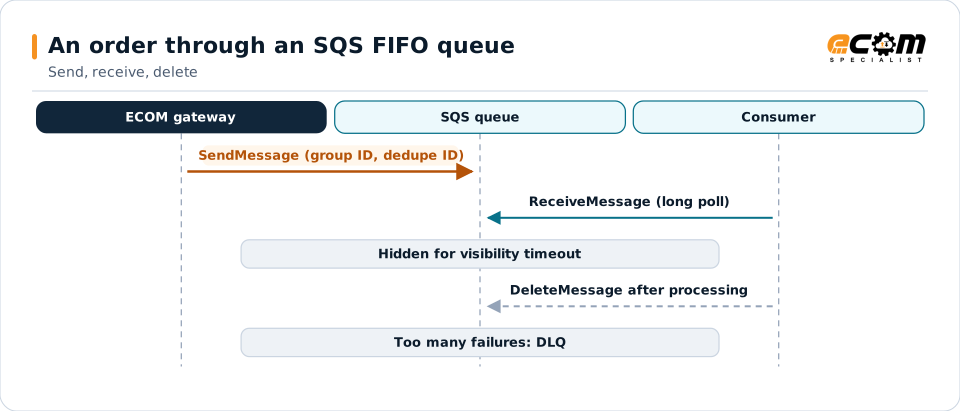
When a consumer receives a message, it becomes invisible for the visibility timeout. If the consumer deletes it in time, it is gone; if not, it reappears for another try. After a set number of failed receives, it moves to a dead-letter queue.
Where businesses use it
AWS applications
Services on AWS that hand off orders and tasks through queues.
Buffering bursts
Absorbing peaks, such as order surges, so downstream systems keep up.
Event fan-out
Combined with SNS or EventBridge to deliver one event to several queues.
How it works
How an SQS exchange works
A producer sends a message, with optional attributes, to the queue URL using credentials allowed by IAM. A consumer polls with long polling, receives a batch of messages, processes each, and deletes it.
Message size is limited, so large documents are usually stored in Amazon S3 and the message carries a reference. FIFO queues need a message group ID and a deduplication ID.
The message is hidden while being processed and deleted when done. If processing keeps failing, it moves to the dead-letter queue.
In depth
SQS integration in practice
Standard or FIFO
FIFO where order and deduplication matter; standard where throughput matters and consumers handle duplicates.
Visibility timeout
Set longer than processing takes, so messages are not processed twice by accident.
Dead-letter queues
Messages that keep failing are moved aside for review and redrive.
Large payloads
Documents are stored in S3 with a reference in the message.
IAM and encryption
Least-privilege IAM roles and server-side encryption protect queues.
Idempotent consumers
Consumers check document IDs so a repeated message does no harm.
In practice
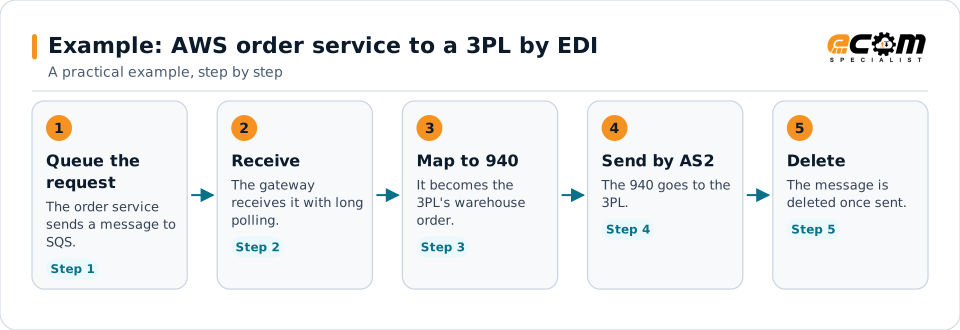
Example: AWS order service to a 3PL by EDI
An order service on AWS places fulfillment requests on SQS. The 3PL needs X12 940s.
Deleting only after the 940 is sent means nothing is lost if a step fails.
Connections
How Amazon SQS connects your business
Trading partners
EDI documents from partners become SQS messages for internal systems, and events become partner documents.
ERP and business systems
Orders, shipments, inventory and invoices move between applications as events, without point-to-point links.
APIs and files
The same data can be published to APIs or written to files for systems that do not read the platform.
Business workflows
Order-to-cash and fulfillment steps react to events as they happen.
ECOM
How ECOM supports Amazon SQS
ECOM supports Amazon SQS with dedicated implementation, mapping, communication and support teams, and with specialists who know the industries your partners work in.
Implementation team
Plans the Amazon SQS setup with you, configures it on the gateway and runs the tests with your partners and systems.
Mapping team
Builds and maintains the maps, code conversions and validation rules between partner data and your applications.
Communication team
Sets up and monitors partner connections, certificates, keys and credentials, and coordinates changes with each partner.
Support team
Watches the flows, investigates failed or missing documents, and works the issue through with you and your partner.
For Amazon SQS in particular
- SQS producers and consumers with IAM roles, FIFO settings, dead-letter queues and S3 payload handling.
- Mapping between SQS messages and EDI, XML, JSON, files and your ERP, with validation.
- Monitoring of queues, subscriptions and failed messages, with alerts and a clear path to reprocess.
Frequently asked questions
What is the difference between standard and FIFO queues?
Standard queues deliver at least once with best-effort ordering. FIFO queues keep order within a message group and remove duplicates within a deduplication window.
What is the visibility timeout?
The time a received message stays hidden from other consumers. If it is not deleted in that time, it becomes visible again for another attempt.
How are large EDI files handled?
The file is stored in Amazon S3 and the SQS message carries a reference to it.
How is access controlled?
With AWS IAM policies that allow only the actions each component needs, plus encryption of the queue.
Talk to an EDI/API Expert
Tell us which partners, systems and Amazon SQS requirements you are working with. An ECOM specialist will review them with you and outline the setup, the maps and the tests.