
Messaging and events
RabbitMQ integration
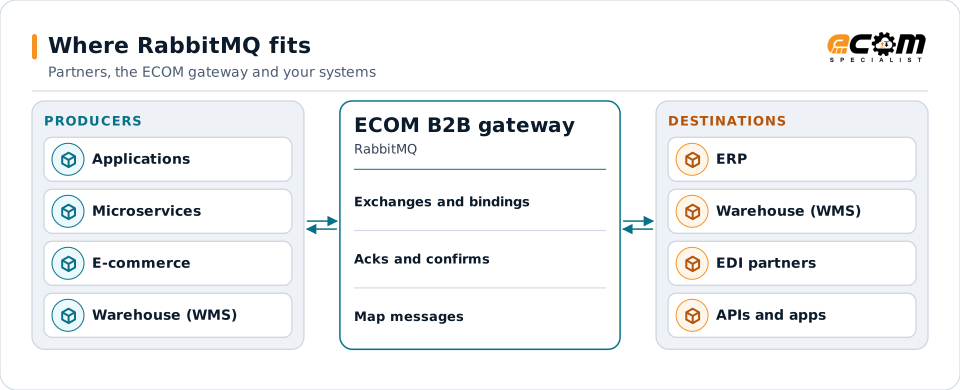
RabbitMQ is a widely used open-source message broker. Applications publish messages to exchanges, which route them to queues by rules. ECOM connects RabbitMQ to EDI partners, ERP systems, files and APIs.
- Type
- Open-source message broker
- Main protocol
- AMQP 0-9-1 (also AMQP 1.0, MQTT, STOMP)
- Routing
- Exchanges, bindings, routing keys
- Queue types
- Classic, quorum and streams
RabbitMQ routes messages between applications; the gateway connects them to partners and other systems.
Overview
What RabbitMQ is
In RabbitMQ, producers publish to an exchange, not directly to a queue. The exchange routes each message to queues using bindings: a direct exchange matches a routing key exactly, a topic exchange matches patterns, a fanout exchange copies to every bound queue, and a headers exchange matches message headers.
Consumers read from queues and acknowledge each message after processing. Unacknowledged messages are redelivered. Messages that are rejected or expire can be routed to a dead-letter exchange for review.
Where businesses use it
Application integration
Decoupling services and applications with reliable queues.
Work distribution
Sharing processing work across several consumers.
Event routing
Routing events to the right services by type or region.
How it works
How RabbitMQ routing works
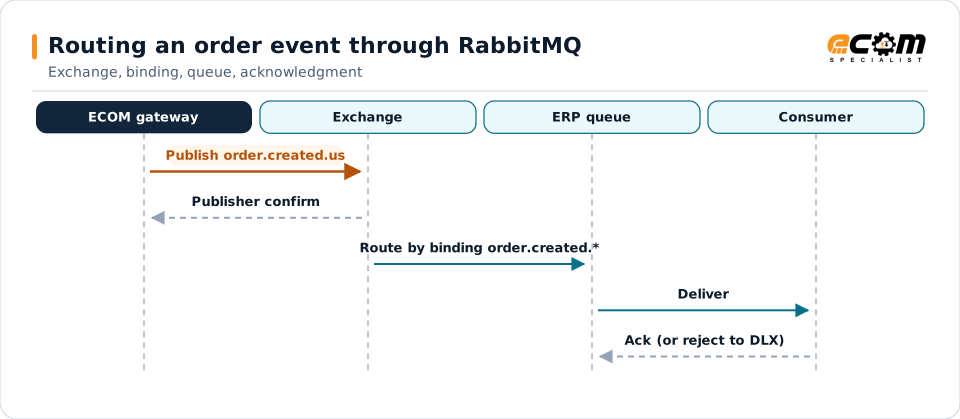
A producer publishes a message with a routing key such as order.created.us to a topic exchange. Bindings such as order.created.* send it to the queues that need it. Publisher confirms tell the producer the broker has accepted it.
Consumers receive messages, process them and acknowledge. Quorum queues replicate messages across nodes for durability; prefetch settings control how many unacknowledged messages a consumer holds.
The exchange routes by key. The consumer's acknowledgment removes the message; a rejection sends it to the dead-letter exchange.
In depth
RabbitMQ integration in practice
Exchange types
Direct, topic, fanout and headers exchanges are chosen to match how messages must be routed.
Acknowledgments and confirms
Consumer acknowledgments and publisher confirms make delivery reliable in both directions.
Dead-letter exchanges
Rejected or expired messages are routed aside for review and reprocessing.
Durable queues
Quorum queues and persistent messages protect data across restarts and node failures.
Security
TLS connections, user permissions and virtual hosts separate and protect traffic.
Ordering
Order is kept per queue; designs that need ordering avoid splitting related messages across queues.
In practice
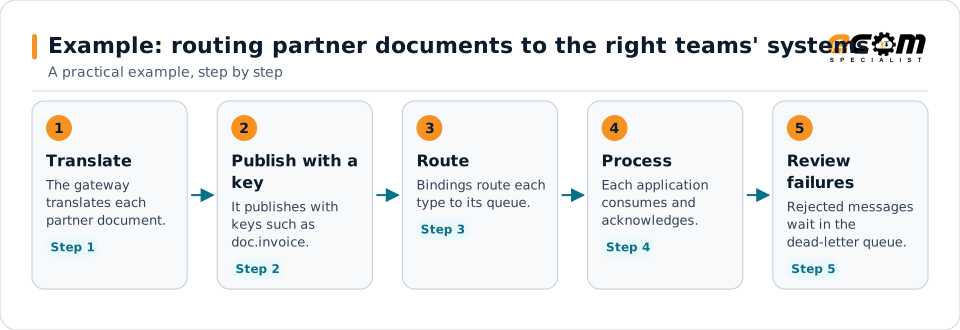
Example: routing partner documents to the right teams' systems
Partner documents arrive as EDI. Orders, invoices and ship notices go to different applications.
Routing keys let new consumers be added without changing the producer.
Connections
How RabbitMQ connects your business
Trading partners
EDI documents from partners become RabbitMQ messages for internal systems, and events become partner documents.
ERP and business systems
Orders, shipments, inventory and invoices move between applications as events, without point-to-point links.
APIs and files
The same data can be published to APIs or written to files for systems that do not read the platform.
Business workflows
Order-to-cash and fulfillment steps react to events as they happen.
ECOM
How ECOM supports RabbitMQ
ECOM supports RabbitMQ with dedicated implementation, mapping, communication and support teams, and with specialists who know the industries your partners work in.
Implementation team
Plans the RabbitMQ setup with you, configures it on the gateway and runs the tests with your partners and systems.
Mapping team
Builds and maintains the maps, code conversions and validation rules between partner data and your applications.
Communication team
Sets up and monitors partner connections, certificates, keys and credentials, and coordinates changes with each partner.
Support team
Watches the flows, investigates failed or missing documents, and works the issue through with you and your partner.
For RabbitMQ in particular
- RabbitMQ publishers and consumers with exchange, binding and dead-letter design.
- Mapping between RabbitMQ messages and EDI, XML, JSON, files and your ERP, with validation.
- Monitoring of queues, subscriptions and failed messages, with alerts and a clear path to reprocess.
Frequently asked questions
What is an exchange in RabbitMQ?
The component that receives published messages and routes them to queues using bindings and routing keys.
How is message loss prevented?
With durable queues, persistent messages, publisher confirms and consumer acknowledgments.
What is a dead-letter exchange?
An exchange that receives messages which were rejected, expired or exceeded limits, so they can be reviewed instead of lost.
Can RabbitMQ messages become EDI documents?
Yes. Messages are mapped to partner EDI formats, and partner documents can be published as messages.
Talk to an EDI/API Expert
Tell us which partners, systems and RabbitMQ requirements you are working with. An ECOM specialist will review them with you and outline the setup, the maps and the tests.