
Messaging and events
Apache ActiveMQ and Artemis integration
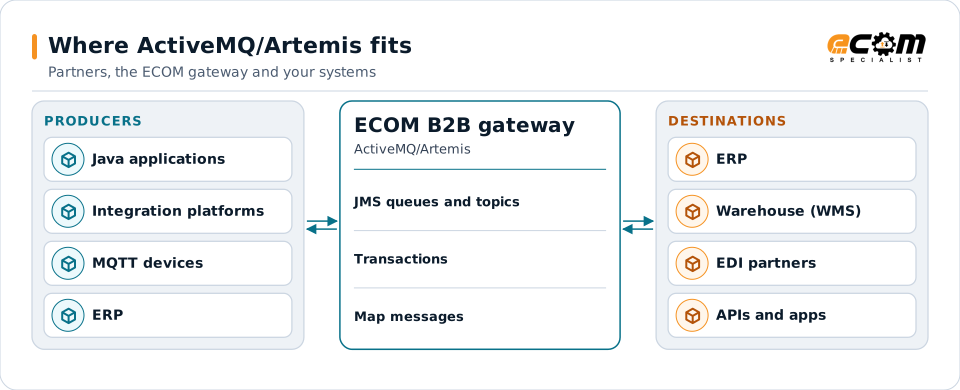
Apache ActiveMQ is an open-source message broker family with two generations: ActiveMQ Classic and ActiveMQ Artemis. Java applications and many integration platforms use them for JMS messaging. ECOM connects ActiveMQ queues and topics to EDI partners, files and APIs.
- Project
- Apache ActiveMQ (open source)
- Brokers
- ActiveMQ Classic and ActiveMQ Artemis
- API
- Java Message Service (JMS)
- Protocols
- OpenWire, Core, AMQP, STOMP, MQTT
Applications use ActiveMQ for messaging; the gateway connects those destinations to partners.
Overview
What ActiveMQ/Artemis is
ActiveMQ brokers hold messages in queues (point to point) and topics (publish and subscribe). Java applications use the JMS API; other languages connect through AMQP, STOMP or MQTT. Artemis is the newer broker, designed for higher throughput, and uses addresses and routing types to model queues and topics.
Durable subscriptions let a subscriber receive topic messages sent while it was disconnected. Redelivery policies retry failed messages and then move them to a dead-letter queue.
Where businesses use it
Java applications
Enterprise Java systems exchanging messages through JMS.
Integration platforms
Middleware that uses ActiveMQ as its internal or external broker.
IoT and devices
MQTT clients connecting to the broker.
How it works
How ActiveMQ messaging works
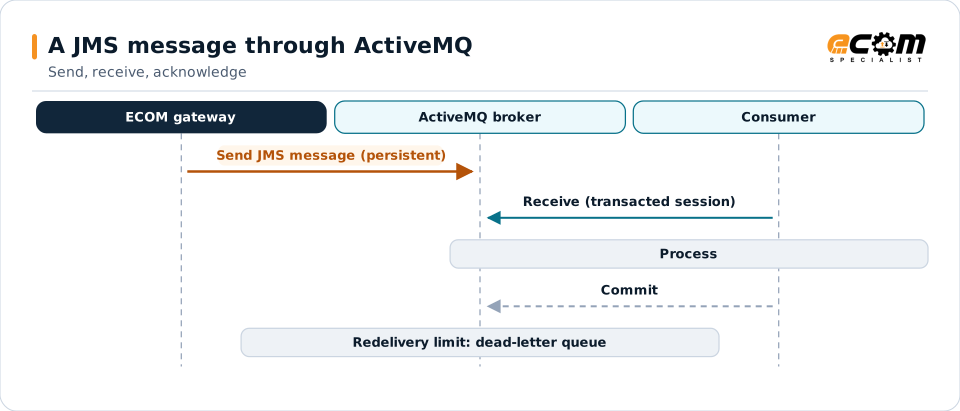
A producer sends a JMS message, with headers and properties, to a queue or topic. A consumer receives it and acknowledges it, or commits a transacted session. Message selectors let consumers receive only messages whose properties match.
If processing fails, the broker redelivers according to the redelivery policy, then moves the message to the dead-letter queue.
The commit removes the message. Repeated failures move it to the dead-letter queue.
In depth
ActiveMQ integration in practice
Classic or Artemis
The broker generation and version decide protocols and configuration; both are supported.
JMS semantics
Persistent delivery, transactions and acknowledgment modes keep messages safe.
Selectors and properties
Message properties carry document type and partner, so consumers can select.
Durable subscriptions
Subscribers receive topic messages published while they were offline.
Dead-letter handling
Redelivery limits move failing messages aside.
Security
TLS connections and user and role permissions protect destinations.
In practice
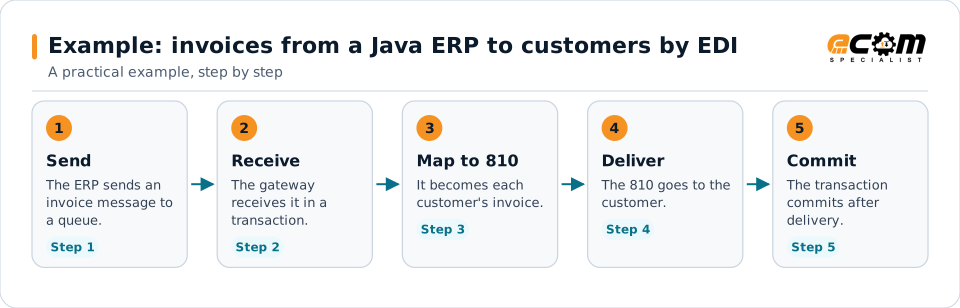
Example: invoices from a Java ERP to customers by EDI
A Java-based ERP sends invoice messages to ActiveMQ. Customers need X12 810s.
Committing after delivery means a failure leaves the message on the queue to try again.
Connections
How ActiveMQ/Artemis connects your business
Trading partners
EDI documents from partners become ActiveMQ messages for internal systems, and events become partner documents.
ERP and business systems
Orders, shipments, inventory and invoices move between applications as events, without point-to-point links.
APIs and files
The same data can be published to APIs or written to files for systems that do not read the platform.
Business workflows
Order-to-cash and fulfillment steps react to events as they happen.
ECOM
How ECOM supports ActiveMQ/Artemis
ECOM supports ActiveMQ/Artemis with dedicated implementation, mapping, communication and support teams, and with specialists who know the industries your partners work in.
Implementation team
Plans the ActiveMQ/Artemis setup with you, configures it on the gateway and runs the tests with your partners and systems.
Mapping team
Builds and maintains the maps, code conversions and validation rules between partner data and your applications.
Communication team
Sets up and monitors partner connections, certificates, keys and credentials, and coordinates changes with each partner.
Support team
Watches the flows, investigates failed or missing documents, and works the issue through with you and your partner.
For ActiveMQ/Artemis in particular
- JMS and AMQP connections to ActiveMQ Classic and Artemis brokers, with redelivery and dead-letter design.
- Mapping between ActiveMQ messages and EDI, XML, JSON, files and your ERP, with validation.
- Monitoring of queues, subscriptions and failed messages, with alerts and a clear path to reprocess.
Frequently asked questions
What is the difference between ActiveMQ Classic and Artemis?
Both are Apache ActiveMQ brokers. Classic is the original; Artemis is the newer broker with a different architecture. Their configuration and some protocols differ.
Can non-Java applications use ActiveMQ?
Yes, through protocols such as AMQP, STOMP and MQTT.
How are failed messages handled?
The broker redelivers them according to its policy, then moves them to a dead-letter queue for review.
Can ECOM connect ActiveMQ to EDI partners?
Yes. Messages are mapped to partner documents and back.
Talk to an EDI/API Expert
Tell us which partners, systems and ActiveMQ/Artemis requirements you are working with. An ECOM specialist will review them with you and outline the setup, the maps and the tests.